<?xml version="1.0" encoding="utf-8"?>
<feed xmlns="http://www.w3.org/2005/Atom">

  <title><![CDATA[Karl's Code]]></title>
  <link href="http://karlroberts.github.io/atom.xml" rel="self"/>
  <link href="http://karlroberts.github.io/"/>
  <updated>2018-05-10T01:17:20+00:00</updated>
  <id>http://karlroberts.github.io/</id>
  <author>
    <name><![CDATA[Karl Roberts]]></name>
    
  </author>
  <generator uri="http://octopress.org/">Octopress</generator>

  
  <entry>
    <title type="html"><![CDATA[Refactoring Ugly Scala to Idiomatic Scala]]></title>
    <link href="http://karlroberts.github.io/blog/2018/05/09/refactoring-ugly-scala-to-idiomatic-scala/"/>
    <updated>2018-05-09T22:06:35+00:00</updated>
    <id>http://karlroberts.github.io/blog/2018/05/09/refactoring-ugly-scala-to-idiomatic-scala</id>
    <content type="html"><![CDATA[<p>This Blog is my (#Scalasyd)[<a href="https://github.com/scalasyd/scalasyd">https://github.com/scalasyd/scalasyd</a>] talk about refactoring Scala code to be more idiomatic <!-- more --></p>

<p><small>It is also a slide deck for the talk given at the ScalaSyd meetup May 2018.<br/>
To switch between modes press a number as follows :<br/></p>

<ul>
<li>&lsquo;1&rsquo; -&gt; Doc mode:

<ul>
<li>shows the document as intended.</li>
</ul>
</li>
<li>&lsquo;2&rsquo; -&gt; Deck mode, see the slides

<ul>
<li>see the slides</li>
</ul>
</li>
<li>&lsquo;4&rsquo; -&gt; Lecture Mode

<ul>
<li>enter zooms current navigated to section</li>
<li>click zooms div or block clicked</li>
</ul>
</li>
</ul>


<p>Arrow keys navigate to next or previous section or slide
</small></p>

<p><section data-slide>
  <h1 align="center">Refactor</h1>
  <h2 align="center">Ugly Scala Code</h2>
  <div align="center">
    <span>9th May 2018</span>
  </div>
  <h4>&nbsp;</h4>
  <h3>Code Weaver</h3>
  <div style="height:100px"></div>
  <div>
    <a href="http://www.codeweaver.com.au">
      <img src="http://karlroberts.github.io/images/codeweaver/Volleyball_Interchange_Diagram.gif" style="max-height: 200px" alt="Code Weaver Logo example"/>
      <!-- image by By VidTheKid at en.wikipedia (Transferred from en.wikipedia by SreeBot) [Public domain], via Wikimedia Commons -->
    </a>
  </div>
  <h5>&nbsp;</h5>
  <h3>By</h3>
  <h5><a href="http://karlcode.owtelse.com/">Karl Roberts</a></h5>
  <h5><a href="https://twitter.com/MrK4rl">@MrK4rl</a></h5>
  <div style="margin-top:100px; text-align: center;">
    <small><small>To present this document press <code>2</code>. Press <code>Esc</code> to get back to document view. Left and Right arrow keys to navigate.
        See <a href="http://github.com/suited">suited.js</a>
    </small></small>
  </div></p>

<p></section></p>

<p>In this blog I&rsquo;ll be talking about working with Scala to build applications.</p>

<p><section data-figure></p>

<h4>Demo code</h4>

<ul>
<li>can be found at the link below</li>
<li><a href="https://github.com/karlroberts/scalasydUglyCode">https://github.com/karlroberts/scalasydUglyCode</a></li>
</ul>


<p></section></p>

<p><section data-figure></p>

<h4>Confession</h4>

<ul>
<li>First I need to admit to a dirty little secret I&rsquo;ve been keeping&hellip;</li>
</ul>


<p></section></p>

<p><section data-slide></p>

<h3>The Ugly Truth</h3>

<ul>
<li>&nbsp;</li>
<li>&nbsp;</li>
<li>&nbsp;</li>
</ul>


<p></section></p>

<p><section data-slide></p>

<h3>The Ugly Truth</h3>

<ul>
<li>It can be easier to hack away in an imperative style</li>
<li>&nbsp;</li>
<li>&nbsp;</li>
</ul>


<p></section></p>

<p><section data-slide></p>

<h3>The Ugly Truth</h3>

<ul>
<li>It can be easier to hack away in an imperative style</li>
<li>Especially when hacking on a new Java API</li>
<li>&nbsp;</li>
</ul>


<p></section></p>

<p><section data-figure></p>

<h3>The Ugly Truth</h3>

<ul>
<li>It can be easier to hack away in an imperative style</li>
<li>Especially when hacking on a new Java API</li>
<li>Or noodling around to get an understanding</li>
</ul>


<p></section></p>

<p><section data-slide></p>

<h3>The Excuses?</h3>

<ul>
<li>&nbsp;</li>
<li>&nbsp;

<ul>
<li>&nbsp;</li>
<li>&nbsp;</li>
</ul>
</li>
<li>&nbsp;</li>
</ul>


<p></section></p>

<p><section data-slide></p>

<h3>The Excuses?</h3>

<ul>
<li>Thinking in Java</li>
<li>&nbsp;
&nbsp;

<ul>
<li>&nbsp;</li>
<li>&nbsp;</li>
</ul>
</li>
<li>&nbsp;</li>
</ul>


<p></section></p>

<p><section data-slide></p>

<h3>The Excuses?</h3>

<ul>
<li>Thinking in Java</li>
<li>looping in loops

<ul>
<li>helps walk or build a data structure</li>
<li>while I&rsquo;m developing it</li>
</ul>
</li>
<li>&nbsp;</li>
</ul>


<p></section></p>

<p>I have a bunch of justifications for this behaviour they may not be good excuses but here they are.</p>

<p><section data-figure></p>

<h3>The Excuses?</h3>

<ul>
<li>Thinking in Java</li>
<li>looping in loops

<ul>
<li>helps walk or build a data structure</li>
<li>while I&rsquo;m developing it</li>
</ul>
</li>
<li>Types get in the way less</li>
</ul>


<p></section></p>

<p><section data-slide></p>

<h3>The Problem?</h3>

<ul>
<li>Sneaky Bugs can exist

<ul>
<li>&nbsp;</li>
</ul>
</li>
<li>Hard to test pieces in isolation</li>
<li>Hard to understand later or refactor?

<ul>
<li>&nbsp;</li>
</ul>
</li>
<li>&nbsp;</li>
</ul>


<p></section></p>

<p><section data-slide></p>

<h3>The Problem?</h3>

<ul>
<li>Sneaky Bugs can exist

<ul>
<li>especially in the edge cases</li>
</ul>
</li>
<li>Hard to test pieces in isolation</li>
<li>Hard to understand later or refactor?

<ul>
<li>&nbsp;</li>
</ul>
</li>
<li>&nbsp;</li>
</ul>


<p></section></p>

<p><section data-slide></p>

<h3>The Problem?</h3>

<ul>
<li>Sneaky Bugs can exist

<ul>
<li>especially in the edge cases</li>
</ul>
</li>
<li>Hard to test pieces in isolation</li>
<li>Hard to understand later or refactor?

<ul>
<li>you may forget to take account of some out of view mutation</li>
</ul>
</li>
<li>&nbsp;</li>
</ul>


<p></section></p>

<p><section data-figure></p>

<h3>The Problem?</h3>

<ul>
<li>Sneaky Bugs can exist

<ul>
<li>especially in the edge cases</li>
</ul>
</li>
<li>Hard to test pieces in isolation</li>
<li>Hard to understand later or refactor?

<ul>
<li>you may forget to take account of some out of view mutation</li>
</ul>
</li>
<li>Gives me the creeps.</li>
</ul>


<p></section></p>

<p>The code written in the style, that you are going to see, runs ok (I think) but I am always wary of it, because I know how hard I had to work to get it running.
Coding it was a trial and error affair, with contant compiling and running and attaching debuggers to test what was happening to my mutable placeholders.</p>

<p>The trick is to refactor it to a more imutable functional style as soon as it is &ldquo;working&rdquo;.</p>

<p>It is always best to refactor runnable code because we can see that the refactor caused no disernable difference to the outcome by simple running it.</p>

<p>Tests help of course, but the problem with testing mutable sections of code is that you have to test from the outside, as alluded to above it is hard to test an isolated fragment to see if it works.</p>

<p><section data-figure></p>

<h3>The Solution?</h3>

<ul>
<li>Once Running Refactor

<ul>
<li>while you still understand the problem</li>
</ul>
</li>
<li>Remove mutation</li>
<li>Remove loops</li>
<li>Learn the API you are working in

<ul>
<li>it may well have realy helpful methods/functions for you to use.</li>
</ul>
</li>
<li>Discover nice general patterns</li>
</ul>


<p></section></p>

<p><section data-figure></p>

<h3>My Example?</h3>

<h5><a href="https://github.com/karlroberts/scalasydUglyCode/blob/start/src/main/scala/historicprices/provider/api.scala">source code location</a></h5>

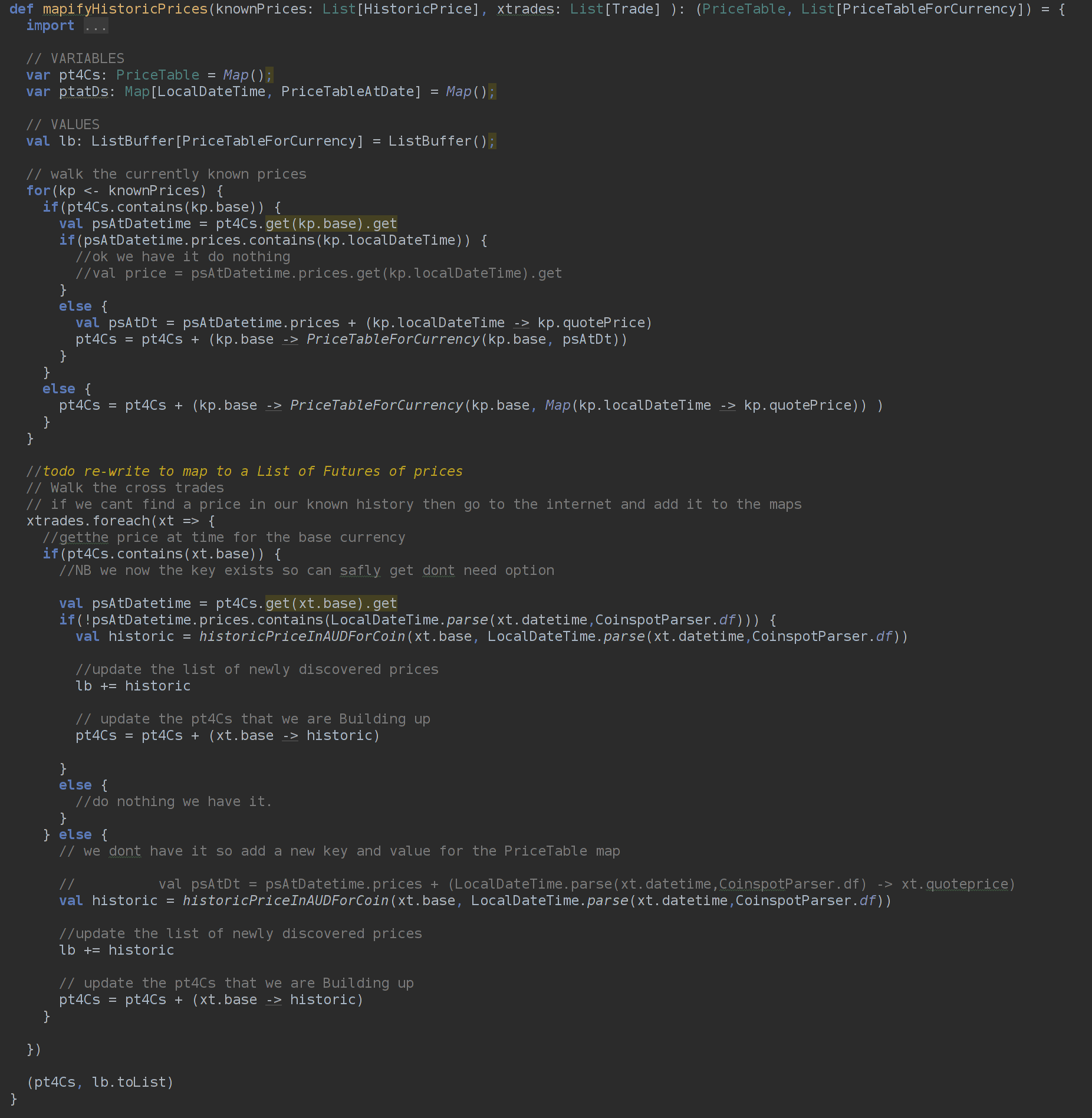
<p><img src="http://karlroberts.github.io/images/codeweaver/uglycode/start.png" style="max-width: 80%" alt="api doc for List"/></p>

<p></section></p>

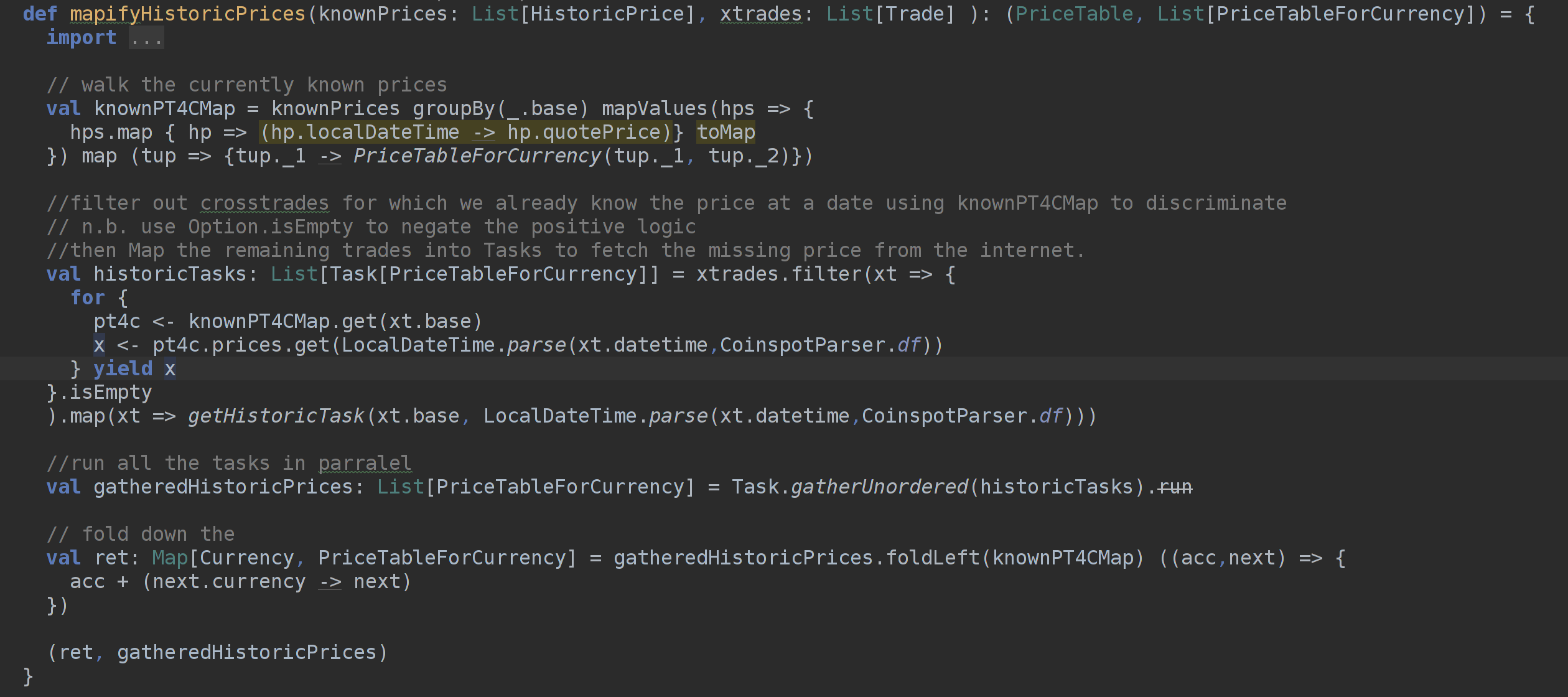
<p>This code is extracted from a Crypto currency tool I wrote to help me keep track of my position on coinspot.</p>

<p>Unfortunatly at the time coinspot api did not allow me to get all the data from them so I needed to extract my trade history as csv,
parse it and build up a data structure to allow me to query my position and other useful info.</p>

<p>Using my Position data structure I can see what currencies I&rsquo;m making money in and ask questions ike &ldquo;how much bitcoin did I buy below this price?&rdquo;</p>

<p>The big problem solved above is that the trade history showed prices for cross trades in terms of each other eg bought 1.2 ETH for .05 BTC but I want to know my
position in AUD for each currency, so I was forced to look to the internet for historical prices of the coins in AUD at the price of the time of the trade to work backwards.</p>

<p>Here you can see I have a list of previously known prices from which I build up a <code>PriceTable</code> which is a <code>Map</code> of <code>PriceTableForCurrency</code>.</p>

<p>This is really a big map of maps. The caller of this function (in this case the main function) saves the newly discovered prices to a file that I read and parse on start-up to contruct my known prices List.</p>

<p>In short what I need to do is:-</p>

<p><section data-slide></p>

<h3>PriceTable</h3>

<ul>
<li>I need to build up a PriceTable for Currencies.

<ul>
<li>&nbsp;</li>
</ul>
</li>
<li>&nbsp;

<ul>
<li>&nbsp;</li>
<li>&nbsp;</li>
</ul>
</li>
</ul>


<p></section></p>

<p><section data-slide></p>

<h3>PriceTable</h3>

<ul>
<li>I need to build up a PriceTable for Currencies.

<ul>
<li>A Map of Maps</li>
</ul>
</li>
<li>&nbsp;

<ul>
<li>&nbsp;</li>
<li>&nbsp;</li>
</ul>
</li>
</ul>


<p></section></p>

<p><section data-slide></p>

<h3>PriceTable</h3>

<ul>
<li>I need to build up a PriceTable for Currencies.

<ul>
<li>A Map of Maps</li>
</ul>
</li>
<li>So I can

<ul>
<li>&nbsp;</li>
<li>&nbsp;</li>
</ul>
</li>
</ul>


<p></section></p>

<p><section data-slide></p>

<h3>PriceTable</h3>

<ul>
<li>I need to build up a PriceTable for Currencies.

<ul>
<li>A Map of Maps</li>
</ul>
</li>
<li>So I can

<ul>
<li>look up a currency and</li>
<li>&nbsp;</li>
</ul>
</li>
</ul>


<p></section></p>

<p><section data-figure></p>

<h3>Build a PriceTable</h3>

<ul>
<li>I need to build up a PriceTable for Currencies.

<ul>
<li>A Map of Maps</li>
</ul>
</li>
<li>So I can

<ul>
<li>look up a currency and</li>
<li>from there look up a price a date I care about</li>
</ul>
</li>
</ul>


<p></section></p>

<p>For context you should know that to help me work around the Map of Maps in the imperative style I created a few type aliases and helper classes to make it easier to reason about, the main structures are as follows:-</p>

<p><section data-figure></p>

<h3>PriceTable</h3>

<pre><code>// a type alias
type PriceTable = Map[Currency, PriceTableForCurrency]
</code></pre>

<p></section></p>

<p>Here <code>PriceTableForCurrency</code> is just a <code>case class</code> that wraps a <code>Map</code> but has a helpful API that allows me to augment it and build it up from <code>HistoricPrice</code> objects
which I get from parsing the CSV file of previously discovered historic prices.</p>

<p><section data-figure></p>

<h3>PriceTableForCurrency</h3>

<h5><a href="https://github.com/karlroberts/scalasydUglyCode/blob/start/src/main/scala/historicprices/provider/api.scala">source code location</a></h5>

<pre><code>case class PriceTableForCurrency(currency: Currency, prices: Map[LocalDateTime,Double]) {
  /**
    * Will overwrite if we alredy have a price at this time
    * @param historicPrice
    * @return
    */
  def +=(historicPrice: HistoricPrice) = {
    val hp = (historicPrice.localDateTime, historicPrice.quotePrice)
    this.copy(prices = prices + hp)
  }
  def ++=(other:PriceTableForCurrency) = if(other.currency == currency) this.copy(prices = prices ++ other.prices) else this

  def asHistoricPrices: List[HistoricPrice] = {
    import scala.collection.mutable.ListBuffer
    val lb = ListBuffer[HistoricPrice]()
    prices.foreach(tup =&gt; {
      lb += HistoricPrice(tup._1,currency,tup._2)
    })
    lb.toList
  }
}
</code></pre>

<p></section></p>

<p><section data-slide></p>

<h3>My Example - quick re-read for context</h3>

<h5><a href="https://github.com/karlroberts/scalasydUglyCode/blob/start/src/main/scala/historicprices/provider/api.scala">source code location</a></h5>

<p><img src="http://karlroberts.github.io/images/codeweaver/uglycode/start.png" style="max-width: 80%" alt="api doc for List"/></p>

<p></section></p>

<p>The first part I want to look at is building up the initial <code>PriceTable</code> (effectivly a Map of Maps) from the known prices list, which I read in from a CSV file.</p>

<p>Building a Map of Maps is something that I do a lot while coding, and it is a pain every time.</p>

<p>Walking a list and examining the Map to see if I have the Key in the map already and adding it and a value if I don&rsquo;t have it or modifying the value if I do have it is tedious for a single Map. It is exponentially more tedious and error prone for each level of nested Map.</p>

<p>If only there was a better way.</p>

<p><section data-slide></p>

<h3>Lets create a better Map of Maps</h3>

<h5><a href="https://www.scala-lang.org/api/2.12.2/scala/collection/mutable/Map$.html">Api docs for Map</a></h5>

<ul>
<li><p>We can contruct a Map like this:</p>

<p>  val myMap = Map(&ldquo;a&rdquo; -> &ldquo;little A&rdquo;, &ldquo;b&rdquo; -> &ldquo;little B&rdquo;)</p></li>
<li><p>&nbsp;</p></li>
<li>&nbsp;

<ul>
<li>&nbsp;</li>
</ul>
</li>
</ul>


<p>&nbsp;</p>

<p></section></p>

<p><section data-slide></p>

<h3>Lets create a better Map of Maps</h3>

<h5><a href="https://www.scala-lang.org/api/2.12.2/scala/collection/mutable/Map$.html">Api docs for Map</a></h5>

<ul>
<li><p>We can contruct a Map like this:</p>

<p>  val myMap = Map(&ldquo;a&rdquo; -> &ldquo;little A&rdquo;, &ldquo;b&rdquo; -> &ldquo;little B&rdquo;)</p></li>
<li><p>The -> is a function that create a Tuple</p></li>
<li>&nbsp;

<ul>
<li>&nbsp;</li>
</ul>
</li>
</ul>


<p>&nbsp;</p>

<p></section></p>

<p><section data-slide></p>

<h3>Lets create a better Map of Maps</h3>

<h5><a href="https://www.scala-lang.org/api/2.12.2/scala/collection/mutable/Map$.html">Api docs for Map</a></h5>

<ul>
<li><p>We can contruct a Map like this:</p>

<p>  val myMap = Map(&ldquo;a&rdquo; -> &ldquo;little A&rdquo;, &ldquo;b&rdquo; -> &ldquo;little B&rdquo;)</p></li>
<li><p>The -> is a function that create a Tuple</p></li>
<li>and so this is like building a Map from a list of Tuples

<ul>
<li>ie (Key, Value) pairs</li>
</ul>
</li>
</ul>


<p>&nbsp;</p>

<p></section></p>

<p><section data-figure></p>

<h3>Lets create a better Map of Maps</h3>

<h5><a href="https://www.scala-lang.org/api/2.12.2/scala/collection/mutable/Map$.html">Api docs for Map</a></h5>

<ul>
<li><p>We can contruct a Map like this:</p>

<p>  val myMap = Map(&ldquo;a&rdquo; -> &ldquo;little A&rdquo;, &ldquo;b&rdquo; -> &ldquo;little B&rdquo;)</p></li>
<li><p>The -> is a function that create a Tuple</p></li>
<li>and so this is like building a Map from a list of Tuples

<ul>
<li>ie (Key, Value) pairs</li>
</ul>
</li>
</ul>


<p><img src="http://karlroberts.github.io/images/codeweaver/uglycode/map-api-doc.png" style="max-width: 80%" alt="api doc for map"/></p>

<p></section></p>

<p>This makes sense. A <code>Map</code> can be thought of as a list of Key and Value pairs.</p>

<p>So if I can convert my <code>List</code> into a list of Key/Value pairs, ie a <code>Tuple2</code> or <code>(Key,Value)</code>,
I should be able to turn it into a Map.</p>

<p><section data-slide></p>

<h3>Lets create a better Map of Maps</h3>

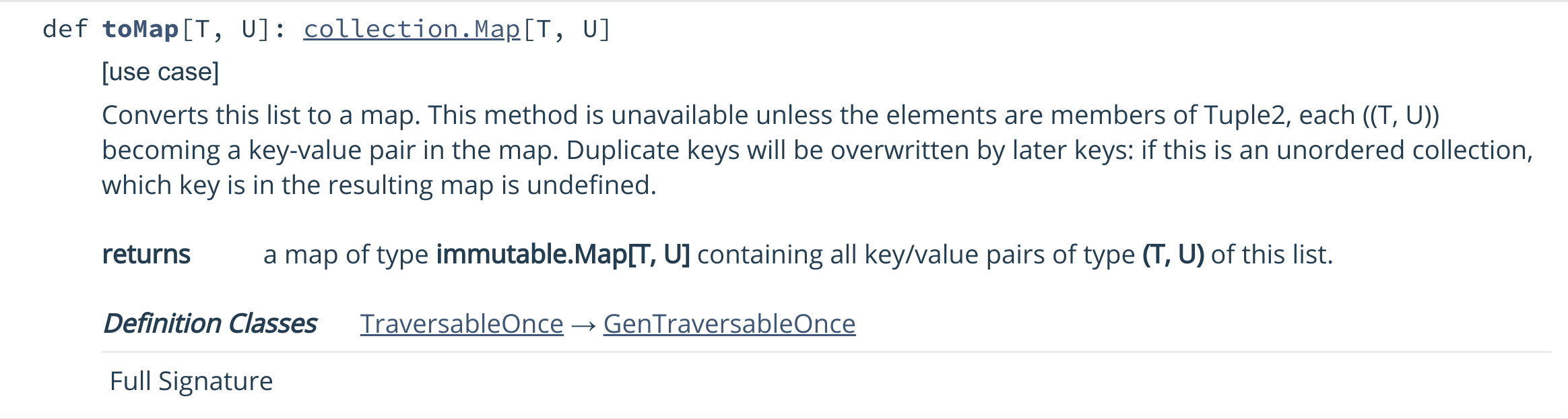
<h5><a href="https://www.scala-lang.org/api/2.12.2/scala/collection/immutable/List.html#toMap[T,U]:scala.collection.Map[T,U]">Api docs for List</a></h5>

<ul>
<li><p>If only there was a way to turn a list of tuples into a Map</p></li>
<li><p>&nbsp;</p></li>
</ul>


<p></section></p>

<p><section data-figure></p>

<h3>Lets create a better Map of Maps</h3>

<h5><a href="https://www.scala-lang.org/api/2.12.2/scala/collection/immutable/List.html#toMap[T,U]:scala.collection.Map[T,U]">Api docs for List</a></h5>

<ul>
<li><p>If only there was a way to turn a list of tuples into a Map</p></li>
<li><p><img src="http://karlroberts.github.io/images/codeweaver/uglycode/list-api-1.png" style="max-width: 80%" alt="api doc for List"/></p></li>
</ul>


<p></section></p>

<p>Awesome. I can do it using the standard library.</p>

<p><section data-slide></p>

<h3>Lets create a better Map of Maps</h3>

<h5><a href="https://www.scala-lang.org/api/2.12.2/scala/collection/immutable/List.html">Api docs for List</a></h5>

<ul>
<li>So we can build a map from a list but what about a <code>Map</code> of <code>Maps</code>?</li>
<li><p>&nbsp;</p></li>
</ul>


<p></section></p>

<p><section data-slide></p>

<h3>Lets create a better Map of Maps</h3>

<h5><a href="https://www.scala-lang.org/api/2.12.2/scala/collection/immutable/List.html">Api docs for List</a></h5>

<ul>
<li>So we can build a <code>Map</code> from a list but what about a <code>Map</code> of <code>Maps</code>?</li>
<li><p>If only there was a way to group list items by some attribute</p></li>
<li><p>&nbsp;</p></li>
</ul>


<p></section></p>

<p><section data-figure></p>

<h3>Lets create a better Map of Maps</h3>

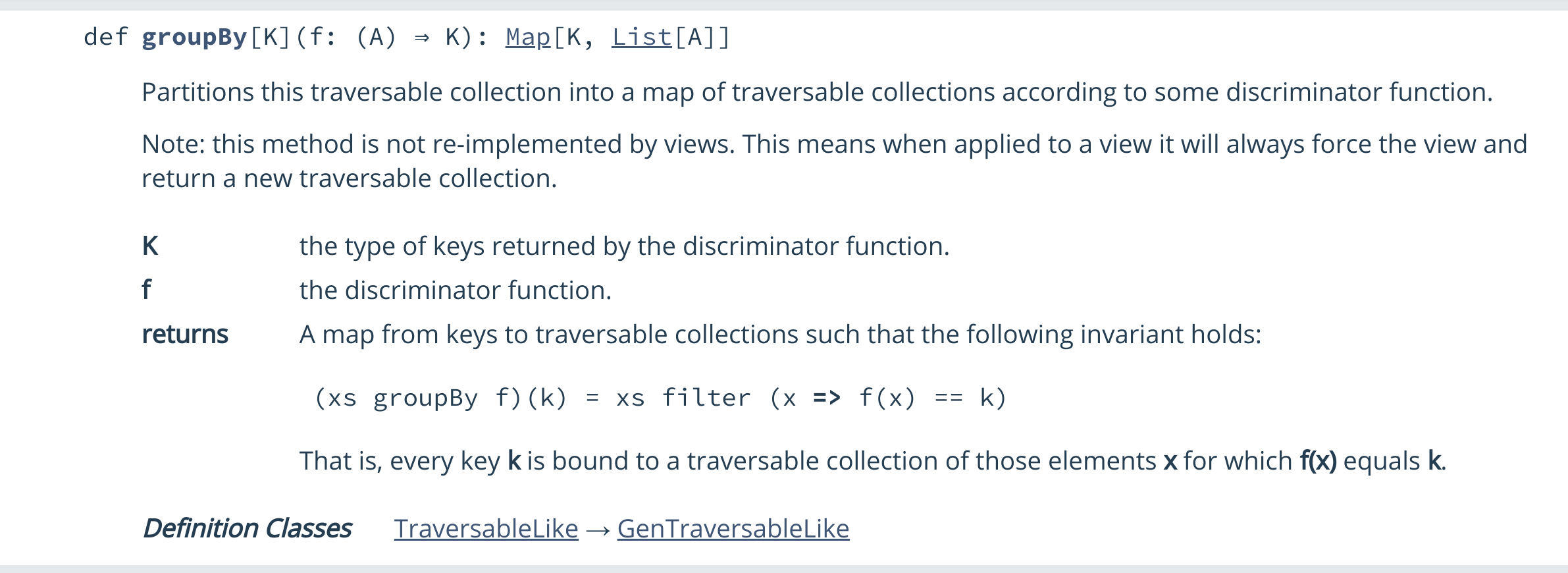
<h5><a href="https://www.scala-lang.org/api/2.12.2/scala/collection/immutable/List.html">Api docs for List</a></h5>

<ul>
<li>So we can build a <code>Map</code> from a list but what about a <code>Map</code> of <code>Maps</code>?</li>
<li><p>If only there was a way to group list items by some attribute</p></li>
<li><p><img src="http://karlroberts.github.io/images/codeweaver/uglycode/list-api-2.png" style="max-width: 80%" alt="api doc for List"/></p></li>
</ul>


<p></section></p>

<p>Mmm. This is giving me a clue. Maybe I can refactor this.</p>

<p><section data-figure></p>

<h3>Lets create a better Map of Maps</h3>

<h5><a href="https://www.scala-lang.org/api/2.12.2/scala/collection/immutable/List.html">Api docs for List</a></h5>

<ul>
<li>So this is cool we an turn a <code>List</code> of <code>Tuple2</code> into a <code>Map</code></li>
<li><p>We can also group a <code>List</code> into a <code>Map</code> with a <code>List</code> as its values</p></li>
<li><p>So if the value <code>List</code> could be transformed into a Tuple</p>

<ul>
<li>we have th building blocks for a Map of Maps
</section></li>
</ul>
</li>
</ul>


<p>This is good I&rsquo;m getting a raging clue now.</p>

<p><section data-figure></p>

<h6>Lets do it - fix Map of Maps trial 1</h6>

<ul>
<li>git checkout start_1</li>
</ul>


<p></section></p>

<p><section data-figure></p>

<h6>Lets do it - fix Map of Maps trail 2</h6>

<ul>
<li>git checkout start_2</li>
</ul>


<p></section></p>

<p><section data-figure></p>

<h6>Lets do it - fixed Map of Maps</h6>

<ul>
<li>git checkout start_3</li>
</ul>


<p></section></p>

<p>That was great. Now I have a functional tool to construct maps and maps of maps.</p>

<pre><code>List.groupBy
</code></pre>

<h3>Now fix the ugly foreach</h3>

<p>Ok now that is done lets look at the ugle walk of the xtrades (cross trades) list using foreach.</p>

<p>While its better than a forloop (which could adds another possible iteration bug) the body of the foreach is convoluted.
The problem is that it is doing too many things at once.</p>

<p>I need to break it down into smaller problems which will not only make it easier to test and debug but will structure the code around clearer thinking.</p>

<p><section data-slide></p>

<h3>Lets fix that ugly foreach</h3>

<ul>
<li>Instead of trying to do 3 things

<ul>
<li>&nbsp;</li>
<li>&nbsp;</li>
<li>&nbsp;

<ul>
<li>&nbsp;</li>
<li>&nbsp;</li>
<li>&nbsp;</li>
</ul>
</li>
</ul>
</li>
</ul>


<p></section></p>

<p><section data-slide></p>

<h3>Lets fix that ugly foreach</h3>

<ul>
<li>Instead of trying to do 3 things

<ul>
<li>walk trades looking for a historic price miss</li>
<li>&nbsp;</li>
<li>&nbsp;

<ul>
<li>&nbsp;</li>
<li>&nbsp;</li>
<li>&nbsp;</li>
</ul>
</li>
</ul>
</li>
</ul>


<p></section></p>

<p><section data-slide></p>

<h3>Lets fix that ugly foreach:</h3>

<ul>
<li>Instead of trying to do 3 things

<ul>
<li>walk trades looking for a historic price miss</li>
<li>fetch the new historic price</li>
<li>&nbsp;

<ul>
<li>&nbsp;</li>
<li>&nbsp;</li>
<li>&nbsp;</li>
</ul>
</li>
</ul>
</li>
</ul>


<p></section></p>

<p><section data-slide></p>

<h3>Lets fix that ugly foreach:</h3>

<ul>
<li>Instead of trying to do 3 things

<ul>
<li>walk trades looking for a historic price miss</li>
<li>fetch the new historic price</li>
<li>add it to Map of Maps

<ul>
<li>&nbsp;</li>
<li>&nbsp;</li>
<li>&nbsp;</li>
</ul>
</li>
</ul>
</li>
</ul>


<p></section></p>

<p><section data-slide></p>

<h3>Lets fix that ugly foreach:</h3>

<ul>
<li>Instead of trying to do 3 things

<ul>
<li>walk trades looking for a historic price miss</li>
<li>fetch the new historic price</li>
<li>add it to Map of Maps

<ul>
<li>looking out to see if we have the key or not first</li>
<li>&nbsp;</li>
<li>&nbsp;</li>
</ul>
</li>
</ul>
</li>
</ul>


<p></section></p>

<p><section data-slide></p>

<h3>Lets fix that ugly foreach:</h3>

<ul>
<li>Instead of trying to do 3 things

<ul>
<li>walk trades looking for a historic price miss</li>
<li>fetch the new historic price</li>
<li>add it to Map of Maps

<ul>
<li>looking out to see if we have the key or not first</li>
<li>and if not adding else just adding</li>
<li>&nbsp;</li>
</ul>
</li>
</ul>
</li>
</ul>


<p></section></p>

<p><section data-figure></p>

<h3>Lets fix that ugly foreach:</h3>

<ul>
<li>Instead of trying to do 3 things

<ul>
<li>walk trades looking for a historic price miss</li>
<li>fetch the new historic price</li>
<li>add it to Map of Maps

<ul>
<li>looking out to see if we have the key or not first</li>
<li>and if not adding else just adding</li>
<li>again looking to see if we have the nested key etc..</li>
</ul>
</li>
</ul>
</li>
</ul>


<p></section></p>

<p><section data-slide></p>

<h3>Lets fix that ugly foreach - why not this?</h3>

<ul>
<li>&nbsp;

<ul>
<li>&nbsp;</li>
</ul>
</li>
<li>&nbsp;</li>
<li>&nbsp;</li>
</ul>


<p></section></p>

<p><section data-slide></p>

<h3>Lets fix that ugly foreach - why not this?</h3>

<ul>
<li>Filter the list of trades

<ul>
<li>&nbsp;</li>
</ul>
</li>
<li>&nbsp;</li>
<li>&nbsp;</li>
</ul>


<p></section></p>

<p><section data-slide></p>

<h3>Lets fix that ugly foreach - why not this?</h3>

<ul>
<li>Filter the list of trades

<ul>
<li>to create a List of trades that dont have a price</li>
</ul>
</li>
<li>&nbsp;</li>
<li>&nbsp;</li>
</ul>


<p></section></p>

<p><section data-figure></p>

<h3>Lets fix that ugly foreach - why not this?</h3>

<ul>
<li>Filter the list of trades

<ul>
<li>to create a List of trades that dont have a price</li>
</ul>
</li>
<li>Then just get them</li>
<li>I can worry about how to stuff the new prices in the <code>PriceTable</code> later</li>
</ul>


<p></section></p>

<p><section data-figure></p>

<h4>Lets do it</h4>

<ul>
<li>git checkout start_4</li>
</ul>


<p></section></p>

<p>That was simple. As a side benefit, now I am not iterativley Building the lists and Maps, I can get rid of all the <code>var</code> placeholder <code>Maps</code> and <code>Buffers</code></p>

<p>A close look at the the code shows that I was able to stuff the new prices into the imutable <code>PriceTable</code> by folding down the new prices.</p>

<p><section data-figure></p>

<h4>Add to imutable <code>PriceTable</code></h4>

<ul>
<li>use a fold</li>
<li>have the starting accumulator be the current <code>PriceTable</code></li>
</ul>


<p><img src="http://karlroberts.github.io/images/codeweaver/uglycode/fold-prices.png" style="max-width: 80%" alt="api doc for List"/></p>

<p></section></p>

<p>Ok</p>

<p><section data-slide></p>

<h3>so &hellip;?</h3>

<ul>
<li>We&rsquo;ve tidied most of it up

<ul>
<li>by mapping and filtering and folding we dont need <code>var</code> placeholders anymore</li>
</ul>
</li>
<li><p>&nbsp;</p></li>
<li>&nbsp;

<ul>
<li>&nbsp;</li>
</ul>
</li>
</ul>


<p></section></p>

<p><section data-slide></p>

<h3>so &hellip;?</h3>

<ul>
<li>We&rsquo;ve tidied most of it up

<ul>
<li>by mapping and filtering and folding we dont need <code>var</code> placeholders anymore</li>
</ul>
</li>
<li><p>Can I get onto the fun stuff?</p></li>
<li><p>&nbsp;</p></li>
<li>&nbsp;

<ul>
<li>&nbsp;</li>
</ul>
</li>
</ul>


<p></section></p>

<p><section data-slide></p>

<h3>so can I prematurely optimize yet?</h3>

<ul>
<li>We&rsquo;ve tidied most of it up

<ul>
<li>by mapping and filtering and folding we dont need <code>var</code> placeholders anymore</li>
</ul>
</li>
<li><p>Can I get onto the fun stuff?</p></li>
<li><p>so can i tune it up a bit?</p></li>
<li>&nbsp;

<ul>
<li>&nbsp;</li>
</ul>
</li>
</ul>


<p></section></p>

<p>So now the code is tidy and manageble, is it time for me to speed up that slow price fetch from the internet?</p>

<p><section data-figure></p>

<h3>so can I prematurely optimize yet?</h3>

<ul>
<li>We&rsquo;ve tidied most of it up

<ul>
<li>by mapping and filtering and folding we dont need <code>var</code> placeholders anymore</li>
</ul>
</li>
<li><p>Can I get onto the fun stuff?</p></li>
<li><p>Can i tune it up a bit?</p></li>
<li>Yes by fetching in parallel.

<ul>
<li>which is now trivial as I have simple collections to work with.</li>
</ul>
</li>
</ul>


<p></section></p>

<p><section data-figure></p>

<h3>so can I prematurely optimize yet?</h3>

<ul>
<li>I will use <code>scalaz</code> Task</li>
<li>to wrap the get historic prices function</li>
<li>and return a List[Task[PriceTableForCurrency]]</li>
<li>rather than a List[PriceTableForCurrency]</li>
<li>then gather all the tasks in parallel</li>
<li>to give me back a List[PriceTableForCurrency]</li>
</ul>


<p></section></p>

<p><section data-figure></p>

<h6>Lets do it</h6>

<pre><code>$ git checkout start_5
$ # clear out the existing prefetched prices
$ cat /dev/null &gt;  $HOME/uglycode/coinspotpos/historicPrices.csv
$ sbt clean run
</code></pre>

<p></section></p>

<p>So lets have a look at how much tidier the code is now.</p>

<p><section data-figure></p>

<h3>Ugly?</h3>

<h5><a href="https://github.com/karlroberts/scalasydUglyCode/blob/start/src/main/scala/historicprices/provider/api.scala">source code location</a></h5>

<p><img src="http://karlroberts.github.io/images/codeweaver/uglycode/start.png" style="max-width: 80%" alt="api doc for List"/></p>

<p></section></p>

<p><section data-figure></p>

<h3>Pretty?</h3>

<h5><a href="https://github.com/karlroberts/scalasydUglyCode/blob/finish/src/main/scala/historicprices/provider/api.scala">source code location</a></h5>

<p><img src="http://karlroberts.github.io/images/codeweaver/uglycode/pretty.png" style="max-width: 80%" alt="api doc for List"/></p>

<p></section></p>

<p>Nice.</p>

<p><section data-slide></p>

<h4>The End</h4>

<p></section></p>

<p><section data-figure></p>

<h4>Thanks &hellip;.</h4>

<ul>
<li><p>me @MrK4rl</p></li>
<li><p>code used in demo <a href="https://github.com/karlroberts/scalasydUglyCode">https://github.com/karlroberts/scalasydUglyCode</a></p></li>
<li>deck and talk (<a href="http://karlcode.owtelse.com/blog/2018/05/09/refactoring-ugly-scala-to-idiomatic-scala/?mode=deck#slide-0">http://karlcode.owtelse.com/blog/2018/05/09/refactoring-ugly-scala-to-idiomatic-scala/?mode=deck#slide-0</a>)</li>
<li>blog (<a href="http://karlcode.owtelse.com/blog/2018/05/09/refactoring-ugly-scala-to-idiomatic-scala/?mode=doc#slide-0">http://karlcode.owtelse.com/blog/2018/05/09/refactoring-ugly-scala-to-idiomatic-scala/?mode=doc#slide-0</a>)</li>
</ul>


<p></section></p>
]]></content>
  </entry>
  
  <entry>
    <title type="html"><![CDATA[ScalaJs Markdown Combinator Parser]]></title>
    <link href="http://karlroberts.github.io/blog/2017/07/09/scala-js-markdown-combinator-parser/"/>
    <updated>2017-07-09T18:20:05+00:00</updated>
    <id>http://karlroberts.github.io/blog/2017/07/09/scala-js-markdown-combinator-parser</id>
    <content type="html"><![CDATA[<p>This Blog is about Scala Combinator Parsers but excitingly about compiling the Scala to JavaScript using Scala.js. <!-- more --></p>

<p><small>It is also a slide deck for a talk given at the ScalaSyd meetup Sept 2017.<br/>
To switch between modes press a number as follows :<br/></p>

<ul>
<li>&lsquo;1&rsquo; -&gt; Doc mode:

<ul>
<li>shows the document as intended.</li>
</ul>
</li>
<li>&lsquo;2&rsquo; -&gt; Deck mode, see the slides

<ul>
<li>see the slides</li>
</ul>
</li>
<li>&lsquo;4&rsquo; -&gt; Lecture Mode

<ul>
<li>enter zooms current navigated to section</li>
<li>click zooms div or block clicked</li>
</ul>
</li>
</ul>


<p>Arrow keys navigate to next or previous section or slide
</small></p>

<p><section data-slide>
  <h1 align="center">A Markdown combinator parser in</h1>
  <h2 align="center">Scala</h2>
  <div align="center">
    <span>13th September 2017</span>
  </div>
  <div style="height:100px"></div>
  <div>
    <a href="http://www.avocadoconsulting.com.au">
      <img src="http://karlroberts.github.io/images/avocado_logo_colour_stacked.png" style="max-height: 200px" alt="Avocado Logo"/>
    </a>
  </div>
  <div style="margin-top:100px; text-align: center;">
    <small><small>To present this document press <code>2</code>. Press <code>Esc</code> to get back to document view. Left and Right arrow keys to navigate.
        See <a href="http://github.com/suited">suited.js</a>
    </small></small>
  </div></p>

<p></section></p>

<p><section data-slide>
  <h1 align="center">A Markdown combinator parser in</h1>
  <h2 align="center">Scala.js</h2>
  <div align="center">
    <span>13th September 2017</span>
  </div>
  <div style="height:100px"></div>
  <div>
    <a href="http://www.avocadoconsulting.com.au">
      <img src="http://karlroberts.github.io/images/avocado-trans.png" style="max-height: 200px" alt="Avocado Logo"/>
    </a>
  </div>
  <div style="margin-top:100px; text-align: center;">
    <small><small>To present this document press <code>2</code>. Press <code>Esc</code> to get back to document view.
        See <a href="http://github.com/suited">suited.js</a>
    </small></small>
  </div></p>

<p></section></p>

<p>This Blog is my talk for ScalaSyd meetup on September 13th 2017. It is about Scala combinator parsers and Scala.js <!-- more --></p>

<p><section data-slide></p>

<h3>Intro</h3>

<ul>
<li>This talk is about Scala

<ul>
<li>&nbsp;</li>
<li>&nbsp;</li>
<li>&nbsp;</li>
</ul>
</li>
</ul>


<p></section></p>

<p><section data-slide></p>

<h3>Intro</h3>

<ul>
<li>This talk is about Scala.js

<ul>
<li>&nbsp;</li>
<li>&nbsp;</li>
<li>&nbsp;</li>
</ul>
</li>
</ul>


<p></section></p>

<p><section data-slide></p>

<h3>Intro</h3>

<ul>
<li>This talk is about Scala.js

<ul>
<li>Combinator Parsing</li>
<li>&nbsp;</li>
<li>&nbsp;</li>
</ul>
</li>
</ul>


<p></section></p>

<p><section data-slide></p>

<h3>Intro</h3>

<ul>
<li>This talk is about Scala.js

<ul>
<li>Combinator Parsing</li>
<li>Markdown</li>
<li>&nbsp;</li>
</ul>
</li>
</ul>


<p></section></p>

<p><section data-figure></p>

<h3>Intro</h3>

<ul>
<li>This talk is about Scala.js

<ul>
<li>Combinator Parsing</li>
<li>Markdown</li>
<li>suited.js</li>
</ul>
</li>
</ul>


<p></section></p>

<p>Before diving into nitty-gritty details it&rsquo;s helpful to explain my motivation for this.</p>

<p><section data-slide></p>

<h3>Why?</h3>

<ul>
<li>&nbsp;

<ul>
<li>&nbsp;</li>
<li>&nbsp;</li>
</ul>
</li>
<li>&nbsp;</li>
<li>&nbsp;

<ul>
<li>&nbsp;</li>
</ul>
</li>
<li>&nbsp;

<ul>
<li>&nbsp;
</section></li>
</ul>
</li>
</ul>


<p><section data-slide></p>

<h3>Why?</h3>

<ul>
<li>LambdaJam 2017

<ul>
<li>&nbsp;</li>
<li>&nbsp;</li>
</ul>
</li>
<li>&nbsp;</li>
<li>&nbsp;

<ul>
<li>&nbsp;</li>
</ul>
</li>
<li>&nbsp;

<ul>
<li>&nbsp;
</section></li>
</ul>
</li>
</ul>


<p><section data-slide></p>

<h3>Why?</h3>

<ul>
<li>LambdaJam 2017

<ul>
<li>compile all the things to other languages</li>
<li>&nbsp;</li>
</ul>
</li>
<li>&nbsp;</li>
<li>&nbsp;

<ul>
<li>&nbsp;</li>
</ul>
</li>
<li>&nbsp;

<ul>
<li>&nbsp;
</section></li>
</ul>
</li>
</ul>


<p><section data-slide></p>

<h3>Why?</h3>

<ul>
<li>LambdaJam 2017

<ul>
<li>compile all the things to other languages</li>
<li>treat javascript like assembly lang for the web</li>
</ul>
</li>
<li>&nbsp;</li>
<li>&nbsp;

<ul>
<li>&nbsp;</li>
</ul>
</li>
<li>&nbsp;

<ul>
<li>&nbsp;
</section></li>
</ul>
</li>
</ul>


<p><section data-slide></p>

<h3>Why?</h3>

<ul>
<li>LambdaJam 2017

<ul>
<li>compile all the things to other languages</li>
<li>treat javascript like assembly lang for the web</li>
</ul>
</li>
<li>Wanted to explore Scala.js</li>
<li>&nbsp;

<ul>
<li>&nbsp;</li>
</ul>
</li>
<li>&nbsp;

<ul>
<li>&nbsp;
</section></li>
</ul>
</li>
</ul>


<p><section data-slide></p>

<h3>Why?</h3>

<ul>
<li>LambdaJam 2017

<ul>
<li>compile all the things to other languages</li>
<li>treat javascript like assembly lang for the web</li>
</ul>
</li>
<li>Wanted to explore Scala.js</li>
<li>I needed yet another partial project

<ul>
<li>&nbsp;</li>
</ul>
</li>
<li>&nbsp;

<ul>
<li>&nbsp;
</section></li>
</ul>
</li>
</ul>


<p><section data-slide></p>

<h3>Why?</h3>

<ul>
<li>LambdaJam 2017

<ul>
<li>compile all the things to other languages</li>
<li>treat javascript like assembly lang for the web</li>
</ul>
</li>
<li>Wanted to explore Scala.js</li>
<li>I needed yet another partial project

<ul>
<li>devs seem to like starting projects</li>
</ul>
</li>
<li>&nbsp;

<ul>
<li>&nbsp;
</section></li>
</ul>
</li>
</ul>


<p><section data-slide></p>

<h3>Why?</h3>

<ul>
<li>LambdaJam 2017

<ul>
<li>compile all the things to other languages</li>
<li>treat javascript like assembly lang for the web</li>
</ul>
</li>
<li>Wanted to explore Scala.js</li>
<li>I needed yet another partial project

<ul>
<li>devs seem to like starting projects</li>
</ul>
</li>
<li>I had too much time on my hands one day.

<ul>
<li>&nbsp;
</section></li>
</ul>
</li>
</ul>


<p><section data-figure></p>

<h3>Why?</h3>

<ul>
<li>LambdaJam 2017

<ul>
<li>compile all the things to other languages</li>
<li>treat javascript like assembly lang for the web</li>
</ul>
</li>
<li>Wanted to explore Scala.js</li>
<li>I needed yet another partial project

<ul>
<li>devs seem to like starting projects</li>
</ul>
</li>
<li>I had too much time on my hands one day.

<ul>
<li>solved!
</section></li>
</ul>
</li>
</ul>


<p>So apart from getting down with all the transpiling kool kids I actually have a need to do some JavaScript jiggery-pokery.</p>

<p><section data-slide></p>

<h3>What?</h3>

<ul>
<li>This talk is presented using <a href="https://github.com/suited">suited.js</a>

<ul>
<li>a JavaScript library</li>
<li>Allows a single document to render as page or slide deck

<ul>
<li>&nbsp;</li>
<li>&nbsp;
</section></li>
</ul>
</li>
</ul>
</li>
</ul>


<p><section data-slide></p>

<h3>What?</h3>

<ul>
<li>This talk is presented using <a href="https://github.com/suited">suited.js</a>

<ul>
<li>a JavaScript library</li>
<li>Allows a single document to render as page or slide deck

<ul>
<li>this slide deck is actually my in blog</li>
<li>&nbsp;
</section></li>
</ul>
</li>
</ul>
</li>
</ul>


<p><section data-figure></p>

<h3>What?</h3>

<ul>
<li>This talk is presented using <a href="https://github.com/suited">suited.js</a>

<ul>
<li>a JavaScript library</li>
<li>Allows a single document to render as page or slide deck

<ul>
<li>this slide deck is actually my in blog</li>
<li>hint: hit key 1,2 or 4 for fun

<ul>
<li>mode 4 will zoom on <code>enter</code> or click
</section></li>
</ul>
</li>
</ul>
</li>
</ul>
</li>
</ul>


<p><section data-figure></p>

<h3><a href="https://github.com/suited">suited.js</a></h3>

<ul>
<li>was written by <a href="http://pappanyn.me/">Dirk</a> and <a href="http://karlcode.owtelse.com/">myself</a>

<ul>
<li>a small library</li>
<li>uses no other js lib</li>
</ul>
</li>
<li>event driven</li>
<li>plugin architecture</li>
</ul>


<p></section></p>

<p><section data-slide></p>

<h3><a href="https://github.com/suited">suited.js</a></h3>

<ul>
<li>but then we wanted markdown
</section></li>
</ul>


<p>Suited is cool and I&rsquo;ve given many talks using it and the same document can be a blog or article too.
But we always want it to do more for instance we wanted to write out talks in markdown.</p>

<p>So we needed a markdown plugin, but we also wanted a magic syntax to add slides and figures in markdown,
Suited.js uses <code>&lt;section data-figure&gt;</code> and <code>&lt;section data-slide&gt;</code> to mark out sections of the contents to appear as navigable
sections. Slides are just visible in the slide show whereas figures are visible in doc mode and also in the slide show.</p>

<p><section data-figure></p>

<h3>markdown slides</h3>

<pre><code>~~* **your bold stuff** *~~
</code></pre>

<p></section></p>

<p><section data-figure></p>

<h3>markdown figures</h3>

<pre><code>~~: **your bold and _italic_ stuff** :~~
</code></pre>

<p></section></p>

<p>So we implemented a markdown plugin, but delegated to markdown-it.</p>

<p>But suited has a fatal flaw. It has no parser to implement fragments</p>

<p><section data-figure></p>

<h3>suited.js</h3>

<ul>
<li>Fragments are no fun
</section></li>
</ul>


<p><section data-figure></p>

<h3>fragments</h3>

<figure class='code'><div class="highlight"><table><tr><td class="gutter"><pre class="line-numbers"><span class='line-number'>1</span>
<span class='line-number'>2</span>
<span class='line-number'>3</span>
<span class='line-number'>4</span>
<span class='line-number'>5</span>
<span class='line-number'>6</span>
<span class='line-number'>7</span>
<span class='line-number'>8</span>
<span class='line-number'>9</span>
<span class='line-number'>10</span>
<span class='line-number'>11</span>
<span class='line-number'>12</span>
<span class='line-number'>13</span>
<span class='line-number'>14</span>
<span class='line-number'>15</span>
<span class='line-number'>16</span>
<span class='line-number'>17</span>
</pre></td><td class='code'><pre><code class=''><span class='line'>&lt;section data-slide&gt;
</span><span class='line'>### Why?
</span><span class='line'>* &amp;nbsp;
</span><span class='line'>  - &amp;nbsp;
</span><span class='line'>&lt;/section&gt;
</span><span class='line'>
</span><span class='line'>&lt;section data-slide&gt;
</span><span class='line'>### Why?
</span><span class='line'>* because
</span><span class='line'>  - &amp;nbsp;
</span><span class='line'>&lt;/section&gt;
</span><span class='line'>
</span><span class='line'>&lt;section data-figure&gt;
</span><span class='line'>### Why?
</span><span class='line'>* because
</span><span class='line'>  - it's like that!
</span><span class='line'>&lt;/section&gt;</span></code></pre></td></tr></table></div></figure>


<p></section></p>

<p><section data-figure></p>

<h3>markdown-it plugin?</h3>

<ul>
<li>I dont want to write another markdownit plugin</li>
<li>especially a complex one

<ul>
<li>it will probably add javascript to the markup
</section></li>
</ul>
</li>
</ul>


<p><section data-figure></p>

<h3>so I wrote my own markdown parser for Javascript?</h3>

<ul>
<li>Using Scala.js</li>
<li>how hard can it be?
</section></li>
</ul>


<p>Because I want to rely on a few libraries as possible while experimenting with Scala.js I decided to use
Mark Hibberd&rsquo;s Combinator Parser <a href="github.com/markhibberd/dont-fear-the-parser">demo code</a> from his previous
Scalasyd talk <a href="http://mth.io/talks/dont-fear-the-parser/">&ldquo;Dont fear the parser&rdquo;</a> as a starting point.</p>

<p><section data-figure></p>

<h3><a href="https://github.com/markhibberd/dont-fear-the-parser">Parser recap</a></h3>

<pre><code>case class Parser[A](run: String =&gt; ParseState[A])
</code></pre>

<p></section></p>

<p><section data-figure></p>

<h3>Parser recap</h3>

<figure class='code'><figcaption><span></span></figcaption><div class="highlight"><table><tr><td class="gutter"><pre class="line-numbers"><span class='line-number'>1</span>
<span class='line-number'>2</span>
<span class='line-number'>3</span>
<span class='line-number'>4</span>
</pre></td><td class='code'><pre><code class='scala'><span class='line'><span class="k">sealed</span> <span class="k">trait</span> <span class="nc">ParseState</span><span class="o">[</span><span class="kt">A</span><span class="o">]</span>
</span><span class='line'>
</span><span class='line'><span class="nc">case</span> <span class="k">class</span> <span class="nc">ParseOk</span><span class="o">[</span><span class="kt">A</span><span class="o">](</span><span class="n">input</span><span class="k">:</span> <span class="kt">String</span><span class="o">,</span> <span class="n">value</span><span class="k">:</span> <span class="kt">A</span><span class="o">)</span> <span class="k">extends</span> <span class="nc">ParseState</span><span class="o">[</span><span class="kt">A</span><span class="o">]</span>
</span><span class='line'><span class="k">case</span> <span class="k">class</span> <span class="nc">ParseKo</span><span class="o">[</span><span class="kt">A</span><span class="o">](</span><span class="n">message</span><span class="k">:</span> <span class="kt">String</span><span class="o">)</span> <span class="k">extends</span> <span class="nc">ParseState</span><span class="o">[</span><span class="kt">A</span><span class="o">]</span>
</span></code></pre></td></tr></table></div></figure>


<p></section></p>

<p>Parsing is OK but I also want to render the parse tree into HTML, this is what Transformers are for.</p>

<p><section data-figure></p>

<h3>Transformer typeclass</h3>

<figure class='code'><figcaption><span></span></figcaption><div class="highlight"><table><tr><td class="gutter"><pre class="line-numbers"><span class='line-number'>1</span>
<span class='line-number'>2</span>
<span class='line-number'>3</span>
<span class='line-number'>4</span>
<span class='line-number'>5</span>
<span class='line-number'>6</span>
</pre></td><td class='code'><pre><code class='scala'><span class='line'><span class="k">trait</span> <span class="nc">Transformer</span><span class="o">[</span><span class="kt">T</span><span class="o">]</span> <span class="o">{</span>
</span><span class='line'>  <span class="k">type</span> <span class="kt">IN</span>
</span><span class='line'>  <span class="k">type</span> <span class="kt">OUT</span>
</span><span class='line'>
</span><span class='line'>  <span class="k">def</span> <span class="n">run</span><span class="o">(</span><span class="n">t</span><span class="k">:</span> <span class="kt">T</span><span class="o">,</span> <span class="n">in</span><span class="k">:</span> <span class="kt">IN</span><span class="o">)</span><span class="k">:</span> <span class="kt">OUT</span>
</span><span class='line'><span class="o">}</span>
</span></code></pre></td></tr></table></div></figure>


<p>
</section></p>

<p><section data-figure></p>

<h3>Syntax pimp and <a href="http://karlcode.owtelse.com/blog/2017/04/11/the-rise-and-hopefully-fall-of-the-aux-pattern-2/?mode=doc#slide-0">Aux Pattern</a></h3>

<figure class='code'><figcaption><span></span></figcaption><div class="highlight"><table><tr><td class="gutter"><pre class="line-numbers"><span class='line-number'>1</span>
<span class='line-number'>2</span>
<span class='line-number'>3</span>
<span class='line-number'>4</span>
<span class='line-number'>5</span>
<span class='line-number'>6</span>
<span class='line-number'>7</span>
<span class='line-number'>8</span>
<span class='line-number'>9</span>
<span class='line-number'>10</span>
<span class='line-number'>11</span>
</pre></td><td class='code'><pre><code class='scala'><span class='line'><span class="c1">// syntax pimps</span>
</span><span class='line'><span class="k">implicit</span> <span class="k">class</span> <span class="nc">TransformerOps</span><span class="o">[</span><span class="kt">T0</span><span class="o">](</span><span class="n">foo</span><span class="k">:</span> <span class="kt">T0</span><span class="o">)</span> <span class="o">{</span>
</span><span class='line'>
</span><span class='line'>  <span class="cm">/**</span>
</span><span class='line'><span class="cm">   * magic wand. pimp alias of Transformer.run eg a transform function</span>
</span><span class='line'><span class="cm">   */</span>
</span><span class='line'>  <span class="k">def</span> <span class="o">---*[</span><span class="kt">A</span>,<span class="kt">B</span><span class="o">](</span><span class="n">bar</span><span class="k">:</span> <span class="kt">A</span><span class="o">)(</span><span class="k">implicit</span> <span class="n">aux</span><span class="k">:</span> <span class="kt">Transformer.Aux</span><span class="o">[</span><span class="kt">T0</span>,<span class="kt">A</span>,<span class="kt">B</span><span class="o">])</span> <span class="k">:</span> <span class="kt">B</span> <span class="o">=</span> <span class="o">{</span>
</span><span class='line'>    <span class="n">aux</span><span class="o">.</span><span class="n">run</span><span class="o">(</span><span class="n">foo</span><span class="o">,</span> <span class="n">bar</span><span class="o">)</span>
</span><span class='line'>  <span class="o">}</span>
</span><span class='line'>  <span class="o">...</span>
</span><span class='line'><span class="o">}</span>
</span></code></pre></td></tr></table></div></figure>


<p></section></p>

<p>See my previous talk on the <a href="http://karlcode.owtelse.com/blog/2017/04/11/the-rise-and-hopefully-fall-of-the-aux-pattern-2/?mode=doc#slide-0">Aux Pattern</a></p>

<p>Now lets look at a specific member of the Transformer typeclass. The <code>MarkdownToHtml</code> transformer.</p>

<p>I wanted to split the transform function into two parts, one to parse, and of course I want to use my markdown parser&rsquo;s run  function in this place, and one to render the <code>ParseResult</code> into HTML.</p>

<p>Not only does this make it easier to reason about but also (I Hope) easier to build a plugin interface where you can supply a function to parse modified markdown as long as it still produces a <code>ParseResult[Markdown]</code> and one to enrich the HTML or even transform it completely, say into rich text or PDF</p>

<p><section data-figure></p>

<h3>MarkdownToHtml</h3>

<figure class='code'><figcaption><span></span></figcaption><div class="highlight"><table><tr><td class="gutter"><pre class="line-numbers"><span class='line-number'>1</span>
<span class='line-number'>2</span>
<span class='line-number'>3</span>
</pre></td><td class='code'><pre><code class='scala'><span class='line'><span class="k">case</span> <span class="k">class</span> <span class="nc">MarkdownToHtml</span><span class="o">(</span>
</span><span class='line'>    <span class="n">p</span><span class="k">:</span> <span class="kt">String</span> <span class="o">=&gt;</span> <span class="nc">ParseState</span><span class="o">[</span><span class="kt">MarkdownDoc</span><span class="o">],</span>
</span><span class='line'>    <span class="n">r</span><span class="k">:</span> <span class="kt">ParseState</span><span class="o">[</span><span class="kt">MarkdownDoc</span><span class="o">]</span> <span class="k">=&gt;</span> <span class="nc">Html</span><span class="o">)</span>
</span></code></pre></td></tr></table></div></figure>


<ul>
<li>notice I&rsquo;ve split it into 2 functions

<ul>
<li>one to parse, p</li>
<li>and one to render, r</li>
</ul>
</li>
</ul>


<p></section></p>

<p><section data-figure></p>

<h3><a href="https://github.com/karlroberts/scalasyd-markdownem/blob/master/src/main/scala/transformers/MarkdownToHtml.scala#L76">MarkdownToHtml</a></h3>

<h5>use <code>instance</code> to join the Transformer typeclass</h5>

<figure class='code'><figcaption><span></span></figcaption><div class="highlight"><table><tr><td class="gutter"><pre class="line-numbers"><span class='line-number'>1</span>
<span class='line-number'>2</span>
<span class='line-number'>3</span>
<span class='line-number'>4</span>
<span class='line-number'>5</span>
<span class='line-number'>6</span>
<span class='line-number'>7</span>
<span class='line-number'>8</span>
<span class='line-number'>9</span>
<span class='line-number'>10</span>
</pre></td><td class='code'><pre><code class='scala'><span class='line'><span class="k">object</span> <span class="nc">MarkdownToHtml</span> <span class="o">{</span>
</span><span class='line'>  <span class="k">import</span> <span class="nn">Transformer._</span>
</span><span class='line'>  <span class="k">import</span> <span class="nn">ast._</span>
</span><span class='line'>
</span><span class='line'>  <span class="c1">// Use `instance` typeclass constructor to add MarkdownToHtml to the Transformer typeclass</span>
</span><span class='line'>  <span class="k">implicit</span> <span class="k">val</span> <span class="n">m2hTransformer</span><span class="k">:</span>
</span><span class='line'>     <span class="kt">Transformer.Aux</span><span class="o">[</span><span class="kt">MarkdownToHtml</span>,<span class="kt">String</span>, <span class="kt">parser.Html</span><span class="o">]</span> <span class="k">=</span>
</span><span class='line'>       <span class="n">instance</span><span class="o">(</span> <span class="o">(</span><span class="n">t</span><span class="o">,</span> <span class="n">in</span><span class="o">)</span> <span class="k">=&gt;</span> <span class="n">t</span><span class="o">.</span><span class="n">r</span><span class="o">(</span><span class="n">t</span><span class="o">.</span><span class="n">p</span><span class="o">(</span><span class="n">in</span><span class="o">))</span> <span class="o">)</span>
</span><span class='line'>  <span class="o">...</span>
</span><span class='line'><span class="o">}</span>
</span></code></pre></td></tr></table></div></figure>


<p></section>
see <a href="https://github.com/karlroberts/scalasyd-markdownem/blob/master/src/main/scala/transformers/MarkdownToHtml.scala#L76">MarkdownToHtml</a></p>

<p><section data-figure></p>

<h3>MarkdownToHtml <code>---*</code> function</h3>

<ul>
<li>Now MarkdownToHtml is in the Transformer typeclass

<ul>
<li>It has access to the transformer Magic Wand function</li>
<li>so my <a href="https://github.com/karlroberts/scalasyd-markdownem/blob/master/src/main/scala/transformers/MarkdownToHtml.scala#L87"><code>simple</code> implementation</a>  can use it like so</li>
</ul>
</li>
</ul>


<figure class='code'><figcaption><span></span></figcaption><div class="highlight"><table><tr><td class="gutter"><pre class="line-numbers"><span class='line-number'>1</span>
</pre></td><td class='code'><pre><code class='scala'><span class='line'><span class="n">simple</span> <span class="o">---*</span> <span class="s">&quot;&quot;&quot;## this is h2 i presume&quot;&quot;&quot;</span>
</span></code></pre></td></tr></table></div></figure>


<p></section></p>

<p><section data-slide></p>

<h1></h1>

<h3>Demo<del>lition</del> time</h3>

<ul>
<li>Scala parser and render in the sbt console
</section></li>
</ul>


<p>So let&rsquo;s demonstrate the parser and renderer in the console.</p>

<p><section data-figure></p>

<h3>Demo parser: start console</h3>

<pre><code>me@host $ sbt
sbt:Markdownem&gt; console
scala&gt; :paste consoleimports.txt
Pasting file consoleimports.txt...
import parser._
import parser.markdownParser._
import transformers._
import transformers.Transformer._
import transformers.MarkdownToHtml._
</code></pre>

<p></section></p>

<p>Notice that</p>

<figure class='code'><figcaption><span></span></figcaption><div class="highlight"><table><tr><td class="gutter"><pre class="line-numbers"><span class='line-number'>1</span>
</pre></td><td class='code'><pre><code class='scala'><span class='line'><span class="o">[</span><span class="kt">warn</span><span class="o">]</span> <span class="nc">Scala</span> <span class="nc">REPL</span> <span class="n">doesn</span><span class="-Symbol">&#39;t</span> <span class="n">work</span> <span class="k">with</span> <span class="nc">Scala</span><span class="o">.</span><span class="n">js</span><span class="o">.</span> <span class="nc">You</span> <span class="n">are</span> <span class="n">running</span> <span class="n">a</span> <span class="nc">JVM</span> <span class="nc">REPL</span><span class="o">.</span>
</span></code></pre></td></tr></table></div></figure>


<p>The Scala REPL is only available to the Scala code. So only code built without depending on
JavaScript libraries will work in this REPL demo.</p>

<p>But that&rsquo;s OK, this demo has no JavaScript dependencies, it just generate JavaScript output.</p>

<p><section data-figure></p>

<h3>Demo headerParser</h3>

<figure class='code'><figcaption><span></span></figcaption><div class="highlight"><table><tr><td class="gutter"><pre class="line-numbers"><span class='line-number'>1</span>
</pre></td><td class='code'><pre><code class='scala'><span class='line'><span class="n">scala</span><span class="o">&gt;</span> <span class="n">headerParser</span><span class="o">.</span><span class="n">run</span><span class="o">(</span><span class="s">&quot;&quot;&quot;## this is h2 i presume&quot;&quot;&quot;</span><span class="o">)</span>
</span></code></pre></td></tr></table></div></figure>


<figure class='code'><figcaption><span></span></figcaption><div class="highlight"><table><tr><td class="gutter"><pre class="line-numbers"><span class='line-number'>1</span>
<span class='line-number'>2</span>
</pre></td><td class='code'><pre><code class='scala'><span class='line'><span class="n">res0</span><span class="k">:</span> <span class="kt">parser.ParseState</span><span class="o">[</span><span class="kt">ast.Markdown</span><span class="o">]</span> <span class="k">=</span>
</span><span class='line'>  <span class="nc">ParseOk</span><span class="o">(,</span><span class="n">H2</span><span class="o">(</span><span class="nc">List</span><span class="o">(</span><span class="k">this</span> <span class="n">is</span> <span class="n">h2</span> <span class="n">i</span> <span class="n">presume</span><span class="o">)))</span>
</span></code></pre></td></tr></table></div></figure>


<p></section></p>

<p><section data-figure></p>

<h3>Demo headerParser</h3>

<figure class='code'><figcaption><span></span></figcaption><div class="highlight"><table><tr><td class="gutter"><pre class="line-numbers"><span class='line-number'>1</span>
<span class='line-number'>2</span>
</pre></td><td class='code'><pre><code class='scala'><span class='line'><span class="n">scala</span><span class="o">&gt;</span> <span class="n">headerParser</span><span class="o">.</span><span class="n">run</span><span class="o">(</span><span class="s">&quot;&quot;&quot;## this is h2 i presume</span>
</span><span class='line'><span class="s">     | more input not in header&quot;&quot;&quot;</span><span class="o">)</span>
</span></code></pre></td></tr></table></div></figure>


<p>The header parser just parses a single header.</p>

<figure class='code'><figcaption><span></span></figcaption><div class="highlight"><table><tr><td class="gutter"><pre class="line-numbers"><span class='line-number'>1</span>
<span class='line-number'>2</span>
<span class='line-number'>3</span>
</pre></td><td class='code'><pre><code class='scala'><span class='line'><span class="n">res3</span><span class="k">:</span> <span class="kt">parser.ParseState</span><span class="o">[</span><span class="kt">ast.Markdown</span><span class="o">]</span> <span class="k">=</span>
</span><span class='line'>  <span class="nc">ParseOk</span><span class="o">(</span><span class="n">more</span> <span class="n">input</span> <span class="n">not</span> <span class="n">in</span> <span class="n">header</span><span class="o">,</span>
</span><span class='line'>    <span class="n">H2</span><span class="o">(</span><span class="nc">List</span><span class="o">(</span><span class="k">this</span> <span class="n">is</span> <span class="n">h2</span> <span class="n">i</span> <span class="n">presume</span><span class="o">)))</span>
</span></code></pre></td></tr></table></div></figure>


<p></section></p>

<p>Notice that this is a successful parse, and that the <code>ParseOK</code> case class also contains the remaining input for further processing</p>

<p>Also notice that the H2 contains a List of more Markdown, in this case <code>rawHtml</code>.
This is because the link text could contain more inline markdown, like so&hellip;</p>

<p><section data-figure></p>

<h3>Demo headerParser</h3>

<figure class='code'><figcaption><span></span></figcaption><div class="highlight"><table><tr><td class="gutter"><pre class="line-numbers"><span class='line-number'>1</span>
</pre></td><td class='code'><pre><code class='scala'><span class='line'><span class="n">scala</span><span class="o">&gt;</span> <span class="n">headerParser</span><span class="o">.</span><span class="n">run</span><span class="o">(</span><span class="s">&quot;&quot;&quot;## this _is_ h2 i **presume**&quot;&quot;&quot;</span><span class="o">)</span>
</span></code></pre></td></tr></table></div></figure>


<figure class='code'><figcaption><span></span></figcaption><div class="highlight"><table><tr><td class="gutter"><pre class="line-numbers"><span class='line-number'>1</span>
<span class='line-number'>2</span>
<span class='line-number'>3</span>
<span class='line-number'>4</span>
</pre></td><td class='code'><pre><code class='scala'><span class='line'><span class="n">res1</span><span class="k">:</span> <span class="kt">parser.ParseState</span><span class="o">[</span><span class="kt">ast.Markdown</span><span class="o">]</span> <span class="k">=</span>
</span><span class='line'>  <span class="nc">ParseOk</span><span class="o">(,</span><span class="n">H2</span><span class="o">(</span><span class="nc">List</span><span class="o">(</span><span class="k">this</span> <span class="o">,</span>
</span><span class='line'>                <span class="nc">Italic</span><span class="o">(</span><span class="nc">List</span><span class="o">(</span><span class="n">is</span><span class="o">)),</span>
</span><span class='line'>                <span class="n">h2</span> <span class="n">i</span> <span class="o">,</span> <span class="nc">Bold</span><span class="o">(</span><span class="nc">List</span><span class="o">(</span><span class="n">presume</span><span class="o">)))))</span>
</span></code></pre></td></tr></table></div></figure>


<p></section></p>

<p><section data-figure></p>

<h3>Demo headerParser failing</h3>

<figure class='code'><figcaption><span></span></figcaption><div class="highlight"><table><tr><td class="gutter"><pre class="line-numbers"><span class='line-number'>1</span>
</pre></td><td class='code'><pre><code class='scala'><span class='line'><span class="n">scala</span><span class="o">&gt;</span> <span class="n">headerParser</span><span class="o">.</span><span class="n">run</span><span class="o">(</span><span class="s">&quot;&quot;&quot;this _is_ NOT h2 i presume&quot;&quot;&quot;</span><span class="o">)</span>
</span></code></pre></td></tr></table></div></figure>


<figure class='code'><figcaption><span></span></figcaption><div class="highlight"><table><tr><td class="gutter"><pre class="line-numbers"><span class='line-number'>1</span>
<span class='line-number'>2</span>
<span class='line-number'>3</span>
<span class='line-number'>4</span>
</pre></td><td class='code'><pre><code class='scala'><span class='line'><span class="n">scala</span><span class="o">&gt;</span> <span class="n">headerParser</span><span class="o">.</span><span class="n">run</span><span class="o">(</span><span class="s">&quot;&quot;&quot;this _is_ NOT h2 i presume&quot;&quot;&quot;</span><span class="o">)</span>
</span><span class='line'><span class="n">headerParser</span><span class="o">.</span><span class="n">run</span><span class="o">(</span><span class="s">&quot;&quot;&quot;this _is_ NOT h2 i presume&quot;&quot;&quot;</span><span class="o">)</span>
</span><span class='line'><span class="n">res0</span><span class="k">:</span> <span class="kt">parser.ParseState</span><span class="o">[</span><span class="kt">ast.Markdown</span><span class="o">]</span> <span class="k">=</span>
</span><span class='line'>  <span class="nc">ParseKo</span><span class="o">(</span><span class="nc">Input</span> <span class="n">failed</span> <span class="n">to</span> <span class="k">match</span> <span class="n">predicate</span><span class="o">.</span><span class="k">:</span> <span class="kt">instead</span> <span class="kt">saw</span> <span class="kt">char</span> <span class="err">&#39;</span><span class="kt">t</span><span class="err">&#39;</span><span class="o">)</span>
</span></code></pre></td></tr></table></div></figure>


<p></section></p>

<p>Admittedly, this is not the best error message (for better errors use the built in Scala combinator parser library rather than this demo).
It failed to see a <code>#</code> as the first char in a header and so produced a <code>ParseKo</code> instead of <code>ParseOk</code>.</p>

<p>The important thing to see is that a parser stops as soon as it can go no further.</p>

<p>In order to parse a whole document we can use the combinator methods, such as <a href="https://github.com/karlroberts/scalasyd-markdownem/blob/master/src/main/scala/parser/parsers.scala#L76">|||</a> i.e. <code>or</code> on <a href="https://github.com/karlroberts/scalasyd-markdownem/blob/master/src/main/scala/parser/parsers.scala">Parser</a> and some of the parsers such a <a href="https://github.com/karlroberts/scalasyd-markdownem/blob/master/src/main/scala/parser/parsers.scala#L145">list</a> to compose more powerful
parsers that continue parsing input by trying one parser after another.</p>

<p>An example is the <a href="https://github.com/karlroberts/scalasyd-markdownem/blob/master/src/main/scala/parser/markdownParser.scala#L50">markdownParser</a> which will try all blockParsers followed by the inlineParsers continuously until it can parse no more.</p>

<p>However that will only occur when there is no more input because the last parser it tries is always the <a href="">rawHtml</a> parser which will always succeed because any input that is not parsed as markdown must be is just treated as <code>RawHtml</code>.</p>

<p><section data-figure></p>

<h3>Demo markdownParser</h3>

<figure class='code'><figcaption><span></span></figcaption><div class="highlight"><table><tr><td class="gutter"><pre class="line-numbers"><span class='line-number'>1</span>
<span class='line-number'>2</span>
</pre></td><td class='code'><pre><code class='scala'><span class='line'><span class="n">scala</span><span class="o">&gt;</span> <span class="n">markdownParser</span><span class="o">.</span><span class="n">run</span><span class="o">(</span><span class="s">&quot;&quot;&quot;this _is_ NOT h2 i presume</span>
</span><span class='line'><span class="s">     | ## but this _is **h2**_&quot;&quot;&quot;</span><span class="o">)</span>
</span></code></pre></td></tr></table></div></figure>


<figure class='code'><figcaption><span></span></figcaption><div class="highlight"><table><tr><td class="gutter"><pre class="line-numbers"><span class='line-number'>1</span>
<span class='line-number'>2</span>
<span class='line-number'>3</span>
<span class='line-number'>4</span>
<span class='line-number'>5</span>
<span class='line-number'>6</span>
<span class='line-number'>7</span>
</pre></td><td class='code'><pre><code class='scala'><span class='line'><span class="n">res4</span><span class="k">:</span> <span class="kt">parser.ParseState</span><span class="o">[</span><span class="kt">List</span><span class="o">[</span><span class="kt">ast.Markdown</span><span class="o">]]</span> <span class="k">=</span>
</span><span class='line'>  <span class="nc">ParseOk</span><span class="o">(,</span><span class="nc">List</span><span class="o">(</span><span class="k">this</span> <span class="o">,</span>
</span><span class='line'>             <span class="nc">Italic</span><span class="o">(</span><span class="nc">List</span><span class="o">(</span><span class="n">is</span><span class="o">)),</span>
</span><span class='line'>              <span class="nc">NOT</span> <span class="n">h2</span> <span class="n">i</span> <span class="n">presume</span><span class="o">,</span>
</span><span class='line'>             <span class="nc">Hardwrap</span><span class="o">,</span>
</span><span class='line'>             <span class="n">H2</span><span class="o">(</span><span class="nc">List</span><span class="o">(</span><span class="n">but</span> <span class="k">this</span> <span class="o">,</span>
</span><span class='line'>               <span class="nc">Italic</span><span class="o">(</span><span class="nc">List</span><span class="o">(</span><span class="n">is</span> <span class="o">,</span> <span class="nc">Bold</span><span class="o">(</span><span class="nc">List</span><span class="o">(</span><span class="n">h2</span><span class="o">))))))))</span>
</span></code></pre></td></tr></table></div></figure>


<p></section></p>

<p>Now we can see that the input parses into a List of <code>Markdown</code>. This is all very well but it&rsquo;d be nice to see the rendered HTML.</p>

<p>This is where <a href="https://github.com/karlroberts/scalasyd-markdownem/blob/master/src/main/scala/transformers/MarkdownToHtml.scala#L87">simple</a> MarkdownToHtml Transformer comes in.</p>

<p>I can now use the <code>---*</code> magic wand function</p>

<p><section data-figure></p>

<h3>Demo <code>simple</code> render</h3>

<figure class='code'><figcaption><span></span></figcaption><div class="highlight"><table><tr><td class="gutter"><pre class="line-numbers"><span class='line-number'>1</span>
<span class='line-number'>2</span>
</pre></td><td class='code'><pre><code class='scala'><span class='line'><span class="n">scala</span><span class="o">&gt;</span> <span class="n">simple</span> <span class="o">---*</span> <span class="s">&quot;&quot;&quot;this _is_ NOT h2 i presume</span>
</span><span class='line'><span class="s">     | ## but this _is **h2**_&quot;&quot;&quot;</span>
</span></code></pre></td></tr></table></div></figure>


<figure class='code'><figcaption><span></span></figcaption><div class="highlight"><table><tr><td class="gutter"><pre class="line-numbers"><span class='line-number'>1</span>
<span class='line-number'>2</span>
<span class='line-number'>3</span>
<span class='line-number'>4</span>
</pre></td><td class='code'><pre><code class='scala'><span class='line'><span class="n">res1</span><span class="k">:</span> <span class="kt">transformers.MarkdownToHtml.m2hTransformer.OUT</span> <span class="o">=</span>
</span><span class='line'><span class="s">&quot;this &lt;em&gt;is&lt;/em&gt; NOT h2 i presume</span>
</span><span class='line'><span class="s">&lt;h2&gt;but this &lt;em&gt;is &lt;strong&gt;h2&lt;/strong&gt;&lt;/em&gt;&lt;/h2&gt;</span>
</span><span class='line'><span class="s">&quot;</span>
</span></code></pre></td></tr></table></div></figure>


<p></section></p>

<p><section data-figure></p>

<h3>Demo <code>simple</code> render a complex list</h3>

<figure class='code'><figcaption><span></span></figcaption><div class="highlight"><table><tr><td class="gutter"><pre class="line-numbers"><span class='line-number'>1</span>
<span class='line-number'>2</span>
<span class='line-number'>3</span>
<span class='line-number'>4</span>
<span class='line-number'>5</span>
<span class='line-number'>6</span>
<span class='line-number'>7</span>
<span class='line-number'>8</span>
</pre></td><td class='code'><pre><code class='scala'><span class='line'><span class="n">scala</span><span class="o">&gt;</span> <span class="n">simple</span> <span class="o">---*</span> <span class="s">&quot;&quot;&quot;* unordered list item</span>
</span><span class='line'><span class="s">     |   1. _nested_ list item</span>
</span><span class='line'><span class="s">     |   2. **another _nested_** list item</span>
</span><span class='line'><span class="s">     | * unorderd [link](http://foo.bar) list item</span>
</span><span class='line'><span class="s">     | </span>
</span><span class='line'><span class="s">     | [a ref link][1] whose url detail is at the end</span>
</span><span class='line'><span class="s">     | </span>
</span><span class='line'><span class="s">     | [1] http://the.reflink.com&quot;&quot;&quot;</span>
</span></code></pre></td></tr></table></div></figure>


<p></section></p>

<p><section data-figure></p>

<h3>Demo <code>simple</code> render a complex list result</h3>

<figure class='code'><figcaption><span></span></figcaption><div class="highlight"><table><tr><td class="gutter"><pre class="line-numbers"><span class='line-number'>1</span>
<span class='line-number'>2</span>
<span class='line-number'>3</span>
<span class='line-number'>4</span>
<span class='line-number'>5</span>
<span class='line-number'>6</span>
<span class='line-number'>7</span>
<span class='line-number'>8</span>
<span class='line-number'>9</span>
<span class='line-number'>10</span>
<span class='line-number'>11</span>
<span class='line-number'>12</span>
<span class='line-number'>13</span>
<span class='line-number'>14</span>
</pre></td><td class='code'><pre><code class='scala'><span class='line'><span class="n">res0</span><span class="k">:</span> <span class="kt">transformers.MarkdownToHtml.m2hTransformer.OUT</span> <span class="o">=</span>
</span><span class='line'><span class="s">&quot;&lt;ul&gt;</span>
</span><span class='line'><span class="s">    &lt;li&gt;unordered list item&lt;/li&gt;</span>
</span><span class='line'><span class="s">    &lt;ol&gt;</span>
</span><span class='line'><span class="s">        &lt;li&gt;&lt;em&gt;nested&lt;/em&gt; list item&lt;/li&gt;</span>
</span><span class='line'><span class="s">        &lt;li&gt;&lt;strong&gt;another &lt;em&gt;nested&lt;/em&gt;&lt;/strong&gt; list item&lt;/li&gt;</span>
</span><span class='line'><span class="s">    &lt;/ol&gt;</span>
</span><span class='line'><span class="s">    &lt;li&gt;unorderd &lt;a href=&quot;</span><span class="n">http</span><span class="o">://</span><span class="n">foo</span><span class="o">.</span><span class="n">bar</span><span class="s">&quot;&gt;link&lt;/a&gt; list item&lt;/li&gt;</span>
</span><span class='line'><span class="s">&lt;/ul&gt;</span>
</span><span class='line'>
</span><span class='line'><span class="s">&lt;a href=&quot;</span><span class="n">http</span><span class="o">://</span><span class="n">the</span><span class="o">.</span><span class="n">reflink</span><span class="o">.</span><span class="n">com</span><span class="s">&quot;&gt;a ref link&lt;/a&gt; whose url detail is at the end</span>
</span><span class='line'><span class="s">&lt;p&gt;</span>
</span><span class='line'><span class="s">&lt;!-- [1] http://the.reflink.com --&gt;&lt;/p&gt;</span>
</span><span class='line'><span class="s">&quot;</span>
</span></code></pre></td></tr></table></div></figure>


<p></section></p>

<p><section data-slide></p>

<h1></h1>

<h3>So&hellip; Performance?</h3>

<p></section></p>

<p>What about Performance?</p>

<p>I haven&rsquo;t run proper benchmarks yet, but as a quick and dirty test
I have added timing output to the <code>main</code> function.</p>

<p><section data-figure></p>

<h3>remember this in <code>build.sbt</code></h3>

<figure class='code'><figcaption><span></span></figcaption><div class="highlight"><table><tr><td class="gutter"><pre class="line-numbers"><span class='line-number'>1</span>
</pre></td><td class='code'><pre><code class='scala'><span class='line'><span class="n">scalaJSUseMainModuleInitializer</span> <span class="o">:=</span> <span class="kc">true</span>
</span></code></pre></td></tr></table></div></figure>


<ul>
<li>After compiling to JavaScript

<ul>
<li>adds a call to the <code>main</code> function in the <code>MainClass</code></li>
<li>at the end of the JavaScript.</li>
</ul>
</li>
<li>This makes the main function run when the JS is loaded
</section></li>
</ul>


<p><section data-figure></p>

<h3>We can get <code>sbt</code> run task to do the same for us</h3>

<figure class='code'><figcaption><span></span></figcaption><div class="highlight"><table><tr><td class="gutter"><pre class="line-numbers"><span class='line-number'>1</span>
<span class='line-number'>2</span>
<span class='line-number'>3</span>
<span class='line-number'>4</span>
<span class='line-number'>5</span>
<span class='line-number'>6</span>
<span class='line-number'>7</span>
<span class='line-number'>8</span>
<span class='line-number'>9</span>
</pre></td><td class='code'><pre><code class='scala'><span class='line'><span class="n">sbt</span>
</span><span class='line'><span class="o">[</span><span class="kt">info</span><span class="o">]</span> <span class="nc">Loading</span> <span class="n">settings</span> <span class="n">from</span> <span class="n">idea</span><span class="o">.</span><span class="n">sbt</span> <span class="o">...</span>
</span><span class='line'><span class="o">[</span><span class="kt">info</span><span class="o">]</span> <span class="nc">Loading</span> <span class="n">global</span> <span class="n">plugins</span> <span class="n">from</span> <span class="o">/</span><span class="n">home</span><span class="o">/</span><span class="n">robertk</span><span class="o">/.</span><span class="n">sbt</span><span class="o">/</span><span class="mf">1.0</span><span class="o">/</span><span class="n">plugins</span>
</span><span class='line'><span class="o">[</span><span class="kt">info</span><span class="o">]</span> <span class="nc">Loading</span> <span class="n">settings</span> <span class="n">from</span> <span class="n">plugins</span><span class="o">.</span><span class="n">sbt</span> <span class="o">...</span>
</span><span class='line'><span class="o">[</span><span class="kt">info</span><span class="o">]</span> <span class="nc">Loading</span> <span class="n">project</span> <span class="n">definition</span> <span class="n">from</span> <span class="o">/</span><span class="n">home</span><span class="o">/</span><span class="n">robertk</span><span class="o">/</span><span class="n">projects</span><span class="o">/</span><span class="n">skunk</span><span class="o">/</span><span class="n">markdownem_js</span><span class="o">/</span><span class="n">project</span>
</span><span class='line'><span class="o">[</span><span class="kt">info</span><span class="o">]</span> <span class="nc">Loading</span> <span class="n">settings</span> <span class="n">from</span> <span class="n">build</span><span class="o">.</span><span class="n">sbt</span> <span class="o">...</span>
</span><span class='line'><span class="o">[</span><span class="kt">info</span><span class="o">]</span> <span class="nc">Set</span> <span class="n">current</span> <span class="n">project</span> <span class="n">to</span> <span class="nc">Markdownem</span> <span class="o">(</span><span class="n">in</span> <span class="n">build</span> <span class="n">file</span><span class="o">:/</span><span class="n">home</span><span class="o">/</span><span class="n">robertk</span><span class="o">/</span><span class="n">projects</span><span class="o">/</span><span class="n">skunk</span><span class="o">/</span><span class="n">markdownem_js</span><span class="o">/)</span>
</span><span class='line'><span class="o">[</span><span class="kt">info</span><span class="o">]</span> <span class="n">sbt</span> <span class="n">server</span> <span class="n">started</span> <span class="n">at</span> <span class="mf">127.0</span><span class="o">.</span><span class="mf">0.1</span><span class="k">:</span><span class="err">5300</span>
</span><span class='line'><span class="kt">sbt:Markdownem&gt;</span>
</span></code></pre></td></tr></table></div></figure>


<p></section></p>

<p><section data-figure></p>

<h3>We can get <code>sbt</code> run task to do the same for us</h3>

<figure class='code'><figcaption><span></span></figcaption><div class="highlight"><table><tr><td class="gutter"><pre class="line-numbers"><span class='line-number'>1</span>
<span class='line-number'>2</span>
<span class='line-number'>3</span>
<span class='line-number'>4</span>
</pre></td><td class='code'><pre><code class='scala'><span class='line'><span class="n">sbt</span><span class="k">:</span><span class="kt">Markdownem&gt;</span> <span class="kt">run</span>
</span><span class='line'><span class="o">[</span><span class="kt">info</span><span class="o">]</span> <span class="nc">Running</span> <span class="n">tutorial</span><span class="o">.</span><span class="n">webapp</span><span class="o">.</span><span class="nc">TestApp</span>
</span><span class='line'><span class="o">[</span><span class="kt">error</span><span class="o">]</span> <span class="n">java</span><span class="o">.</span><span class="n">io</span><span class="o">.</span><span class="nc">IOException</span><span class="k">:</span> <span class="kt">Cannot</span> <span class="kt">run</span> <span class="kt">program</span> <span class="err">&quot;</span><span class="kt">node</span><span class="err">&quot;</span><span class="kt">:</span> <span class="kt">error</span><span class="o">=</span><span class="mi">2</span><span class="o">,</span> <span class="nc">No</span> <span class="n">such</span> <span class="n">file</span> <span class="n">or</span> <span class="n">directory</span>
</span><span class='line'><span class="o">...</span>
</span></code></pre></td></tr></table></div></figure>


<p></section></p>

<p>What happened?</p>

<p>It is an error from sbt as it is trying to run the default JavaScript runtime <code>Node.js</code> to execute the generated JavaScript.</p>

<p>sbt can also run using other JavaScript runners such as <code>PhantomJS</code>, <code>Selenium</code> or <code>Rhino</code> see the <a href="https://www.scala-js.org/doc/project/js-environments.html">docs</a></p>

<p>I had better load NodeJS onto my PATH, i use <code>nvm</code> for this.</p>

<p><section data-slide></p>

<h1>&nbsp;</h1>

<h3>WTF!</h3>

<p></section></p>

<p><section data-slide>
#</p>

<h3>WTF!</h3>

<ul>
<li>It was trying to use <code>node</code> to run the JavaScript.</li>
<li>&nbsp;
</section></li>
</ul>


<p><section data-slide>
#</p>

<h3>WTF!</h3>

<ul>
<li>It was trying to use <code>node</code> to run the JavaScript.</li>
<li>I better load it onto my PATH
</section></li>
</ul>


<p><section data-figure></p>

<figure class='code'><figcaption><span></span></figcaption><div class="highlight"><table><tr><td class="gutter"><pre class="line-numbers"><span class='line-number'>1</span>
<span class='line-number'>2</span>
<span class='line-number'>3</span>
<span class='line-number'>4</span>
<span class='line-number'>5</span>
<span class='line-number'>6</span>
<span class='line-number'>7</span>
<span class='line-number'>8</span>
<span class='line-number'>9</span>
</pre></td><td class='code'><pre><code class='scala'><span class='line'><span class="n">sbt</span><span class="k">:</span><span class="kt">Markdownem&gt;</span> <span class="kt">exit</span>
</span><span class='line'><span class="n">$</span> <span class="n">nvm</span> <span class="n">use</span> <span class="n">v7</span><span class="o">.</span><span class="mf">9.0</span>
</span><span class='line'><span class="nc">Now</span> <span class="n">using</span> <span class="n">node</span> <span class="n">v7</span><span class="o">.</span><span class="mf">9.0</span> <span class="o">(</span><span class="n">npm</span> <span class="n">v4</span><span class="o">.</span><span class="mf">2.0</span><span class="o">)</span>
</span><span class='line'><span class="n">$</span> <span class="n">sbt</span>
</span><span class='line'><span class="o">[</span><span class="kt">info</span><span class="o">]</span> <span class="nc">Loading</span> <span class="n">settings</span> <span class="n">from</span> <span class="n">idea</span><span class="o">.</span><span class="n">sbt</span> <span class="o">...</span>
</span><span class='line'><span class="o">...</span>
</span><span class='line'><span class="o">[</span><span class="kt">info</span><span class="o">]</span> <span class="nc">Set</span> <span class="n">current</span> <span class="n">project</span> <span class="n">to</span> <span class="nc">Markdownem</span> <span class="o">(</span><span class="n">in</span> <span class="n">build</span> <span class="n">file</span><span class="o">:/</span><span class="n">home</span><span class="o">/</span><span class="n">robertk</span><span class="o">/</span><span class="n">projects</span><span class="o">/</span><span class="n">skunk</span><span class="o">/</span><span class="n">markdownem_js</span><span class="o">/)</span>
</span><span class='line'><span class="o">[</span><span class="kt">info</span><span class="o">]</span> <span class="n">sbt</span> <span class="n">server</span> <span class="n">started</span> <span class="n">at</span> <span class="mf">127.0</span><span class="o">.</span><span class="mf">0.1</span><span class="k">:</span><span class="err">5300</span>
</span><span class='line'><span class="kt">sbt:Markdownem&gt;</span>
</span></code></pre></td></tr></table></div></figure>


<p></section></p>

<p><section data-figure></p>

<h3>We can get <code>sbt</code> running NodeJs</h3>

<figure class='code'><figcaption><span></span></figcaption><div class="highlight"><table><tr><td class="gutter"><pre class="line-numbers"><span class='line-number'>1</span>
<span class='line-number'>2</span>
<span class='line-number'>3</span>
<span class='line-number'>4</span>
<span class='line-number'>5</span>
<span class='line-number'>6</span>
<span class='line-number'>7</span>
<span class='line-number'>8</span>
<span class='line-number'>9</span>
<span class='line-number'>10</span>
<span class='line-number'>11</span>
</pre></td><td class='code'><pre><code class='scala'><span class='line'><span class="n">sbt</span><span class="k">:</span><span class="kt">Markdownem&gt;</span> <span class="kt">run</span>
</span><span class='line'><span class="o">[</span><span class="kt">info</span><span class="o">]</span> <span class="nc">Running</span> <span class="n">tutorial</span><span class="o">.</span><span class="n">webapp</span><span class="o">.</span><span class="nc">TestApp</span>
</span><span class='line'><span class="o">&gt;&gt;&gt;&gt;&gt;&gt;&gt;&gt;&gt;&gt;&gt;</span> <span class="n">ms</span><span class="k">:</span> <span class="kt">-&gt;</span> <span class="err">690</span>
</span><span class='line'><span class="kt">&gt;&gt;&gt;&gt;&gt;&gt;&gt;&gt;&gt;&gt;&gt;</span> <span class="kt">ms:</span> <span class="kt">-&gt;</span> <span class="err">443</span>
</span><span class='line'><span class="kt">&gt;&gt;&gt;&gt;&gt;&gt;&gt;&gt;&gt;&gt;&gt;</span> <span class="kt">ms:</span> <span class="kt">-&gt;</span> <span class="err">434</span>
</span><span class='line'><span class="kt">&gt;&gt;&gt;&gt;&gt;&gt;&gt;&gt;&gt;&gt;&gt;</span> <span class="kt">ms:</span> <span class="kt">-&gt;</span> <span class="err">447</span>
</span><span class='line'><span class="kt">&gt;&gt;&gt;&gt;&gt;&gt;&gt;&gt;&gt;&gt;&gt;</span> <span class="kt">ms:</span> <span class="kt">-&gt;</span> <span class="err">423</span>
</span><span class='line'><span class="kt">&gt;&gt;&gt;&gt;&gt;&gt;&gt;&gt;&gt;&gt;&gt;</span> <span class="kt">ms:</span> <span class="kt">-&gt;</span> <span class="err">430</span>
</span><span class='line'><span class="err">[</span><span class="kt">success</span><span class="err">]</span> <span class="kt">Total</span> <span class="kt">time:</span> <span class="err">4</span> <span class="kt">s</span><span class="o">,</span> <span class="n">completed</span> <span class="mi">21</span><span class="o">/</span><span class="mi">09</span><span class="o">/</span><span class="mi">2017</span> <span class="mi">9</span><span class="k">:</span><span class="err">53</span><span class="kt">:</span><span class="err">01</span> <span class="kt">AM</span>
</span><span class='line'><span class="n">sbt</span><span class="k">:</span><span class="kt">Markdownem&gt;</span>
</span><span class='line'><span class="o">...</span>
</span></code></pre></td></tr></table></div></figure>


<p></section></p>

<p>The <a href="https://github.com/karlroberts/scalasyd-markdownem/blob/master/src/main/scala/webapp/TestApp.scala">TestApp</a> just renders 112 lines of markdown into HTML a few times.</p>

<p>We can see that after the initial run where it starts the node environment it ends up taking about 430ms.</p>

<p>That seems slow!</p>

<p><section data-slide></p>

<h3>seems a bit slow!</h3>

<ul>
<li><p>112 lines of markdown in 430ms</p></li>
<li><p>&nbsp;
</section></p></li>
</ul>


<p><section data-figure></p>

<h3>seems a bit slow!</h3>

<ul>
<li><p>112 lines of markdown in 430ms</p></li>
<li><p>lets compare the JS to a scala/JVM run
</section></p></li>
</ul>


<p>If we comment the JS lines in build.sbt we can build and run the main app in standard Scala on the JVM</p>

<p><section data-figure></p>

<h3>comment Scala.js from build.sbt</h3>

<figure class='code'><figcaption><span></span></figcaption><div class="highlight"><table><tr><td class="gutter"><pre class="line-numbers"><span class='line-number'>1</span>
<span class='line-number'>2</span>
<span class='line-number'>3</span>
<span class='line-number'>4</span>
<span class='line-number'>5</span>
<span class='line-number'>6</span>
<span class='line-number'>7</span>
<span class='line-number'>8</span>
<span class='line-number'>9</span>
</pre></td><td class='code'><pre><code class='scala'><span class='line'><span class="c1">// enablePlugins(ScalaJSPlugin)</span>
</span><span class='line'>
</span><span class='line'><span class="c1">// This is an application with a main method</span>
</span><span class='line'><span class="c1">// change this to true if you want the The TestApp main class to be a JS &quot;Application&quot;</span>
</span><span class='line'><span class="c1">// scalaJSUseMainModuleInitializer := true</span>
</span><span class='line'>
</span><span class='line'><span class="n">name</span> <span class="o">:=</span> <span class="s">&quot;Markdownem&quot;</span>
</span><span class='line'><span class="n">scalaVersion</span> <span class="o">:=</span> <span class="s">&quot;2.12.2&quot;</span>
</span><span class='line'><span class="o">...</span>
</span></code></pre></td></tr></table></div></figure>


<p></section></p>

<p><section data-figure></p>

<h3>now run as a ScalaJVM app</h3>

<figure class='code'><figcaption><span></span></figcaption><div class="highlight"><table><tr><td class="gutter"><pre class="line-numbers"><span class='line-number'>1</span>
<span class='line-number'>2</span>
<span class='line-number'>3</span>
<span class='line-number'>4</span>
<span class='line-number'>5</span>
<span class='line-number'>6</span>
<span class='line-number'>7</span>
<span class='line-number'>8</span>
<span class='line-number'>9</span>
<span class='line-number'>10</span>
<span class='line-number'>11</span>
<span class='line-number'>12</span>
<span class='line-number'>13</span>
</pre></td><td class='code'><pre><code class='scala'><span class='line'><span class="n">sbt</span><span class="k">:</span><span class="kt">Markdownem&gt;</span> <span class="kt">reload</span>
</span><span class='line'><span class="n">sbt</span><span class="k">:</span><span class="kt">Markdownem&gt;</span> <span class="kt">run</span>
</span><span class='line'><span class="o">[</span><span class="kt">info</span><span class="o">]</span> <span class="nc">Compiling</span> <span class="mi">8</span> <span class="nc">Scala</span> <span class="n">sources</span> <span class="n">to</span> <span class="o">/</span><span class="n">home</span><span class="o">/</span><span class="n">markdownem_js</span><span class="o">/</span><span class="n">target</span><span class="o">/</span><span class="n">scala</span><span class="o">-</span><span class="mf">2.12</span><span class="o">/</span><span class="n">classes</span> <span class="o">...</span>
</span><span class='line'><span class="o">[</span><span class="kt">info</span><span class="o">]</span> <span class="nc">Done</span> <span class="n">compiling</span><span class="o">.</span>
</span><span class='line'><span class="o">[</span><span class="kt">info</span><span class="o">]</span> <span class="nc">Packaging</span> <span class="o">/</span><span class="n">home</span><span class="o">/</span><span class="n">markdownem_js</span><span class="o">/</span><span class="n">target</span><span class="o">/</span><span class="n">scala</span><span class="o">-</span><span class="mf">2.12</span><span class="o">/</span><span class="n">markdownem_2</span><span class="o">.</span><span class="mi">12</span><span class="o">-</span><span class="mf">0.1</span><span class="o">-</span><span class="nc">SNAPSHOT</span><span class="o">.</span><span class="n">jar</span> <span class="o">...</span>
</span><span class='line'><span class="o">[</span><span class="kt">info</span><span class="o">]</span> <span class="nc">Done</span> <span class="n">packaging</span><span class="o">.</span>
</span><span class='line'><span class="o">[</span><span class="kt">info</span><span class="o">]</span> <span class="nc">Running</span> <span class="n">tutorial</span><span class="o">.</span><span class="n">webapp</span><span class="o">.</span><span class="nc">TestApp</span>
</span><span class='line'><span class="o">&gt;&gt;&gt;&gt;&gt;&gt;&gt;&gt;&gt;&gt;&gt;</span> <span class="n">ms</span><span class="k">:</span> <span class="kt">-&gt;</span> <span class="err">592</span>
</span><span class='line'><span class="kt">&gt;&gt;&gt;&gt;&gt;&gt;&gt;&gt;&gt;&gt;&gt;</span> <span class="kt">ms:</span> <span class="kt">-&gt;</span> <span class="err">263</span>
</span><span class='line'><span class="kt">&gt;&gt;&gt;&gt;&gt;&gt;&gt;&gt;&gt;&gt;&gt;</span> <span class="kt">ms:</span> <span class="kt">-&gt;</span> <span class="err">234</span>
</span><span class='line'><span class="kt">&gt;&gt;&gt;&gt;&gt;&gt;&gt;&gt;&gt;&gt;&gt;</span> <span class="kt">ms:</span> <span class="kt">-&gt;</span> <span class="err">229</span>
</span><span class='line'><span class="kt">&gt;&gt;&gt;&gt;&gt;&gt;&gt;&gt;&gt;&gt;&gt;</span> <span class="kt">ms:</span> <span class="kt">-&gt;</span> <span class="err">225</span>
</span><span class='line'><span class="kt">&gt;&gt;&gt;&gt;&gt;&gt;&gt;&gt;&gt;&gt;&gt;</span> <span class="kt">ms:</span> <span class="kt">-&gt;</span> <span class="err">235</span>
</span></code></pre></td></tr></table></div></figure>


<p></section></p>

<p><section data-slide></p>

<h3>On the JVM same code runs 200ms faster</h3>

<ul>
<li><p>112 lines of markdown in ~ 230ms</p></li>
<li><p>&nbsp;</p></li>
<li><p>&nbsp;
</section></p></li>
</ul>


<p><section data-slide></p>

<h3>On the JVM same code runs 200ms faster</h3>

<ul>
<li><p>112 lines of markdown in ~ 230ms</p></li>
<li><p>But this is not really a fair comparison with NodeJS</p></li>
<li><p>&nbsp;</p></li>
<li><p>&nbsp;
</section></p></li>
</ul>


<p><section data-slide></p>

<h3>On the JVM same code runs 200ms faster</h3>

<ul>
<li><p>112 lines of markdown in ~ 230ms</p></li>
<li><p>But this is not really a fair comparison with NodeJS</p></li>
<li><p>The Javascript was not fully optomised because it would take longer to compile</p></li>
<li><p>&nbsp;
</section></p></li>
</ul>


<p><section data-figure></p>

<h3>On the JVM same code runs 200ms faster</h3>

<ul>
<li><p>112 lines of markdown in ~ 230ms</p></li>
<li><p>But this is not really a fair comparison with NodeJS</p></li>
<li><p>The Javascript was not fully optomised because it would take longer to compile</p></li>
<li><p>So lets optomise it.
</section></p></li>
</ul>


<p><section data-figure></p>

<h3>use the optimising compiler</h3>

<ul>
<li>The Javascript was compiled with the <code>FastOptStage</code> compiler

<ul>
<li>meaning it was fast to compile</li>
</ul>
</li>
<li>We can tell sbt to run with the <code>FullOptStage</code> compiler

<ul>
<li>which will optimise much more
</section></li>
</ul>
</li>
</ul>


<p><section data-figure></p>

<h3>un-comment Scala.js, put it back into build.sbt</h3>

<figure class='code'><figcaption><span></span></figcaption><div class="highlight"><table><tr><td class="gutter"><pre class="line-numbers"><span class='line-number'>1</span>
<span class='line-number'>2</span>
<span class='line-number'>3</span>
<span class='line-number'>4</span>
<span class='line-number'>5</span>
<span class='line-number'>6</span>
<span class='line-number'>7</span>
<span class='line-number'>8</span>
<span class='line-number'>9</span>
</pre></td><td class='code'><pre><code class='scala'><span class='line'><span class="n">enablePlugins</span><span class="o">(</span><span class="nc">ScalaJSPlugin</span><span class="o">)</span>
</span><span class='line'>
</span><span class='line'><span class="c1">// This is an application with a main method</span>
</span><span class='line'><span class="c1">// change this to true if you want the The TestApp main class to be a JS &quot;Application&quot;</span>
</span><span class='line'><span class="n">scalaJSUseMainModuleInitializer</span> <span class="o">:=</span> <span class="kc">true</span>
</span><span class='line'>
</span><span class='line'><span class="n">name</span> <span class="o">:=</span> <span class="s">&quot;Markdownem&quot;</span>
</span><span class='line'><span class="n">scalaVersion</span> <span class="o">:=</span> <span class="s">&quot;2.12.2&quot;</span>
</span><span class='line'><span class="o">...</span>
</span></code></pre></td></tr></table></div></figure>


<p></section></p>

<p><section data-figure></p>

<h3>tell sbt to use Full optimisation</h3>

<figure class='code'><figcaption><span></span></figcaption><div class="highlight"><table><tr><td class="gutter"><pre class="line-numbers"><span class='line-number'>1</span>
<span class='line-number'>2</span>
</pre></td><td class='code'><pre><code class='scala'><span class='line'><span class="n">sbt</span><span class="k">:</span><span class="kt">Markdownem&gt;</span> <span class="kt">reload</span>
</span><span class='line'><span class="n">sbt</span><span class="k">:</span><span class="kt">Markdownem&gt;</span> <span class="kt">set</span> <span class="kt">scalaJSStage</span> <span class="kt">in</span> <span class="kt">Global</span> <span class="kt">:=</span> <span class="kt">FullOptStage</span>
</span></code></pre></td></tr></table></div></figure>


<ul>
<li>N.B. we can set it back with</li>
</ul>


<figure class='code'><figcaption><span></span></figcaption><div class="highlight"><table><tr><td class="gutter"><pre class="line-numbers"><span class='line-number'>1</span>
</pre></td><td class='code'><pre><code class='scala'><span class='line'><span class="n">sbt</span><span class="k">:</span><span class="kt">Markdownem&gt;</span> <span class="kt">set</span> <span class="kt">scalaJSStage</span> <span class="kt">in</span> <span class="kt">Global</span> <span class="kt">:=</span> <span class="kt">FastOptStage</span>
</span></code></pre></td></tr></table></div></figure>


<p></section></p>

<p><section data-figure></p>

<h3>now run optimised Javascript</h3>

<figure class='code'><figcaption><span></span></figcaption><div class="highlight"><table><tr><td class="gutter"><pre class="line-numbers"><span class='line-number'>1</span>
<span class='line-number'>2</span>
<span class='line-number'>3</span>
<span class='line-number'>4</span>
<span class='line-number'>5</span>
<span class='line-number'>6</span>
<span class='line-number'>7</span>
<span class='line-number'>8</span>
<span class='line-number'>9</span>
<span class='line-number'>10</span>
</pre></td><td class='code'><pre><code class='scala'><span class='line'><span class="n">sbt</span><span class="k">:</span><span class="kt">Markdownem&gt;</span> <span class="kt">run</span>
</span><span class='line'><span class="o">[</span><span class="kt">info</span><span class="o">]</span> <span class="nc">Full</span> <span class="n">optimizing</span> <span class="o">./</span><span class="n">target</span><span class="o">/</span><span class="n">scala</span><span class="o">-</span><span class="mf">2.12</span><span class="o">/</span><span class="n">markdownem</span><span class="o">-</span><span class="n">opt</span><span class="o">.</span><span class="n">js</span>
</span><span class='line'><span class="o">[</span><span class="kt">info</span><span class="o">]</span> <span class="nc">Closure</span><span class="k">:</span> <span class="err">0</span> <span class="kt">error</span><span class="o">(</span><span class="kt">s</span><span class="o">),</span> <span class="mi">0</span> <span class="n">warning</span><span class="o">(</span><span class="n">s</span><span class="o">)</span>
</span><span class='line'><span class="o">[</span><span class="kt">info</span><span class="o">]</span> <span class="nc">Running</span> <span class="n">tutorial</span><span class="o">.</span><span class="n">webapp</span><span class="o">.</span><span class="nc">TestApp</span>
</span><span class='line'><span class="o">&gt;&gt;&gt;&gt;&gt;&gt;&gt;&gt;&gt;&gt;&gt;</span> <span class="n">ms</span><span class="k">:</span> <span class="kt">-&gt;</span> <span class="err">590</span>
</span><span class='line'><span class="kt">&gt;&gt;&gt;&gt;&gt;&gt;&gt;&gt;&gt;&gt;&gt;</span> <span class="kt">ms:</span> <span class="kt">-&gt;</span> <span class="err">298</span>
</span><span class='line'><span class="kt">&gt;&gt;&gt;&gt;&gt;&gt;&gt;&gt;&gt;&gt;&gt;</span> <span class="kt">ms:</span> <span class="kt">-&gt;</span> <span class="err">281</span>
</span><span class='line'><span class="kt">&gt;&gt;&gt;&gt;&gt;&gt;&gt;&gt;&gt;&gt;&gt;</span> <span class="kt">ms:</span> <span class="kt">-&gt;</span> <span class="err">296</span>
</span><span class='line'><span class="kt">&gt;&gt;&gt;&gt;&gt;&gt;&gt;&gt;&gt;&gt;&gt;</span> <span class="kt">ms:</span> <span class="kt">-&gt;</span> <span class="err">270</span>
</span><span class='line'><span class="kt">&gt;&gt;&gt;&gt;&gt;&gt;&gt;&gt;&gt;&gt;&gt;</span> <span class="kt">ms:</span> <span class="kt">-&gt;</span> <span class="err">259</span>
</span></code></pre></td></tr></table></div></figure>


<p></section></p>

<p><section data-figure></p>

<h3>Javascript in NodeJS almost as quick as JVM</h3>

<ul>
<li>112 lines of markdown in 260ms</li>
</ul>


<p></section></p>

<p><section data-slide></p>

<h3>But still it seems slow</h3>

<ul>
<li>Combinator parsers are recursive decent parsers</li>
<li>every <code>or</code> <code>|||</code> branch backtracks on the input

<ul>
<li>and re-parses of the first parser fails</li>
</ul>
</li>
<li>&nbsp;</li>
</ul>


<h6>&nbsp;</h6>

<p></section></p>

<p><section data-slide></p>

<h3>But still it seems slow</h3>

<ul>
<li>Combinator parsers are recursive decent parsers</li>
<li>every <code>or</code> <code>|||</code> branch backtracks on the input

<ul>
<li>and re-parses of the first parser fails</li>
</ul>
</li>
<li>Packrat parsing&rsquo;s memoization can massivly improve it.</li>
</ul>


<h6>&nbsp;</h6>

<p></section></p>

<p><section data-figure></p>

<h3>But still it seems slow</h3>

<ul>
<li>Combinator parsers are recursive decent parsers</li>
<li>every <code>or</code> <code>|||</code> branch backtracks on the input

<ul>
<li>and re-parses of the first parser fails</li>
</ul>
</li>
<li>Packrat parsing&rsquo;s memoization can massivly improve it.</li>
</ul>


<h6>caveat: also I&rsquo;ve done no code optimisation yet</h6>

<p></section></p>

<p>Runing in the sbt prompt is all very well.</p>

<p>But how can I run this code in my browser?</p>

<p><section data-slide></p>

<h1></h1>

<h3>So&hellip; how do I run it in my browser?</h3>

<p></section></p>

<p><section data-figure></p>

<h3>export a javascript function to the &ldquo;toplevel&rdquo;</h3>

<ul>
<li>this allows other javascript ion a page to call it.</li>
<li>add <code>@JSExportTopLevel</code> annotation to the method to export

<ul>
<li>so in <a href="https://github.com/karlroberts/scalasyd-markdownem/blob/master/src/main/scala/transformers/MarkdownToHtml.scala#L3">MarkdownToHtml.scala line 3</a> uncomment the <code>import</code></li>
</ul>
</li>
</ul>


<figure class='code'><figcaption><span></span></figcaption><div class="highlight"><table><tr><td class="gutter"><pre class="line-numbers"><span class='line-number'>1</span>
</pre></td><td class='code'><pre><code class='scala'><span class='line'><span class="k">import</span> <span class="nn">scala.scalajs.js.annotation.JSExportTopLevel</span>
</span></code></pre></td></tr></table></div></figure>


<p></section></p>

<p><section data-figure></p>

<h3>export a javascript function to the &ldquo;toplevel&rdquo;</h3>

<ul>
<li>add <code>@JSExportTopLevel</code> annotation to the method to export

<ul>
<li>so in <a href="https://github.com/karlroberts/scalasyd-markdownem/blob/master/src/main/scala/transformers/MarkdownToHtml.scala#L3">MarkdownToHtml.scala line 83</a> uncomment the annotation and expose a top level function called <code>mdmagic</code></li>
</ul>
</li>
</ul>


<figure class='code'><figcaption><span></span></figcaption><div class="highlight"><table><tr><td class="gutter"><pre class="line-numbers"><span class='line-number'>1</span>
<span class='line-number'>2</span>
</pre></td><td class='code'><pre><code class='scala'><span class='line'><span class="nd">@JSExportTopLevel</span><span class="o">(</span><span class="s">&quot;mdmagic&quot;</span><span class="o">)</span>
</span><span class='line'><span class="k">def</span> <span class="n">transform</span><span class="o">(</span><span class="n">md</span><span class="k">:</span> <span class="kt">String</span><span class="o">)</span><span class="k">:</span> <span class="kt">String</span> <span class="o">=</span> <span class="n">simple</span> <span class="o">---*</span> <span class="n">md</span>
</span></code></pre></td></tr></table></div></figure>


<p></section></p>

<p><section data-figure></p>

<h3>compile the optimised JavaScript</h3>

<figure class='code'><figcaption><span></span></figcaption><div class="highlight"><table><tr><td class="gutter"><pre class="line-numbers"><span class='line-number'>1</span>
<span class='line-number'>2</span>
<span class='line-number'>3</span>
<span class='line-number'>4</span>
<span class='line-number'>5</span>
<span class='line-number'>6</span>
</pre></td><td class='code'><pre><code class='scala'><span class='line'><span class="n">sbt</span><span class="k">:</span><span class="kt">Markdownem&gt;</span> <span class="kt">fullOptJS</span>
</span><span class='line'><span class="o">[</span><span class="kt">info</span><span class="o">]</span> <span class="nc">Compiling</span> <span class="mi">8</span> <span class="nc">Scala</span> <span class="n">sources</span> <span class="n">to</span> <span class="o">./</span><span class="n">target</span><span class="o">/</span><span class="n">scala</span><span class="o">-</span><span class="mf">2.12</span><span class="o">/</span><span class="n">classes</span> <span class="o">...</span>
</span><span class='line'><span class="o">[</span><span class="kt">info</span><span class="o">]</span> <span class="nc">Done</span> <span class="n">compiling</span><span class="o">.</span>
</span><span class='line'><span class="o">[</span><span class="kt">info</span><span class="o">]</span> <span class="nc">Full</span> <span class="n">optimizing</span> <span class="o">/</span><span class="n">home</span><span class="o">/</span><span class="n">robertk</span><span class="o">/</span><span class="n">projects</span><span class="o">/</span><span class="n">skunk</span><span class="o">/</span><span class="n">markdownem_js</span><span class="o">/</span><span class="n">target</span><span class="o">/</span><span class="n">scala</span><span class="o">-</span><span class="mf">2.12</span><span class="o">/</span><span class="n">markdownem</span><span class="o">-</span><span class="n">opt</span><span class="o">.</span><span class="n">js</span>
</span><span class='line'><span class="o">[</span><span class="kt">info</span><span class="o">]</span> <span class="nc">Closure</span><span class="k">:</span> <span class="err">0</span> <span class="kt">error</span><span class="o">(</span><span class="kt">s</span><span class="o">),</span> <span class="mi">0</span> <span class="n">warning</span><span class="o">(</span><span class="n">s</span><span class="o">)</span>
</span><span class='line'><span class="o">[</span><span class="kt">success</span><span class="o">]</span> <span class="nc">Total</span> <span class="n">time</span><span class="k">:</span> <span class="err">16</span> <span class="kt">s</span><span class="o">,</span> <span class="n">completed</span> <span class="mi">21</span><span class="o">/</span><span class="mi">09</span><span class="o">/</span><span class="mi">2017</span> <span class="mi">11</span><span class="k">:</span><span class="err">26</span><span class="kt">:</span><span class="err">04</span> <span class="kt">AM</span>
</span></code></pre></td></tr></table></div></figure>


<p></section></p>

<p><section data-figure></p>

<h3>import the markdownem-opt.js in a html page</h3>

<ul>
<li>see <a href="https://github.com/karlroberts/scalasyd-markdownem/blob/master/test.html#L9">test.html</a></li>
</ul>


<figure class='code'><figcaption><span></span></figcaption><div class="highlight"><table><tr><td class="gutter"><pre class="line-numbers"><span class='line-number'>1</span>
</pre></td><td class='code'><pre><code class='html'><span class='line'><span class="nt">&lt;script </span><span class="na">type=</span><span class="s">&quot;text/javascript&quot;</span> <span class="na">src=</span><span class="s">&quot;./target/scala-2.12/markdownem-opt.js&quot;</span><span class="nt">&gt;&lt;/script&gt;</span>
</span></code></pre></td></tr></table></div></figure>


<h6>NB you probably want to set <code>scalaJSUseMainModuleInitializer := false</code> in build.sbt</h6>

<h6>to prevent the slow main app test from running when the page loads</h6>

<p></section></p>

<p><section data-figure></p>

<h5>simply use the <a href="https://github.com/karlroberts/scalasyd-markdownem/blob/master/test.html#L101-L106">mdmagic</a> function in some javascript</h5>

<figure class='code'><figcaption><span></span></figcaption><div class="highlight"><table><tr><td class="gutter"><pre class="line-numbers"><span class='line-number'>1</span>
<span class='line-number'>2</span>
<span class='line-number'>3</span>
</pre></td><td class='code'><pre><code class='html'><span class='line'>element = document.getElementById(elementId)
</span><span class='line'>theContent = element.innerHTML
</span><span class='line'>element.innerHTML = mdmagic(theContent)
</span></code></pre></td></tr></table></div></figure>


<p></section></p>

<p><section data-figure>
* Open test.html in your browser
  - to see it render the markdown as html
</section></p>

<p><section data-figure></p>

<h3>For Remaining topics eg</h3>

<h4>Javascript interop</h4>

<ul>
<li>RTF<a href="https://www.scala-js.org/doc/">M https://www.scala-js.org/doc/</a></li>
<li>RTF<a href="https://www.scala-js.org/tutorial/">T https://www.scala-js.org/tutorial/</a>
</section></li>
</ul>


<p><section data-figure></p>

<h4>TODO&hellip;.</h4>

<ul>
<li>just use scala lib <a href="http://www.scala-lang.org/api/2.12.3/scala-parser-combinators/scala/util/parsing/combinator/PackratParsers.html">PackratParsers</a>
or <a href="https://bitbucket.org/inkytonik/sbt-rats">sbt-rats</a>

<ul>
<li>better error messages</li>
<li>faster</li>
</ul>
</li>
<li>add the plugin interface</li>
<li>write the fragments plugin</li>
<li>re-write suited.js in scala.js</li>
<li>look at a recursion scheme for render</li>
<li>Free Monad/Applicative for renderer/interpreter</li>
</ul>


<p></section></p>

<p><section data-figure></p>

<h4>The End</h4>

<p></section></p>

<p><section data-figure></p>

<h4>Thanks &hellip;.</h4>

<ul>
<li><p>me @MrK4rl</p></li>
<li><p>code used in demo <a href="https://bitbucket.org/suited/markdownem">https://bitbucket.org/suited/markdownem</a></p></li>
<li>deck and talk (<a href="http://karlcode.owtelse.com/blog/2017/07/09/scala-js-markdown-combinator-parser/?mode=deck#slide-0">http://karlcode.owtelse.com/blog/2017/07/09/scala-js-markdown-combinator-parser/?mode=deck#slide-0</a>)</li>
<li>ref <a href="https://www.scala-js.org/doc/">Scala.js doco</a></li>
<li>ref <a href="http://mth.io/talks/dont-fear-the-parser/">&ldquo;Dont fear the parser&rdquo;</a> - Mark Hibberd - scalasyd talk</li>
<li>ref <a href="http://github.com/markhibberd/dont-fear-the-parser">&ldquo;Dont fear the parser&rdquo;</a> - Mark Hibberd - demo code</li>
<li>ref <a href="http://underscore.io/books/shapeless-guide/">The Type Astronaut&rsquo;s Guide to Shapeless http://underscore.io/books/shapeless-guide/</a></li>
<li>ref <a href="http://karlcode.owtelse.com/blog/2017/04/11/the-rise-and-hopefully-fall-of-the-aux-pattern-2">&ldquo;The rise and fall of the Aux pattern&rdquo;</a> - Karl Roberts - scalasyd talk</li>
</ul>


<p></section></p>
]]></content>
  </entry>
  
  <entry>
    <title type="html"><![CDATA[The Rise and (Hopefully) Fall of the Aux Pattern]]></title>
    <link href="http://karlroberts.github.io/blog/2017/04/11/the-rise-and-hopefully-fall-of-the-aux-pattern-2/"/>
    <updated>2017-04-11T21:36:16+00:00</updated>
    <id>http://karlroberts.github.io/blog/2017/04/11/the-rise-and-hopefully-fall-of-the-aux-pattern-2</id>
    <content type="html"><![CDATA[<p>This Blog is about the Aux Pattern as seen all over the Shapeless library. <!-- more --></p>

<p><small>It is also a slide deck for a talk givn at Scalasyd April 2017.<br/>
To switch between modes press a number as follows :<br/></p>

<ul>
<li>&lsquo;1&rsquo; -&gt; Doc mode:

<ul>
<li>shows the document as intended.</li>
</ul>
</li>
<li>&lsquo;2&rsquo; -&gt; Deck mode, see the slides

<ul>
<li>see the slides</li>
</ul>
</li>
<li>&lsquo;4&rsquo; -&gt; Lecture Mode

<ul>
<li>enter zooms current navigated to section</li>
<li>click zooms div or block clicked</li>
</ul>
</li>
</ul>


<p>Arrow keys navigate to next or previous section. or slide
</small></p>

<p><section data-slide>
  <h1 align="center">The Rise (and hopefully fall) of</h1>
  <h2 align="center">The Aux Pattern</h2>
  <div align="center">
    <span>12th April 2017</span>
  </div>
  <div style="height:100px"></div>
  <div>
    <a href="http://www.avocadoconsulting.com.au">
      <img src="http://karlroberts.github.io/images/avocado_logo_colour_stacked.png" style="max-height: 200px" alt="Avocado Logo"/>
    </a>
  </div>
  <div style="margin-top:100px; text-align: center;">
    <small><small>To present this document press <code>2</code>. Press <code>Esc</code> to get back to document view. Left and Right arrow keys to navigate.
        See <a href="http://github.com/suited">suited.js</a>
    </small></small>
  </div></p>

<p></section></p>

<p>This Blog is my talk for Scalasyd April 12th 2017. It is about the Aux Pattern as seen all over the Shapeless library. <!-- more --></p>

<p><section data-slide></p>

<h3>Intro</h3>

<ul>
<li>This talk is about Scala

<ul>
<li>&nbsp;</li>
</ul>
</li>
<li>&nbsp;

<ul>
<li>&nbsp;</li>
<li>&nbsp;</li>
<li>&nbsp;</li>
</ul>
</li>
<li>&nbsp;</li>
</ul>


<p></section></p>

<p><section data-slide></p>

<h3>Intro</h3>

<ul>
<li>This talk is about Scala

<ul>
<li>Not a Haskel talk dressed up in scala rags.</li>
</ul>
</li>
<li>&nbsp;

<ul>
<li>&nbsp;</li>
<li>&nbsp;</li>
<li>&nbsp;</li>
</ul>
</li>
<li>&nbsp;</li>
</ul>


<p></section></p>

<p><section data-slide></p>

<h3>Intro</h3>

<ul>
<li>This talk is about Scala

<ul>
<li>Not a Haskel talk dressed up in scala rags.</li>
</ul>
</li>
<li>About the scala type system

<ul>
<li>dependant types</li>
<li>type inference</li>
<li>implicits</li>
</ul>
</li>
<li>&nbsp;
</section></li>
</ul>


<p><section data-figure></p>

<h3>Intro</h3>

<ul>
<li>This talk is about Scala

<ul>
<li>Not a Haskel talk dressed up in scala rags.</li>
</ul>
</li>
<li>About the scala type system

<ul>
<li>dependant types</li>
<li>type inference</li>
<li>implicits</li>
</ul>
</li>
<li>About a cluncky work around
</section></li>
</ul>


<p><section data-figure></p>

<h3>Aim</h3>

<ul>
<li>De-mystify Shapeless code
</section></li>
</ul>


<p>We&rsquo;ve all seen code like this:-</p>

<p><section data-figure></p>

<figure class='code'><figcaption><span></span></figcaption><div class="highlight"><table><tr><td class="gutter"><pre class="line-numbers"><span class='line-number'>1</span>
<span class='line-number'>2</span>
<span class='line-number'>3</span>
<span class='line-number'>4</span>
<span class='line-number'>5</span>
<span class='line-number'>6</span>
<span class='line-number'>7</span>
<span class='line-number'>8</span>
<span class='line-number'>9</span>
<span class='line-number'>10</span>
<span class='line-number'>11</span>
<span class='line-number'>12</span>
<span class='line-number'>13</span>
<span class='line-number'>14</span>
<span class='line-number'>15</span>
</pre></td><td class='code'><pre><code class='scala'><span class='line'><span class="k">object</span> <span class="nc">IsHCons</span> <span class="o">{</span>
</span><span class='line'>  <span class="k">def</span> <span class="n">apply</span><span class="o">[</span><span class="kt">L</span> <span class="k">&lt;:</span> <span class="kt">HList</span><span class="o">](</span><span class="k">implicit</span> <span class="n">isHCons</span><span class="k">:</span> <span class="kt">IsHCons</span><span class="o">[</span><span class="kt">L</span><span class="o">])</span><span class="k">:</span> <span class="kt">Aux</span><span class="o">[</span><span class="kt">L</span>, <span class="kt">isHCons.H</span>, <span class="kt">isHCons.T</span><span class="o">]</span> <span class="k">=</span> <span class="n">isHCons</span>
</span><span class='line'>
</span><span class='line'>  <span class="k">type</span> <span class="kt">Aux</span><span class="o">[</span><span class="kt">L</span> <span class="k">&lt;:</span> <span class="kt">HList</span>, <span class="kt">H0</span>, <span class="kt">T0</span> <span class="k">&lt;:</span> <span class="kt">HList</span><span class="o">]</span> <span class="k">=</span> <span class="nc">IsHCons</span><span class="o">[</span><span class="kt">L</span><span class="o">]</span> <span class="o">{</span> <span class="k">type</span> <span class="kt">H</span> <span class="o">=</span> <span class="n">H0</span><span class="o">;</span> <span class="k">type</span> <span class="kt">T</span> <span class="o">=</span> <span class="n">T0</span> <span class="o">}</span>
</span><span class='line'>
</span><span class='line'>  <span class="k">implicit</span> <span class="k">def</span> <span class="n">hlistIsHCons</span><span class="o">[</span><span class="kt">H0</span>, <span class="kt">T0</span> <span class="k">&lt;:</span> <span class="kt">HList</span><span class="o">]</span><span class="k">:</span> <span class="kt">Aux</span><span class="o">[</span><span class="kt">H0</span> <span class="kt">::</span> <span class="kt">T0</span>, <span class="kt">H0</span>, <span class="kt">T0</span><span class="o">]</span> <span class="k">=</span>
</span><span class='line'>    <span class="k">new</span> <span class="nc">IsHCons</span><span class="o">[</span><span class="kt">H0</span> <span class="kt">::</span> <span class="kt">T0</span><span class="o">]</span> <span class="o">{</span>
</span><span class='line'>      <span class="k">type</span> <span class="kt">H</span> <span class="o">=</span> <span class="n">H0</span>
</span><span class='line'>      <span class="k">type</span> <span class="kt">T</span> <span class="o">=</span> <span class="n">T0</span>
</span><span class='line'>
</span><span class='line'>      <span class="k">def</span> <span class="n">head</span><span class="o">(</span><span class="n">l</span> <span class="k">:</span> <span class="kt">H0</span> <span class="kt">::</span> <span class="kt">T0</span><span class="o">)</span> <span class="k">:</span> <span class="kt">H</span> <span class="o">=</span> <span class="n">l</span><span class="o">.</span><span class="n">head</span>
</span><span class='line'>      <span class="k">def</span> <span class="n">tail</span><span class="o">(</span><span class="n">l</span> <span class="k">:</span> <span class="kt">H0</span> <span class="kt">::</span> <span class="kt">T0</span><span class="o">)</span> <span class="k">:</span> <span class="kt">T</span> <span class="o">=</span> <span class="n">l</span><span class="o">.</span><span class="n">tail</span>
</span><span class='line'>      <span class="k">def</span> <span class="n">cons</span><span class="o">(</span><span class="n">h</span> <span class="k">:</span> <span class="kt">H0</span><span class="o">,</span> <span class="n">t</span> <span class="k">:</span> <span class="kt">T0</span><span class="o">)</span> <span class="k">:</span> <span class="kt">H0</span> <span class="kt">::</span> <span class="kt">T0</span> <span class="o">=</span> <span class="n">h</span> <span class="o">::</span> <span class="n">t</span>
</span><span class='line'>    <span class="o">}</span>
</span><span class='line'><span class="o">}</span>
</span></code></pre></td></tr></table></div></figure>


<p></section></p>

<p>Alphabet soup if ever there was some. Hopefully at the end of this, we&rsquo;ll all be able to read this.
But before I skip on, notice the <code>Aux</code> all over that code. This is the source of the name of the <code>Aux</code> pattern.</p>

<p><section data-slide></p>

<h2>The Aux Pattern</h2>

<p></section></p>

<p>The first thing to realise is that it is not a Pattern that can apply to a programming paradidm
It is really a hack. An elegant hack, but never-the-less a hack.
Definatly a hack.</p>

<p><section data-slide></p>

<h2>The Aux Hack</h2>

<p></section></p>

<p><section data-slide></p>

<h2>The Aux Idiom</h2>

<p></section></p>

<p>To be kinds to it, it has become quite pervasive as a way to work around
a problem so I guess I can call it an idiom specific to Scala and its type system.</p>

<p>Being an idom it has become a common way to get stuff done in scala, but what is it solving?
To answer that we need a little ramble around the scala type system.</p>

<h3>Type inference</h3>

<p>First let&rsquo;s talk about <code>type inference</code></p>

<p><section data-slide></p>

<h3>Type inference</h3>

<ul>
<li>&nbsp;</li>
<li>&nbsp;</li>
<li>&nbsp;</li>
</ul>


<p></section></p>

<p><section data-slide></p>

<h3>Type inference</h3>

<ul>
<li>the compiler can work out the type of a thing</li>
<li>&nbsp;</li>
<li>&nbsp;</li>
</ul>


<p></section></p>

<p><section data-slide></p>

<h3>Type inference</h3>

<ul>
<li>the compiler can work out the type of a thing</li>
<li>without us supplying a clue</li>
<li>&nbsp;</li>
</ul>


<p></section></p>

<p><section data-figure></p>

<h3>Type inference</h3>

<ul>
<li>the compiler can work out the type of a thing</li>
<li>without us supplying a clue</li>
<li>based on info it already has.</li>
</ul>


<p></section></p>

<p>A pretty useful feature to have, as I&rsquo;m sure you&rsquo;ll agree, as it helps cut down on &ldquo;Type boiler-plate&rdquo;, while letting the compiler asset correctness for us.</p>

<p>So let&rsquo;s look an simple example</p>

<p><section data-figure></p>

<h3>Type inference</h3>

<pre><code>object InferenceTest1 extends Application {
  val x = 1 + 2 * 3         // the type of x is Int
  val y = x.toString()      // the type of y is String
  def succ(x: Int) = x + 1  // method succ returns Int values
}
</code></pre>

<p></section></p>

<p>As we can see the compiler is able to infer some types from the context.
The next example shows that even with generic types we can infer types at the call site.
I.e. when the specific type is first used.</p>

<p><section data-figure></p>

<h3>Type inference</h3>

<pre><code>case class MyPair[A, B](x: A, y: B);
object InferenceTest3 extends Application {
  def id[T](x: T) = x            // return type: T
  val p = new MyPair(1, "scala") // type: MyPair[Int, String]
  val q = id(1)                  // type: Int
}
</code></pre>

<p></section></p>

<p>with no hints the compiler knows that <code>p</code> is a <code>MyPair[Int, String]</code> and <code>q</code> is an int</p>

<p>as an a2tion" sometimes mislabled &ldquo;type annotation&rdquo;,
for example here is the some code with more type ascription than is necessary in scala</p>

<p><section data-figure></p>

<h3>Type ascription</h3>

<pre><code>def id[T](x: T): T = x
val p: MyPair[Int, String] = new MyPair[Int, String](1, "scala")
val q: Int = id[Int](1)

val b = 2 : Byte
</code></pre>

<p></section></p>

<p>The only necessary ascription here was on on <code>val b</code> which we want to be a <code>Byte</code> rather than let the default inference of <code>Int</code>.</p>

<h3>Path Dependent Types</h3>

<p>OK no lets switch to another Scala feature, <code>path dependant types</code>.</p>

<p><section data-slide></p>

<h3>Path-dependent types</h3>

<ul>
<li>&nbsp;</li>
<li>&nbsp;</li>
</ul>


<p></section></p>

<p><section data-slide></p>

<h3>Path-dependent types</h3>

<ul>
<li>the type depends on the path</li>
<li>&nbsp;</li>
</ul>


<p></section></p>

<p><section data-slide></p>

<h3>Path-dependent types</h3>

<ul>
<li>the type depends on the path</li>
<li>so we can have types that depend on the Object that defines them.</li>
</ul>


<p></section></p>

<p><section data-figure></p>

<h3>Path-dependent types</h3>

<ul>
<li>the type depends on the path</li>
<li>so we can have types that depend on the Object that defines them.

<ul>
<li>we can reference these types in out functions and methods.</li>
</ul>
</li>
</ul>


<p></section></p>

<p>Why do I care?</p>

<p>let&rsquo;s see an example</p>

<p><section data-figure></p>

<h4>bad example</h4>

<pre><code>trait Food {
  override def toString(): String
}

object grass extends Food {
  override def toString: String = "grass"
}

object dogfood extends Food {
  override def toString: String = "dogfood"
}
</code></pre>

<p></section></p>

<p>In good OOP style I&rsquo;ve used <code>inheritance</code> to create a type hierarchy.</p>

<p>I can then use these types to define some object instances.</p>

<p><section data-figure></p>

<h4>bad example</h4>

<pre><code>abstract class BadAnimal  {
  def eat(fodder: Food): Unit = {
    println(s" ${this.getClass} Eating my food: "+ fodder)
  }
}

object badfeeder {
  def feed(animal: BadAnimal, food: Food): Unit = {
    animal.eat(food)
  }
}

class Cow extends BadAnimal with Food {
  override def toString = "Cow"
}
</code></pre>

<p></section></p>

<p>Now I can use the <code>badfeeder</code> object to feed Daisy the cow.</p>

<p><section data-figure></p>

<h4>bad example, so far so good</h4>

<pre><code>val Daisy = new Cow

//Acceptable
badfeeder.feed(Daisy, grass)
</code></pre>

<p></section></p>

<p><section data-figure></p>

<h4>bad example, errrm?</h4>

<pre><code>val Daisy = new Cow

//naughty
badfeeder.feed(Daisy, dogfood)
</code></pre>

<p></section></p>

<p><section data-figure></p>

<h4>bad example, WTF!</h4>

<pre><code>val Daisy = new Cow

//totally unacceptable. Canibalism
badfeeder.feed(Daisy, Daisy)
</code></pre>

<p></section></p>

<p>As you can see <code>badfeeder</code> was allowed by the compiler to turn Daisy into a masochistic canible.</p>

<p>The problem is that the feeder was allowed to give <code>Food</code> to an <code>BadAnimal</code>, and Daisy was Food as well as an <code>BadAnimal</code> .
What we need is that an Animal can only eat food suitable for that animal.</p>

<p>But at the time we declare the Animal supertype we don&rsquo;t know what is suitable food.
The solution is to create an abstract type in Animal that will be specialised by each animal kind when
we extend Animal. So as before&hellip;</p>

<p><section data-figure></p>

<h4>good example (same food)</h4>

<pre><code>trait Food {
  override def toString(): String
}

object grass extends Food {
  override def toString: String = "grass"
}

object dogfood extends Food {
  override def toString: String = "dogfood"
}
</code></pre>

<p></section></p>

<p><section data-figure></p>

<h4>good example, better Animals</h4>

<pre><code>abstract class GoodAnimal {
  // path dependent type
  type SuitableFood &lt;: Food

  def eat(food: SuitableFood): Unit = {
      println(s" ${this.getClass} Eating my food: "+ food)
  }
}

class Cow extends GoodAnimal with Food {
  type SuitableFood = grass.type
}
</code></pre>

<p></section></p>

<p>Now we are saying that an Animal can only eat food that is suitable, we don&rsquo;t know what that is when we create the
<code>GoodAnimal</code> class so we make it abstract and give it an Abstract type.</p>

<p>Subclasses can declare what the type is.
Notice that we can refer to the abstract type in the method eat.</p>

<p>Now let&rsquo;s try to define the feed function. We might be tempted to try using the <code>#</code> operator (type projectionn) to
access the type defined inside the <code>GoodAnimal</code> &hellip;</p>

<p><section data-slide></p>

<h4>good example, feeding time..</h4>

<pre><code>def feed(animal: GoodAnimal, food: GoodAnimal#SuitableFood): Unit = {


  animal.eat(food)
}
</code></pre>

<p></section></p>

<p><section data-figure></p>

<h4>good example, wont compile!</h4>

<pre><code>def feed(animal: GoodAnimal, food: GoodAnimal#SuitableFood): Unit = {
//    OOPS cant do this it says
//     expected animal.Suitablefood, actual:GoodAnimal#SuitableFood
//
  animal.eat(food)
}
</code></pre>

<p></section></p>

<p>It won&rsquo;t compile. Carefully reading the error message we see that we need <code>animal.Suitablefood</code>, notice that this is specific to this <code>animal</code> object instance!</p>

<p><section data-slide></p>

<h4>good example, feeding time..</h4>

<pre><code>//
//
//
def feed1(animal: GoodAnimal, food: animal.SuitableFood): Unit = {
      animal.eat(food)
}
</code></pre>

<p></section></p>

<p><section data-figure></p>

<h4>good example, wont compile!</h4>

<pre><code>// OOPs cant resolve symbol animal
// can't re-refer to a param in same parameter list
// type system works left to right
def feed1(animal: GoodAnimal, food: animal.SuitableFood): Unit = {
      animal.eat(food)
}
</code></pre>

<p></section></p>

<p>The problem here is that the Scala compiler&rsquo;s type inferencer expects to be able to resolve all types statically in a parameter list,
but when declaring <code>food</code> we don&rsquo;t know yet what the type of actual type of animal is, we only know its abstract supertype.
The compiler has a rule to prevent this problem, as it says in the error, you  <code>can't re-refer to a param in same parameter list</code></p>

<p>This is getting tricky. How can I use this fancy good animal?</p>

<p>The solution is to give the Compiler and type inference system a chance to work it out statically using another
scala feature</p>

<h3>Multiple parameter lists</h3>

<p><section data-figure>
* We need to delay type resolution
* To give the compiler a chance to work it out
</section></p>

<p><section data-slide></p>

<h4>good example, multi parameter list</h4>

<pre><code>// 
// 
def feed2(animal: GoodAnimal)( food: animal.SuitableFood): Unit = {
  animal.eat(food)
}
</code></pre>

<p></section></p>

<p><section data-figure></p>

<h4>good example, multi parameter list</h4>

<pre><code>// solution is add a second parameter list now type is known at call site
// type resolution works left to right
def feed2(animal: GoodAnimal)( food: animal.SuitableFood): Unit = {
  animal.eat(food)
}
</code></pre>

<p></section></p>

<p>As shown in the previous section, by using multiple parameter lists we can use the type <code>animal.SuitableFood</code> in the second list because
the compiler will have been able to reason about the type of <code>GoodAnimal</code> in the first list from its use at the call site.</p>

<p>Now the bad example are impossible.</p>

<p><section data-slide></p>

<h4>good example, feeding time..</h4>

<pre><code>val Daisy = new Cow
// Acceptable
goodfeeder.feed2(Daisy)(grass)

// naughty
// 
//

// totally unacceptable. Canabalism
//
//
</code></pre>

<p></section></p>

<p><section data-slide></p>

<h4>good example, feeding time..</h4>

<pre><code>val Daisy = new Cow
//Acceptable
goodfeeder.feed2(Daisy)(grass)

// naughty
// wont compile says: expected Cow:SuitableFood, actual dogfood.type
//goodfeeder.feed2(Daisy)(dogfood)

//
// 
//
</code></pre>

<p></section></p>

<p><section data-figure></p>

<h4>good example, feeding time..</h4>

<pre><code>val Daisy = new Cow
//Acceptable
goodfeeder.feed2(Daisy)(grass)

//naughty
// wont compile says: expected Cow:SuitableFood, actual dogfood.type
//goodfeeder.feed2(Daisy)(dogfood)

//totally unacceptable. Canabalism
// wont compile says: expected Cow:SuitableFood, actual GoodAnimal.Daisy.type
// goodfeeder.feed2(Daisy)(Daisy)
</code></pre>

<p><small>
<small></p>

<p>The &ldquo;multiple parameter list&rdquo; feature is used all over scala and has more than one use. I found a good summary for <a href="http://stackoverflow.com/questions/18116303/whats-the-advantage-of-using-multiple-lists-of-function-parameters">uses of multiple parameter lists  here on stack overflow</a>.</p>

<p></small>
</small></p>

<p></section></p>

<p><section data-figure></p>

<h4>Multiple parameter lists</h4>

<ul>
<li>Allow us to delay type resolution</li>
<li>while still allowing call site inference
</section></li>
</ul>


<p>So far so good.</p>

<p><section data-slide></p>

<h4>How About with Type-Classes?</h4>

<ul>
<li><p></section></p></li>
</ul>


<p><section data-figure></p>

<h4>How About with Type-Classes?</h4>

<ul>
<li>Now we are getting close to what the Aux pattern is about
</section></li>
</ul>


<p>You will often see this kind of code in scala libraries.</p>

<p><section data-figure></p>

<h4>implicit parameter lists (context bound sugar)</h4>

<pre><code>def join[A: Monoid](a: A, b: A): A = {
  a |+| b
}
</code></pre>

<p></section></p>

<p>the form <code>[S : T]</code> in the type parameter list is actually syntactic sugar, called <code>context bound</code>, for this:-</p>

<p><section data-figure></p>

<h4>implicit parameter lists</h4>

<pre><code>def join[A](a: A, b: A)(implicit ev: Monoid[A]): A = {
  a |+| b
}
</code></pre>

<p></section></p>

<p>There is implicit evidence available that a Monaid[A] exists, and so we can use the <code>|+|</code> function from Monoid, nowing that an implicit converion to Monoid is available.</p>

<p><section data-slide></p>

<h4>What if my Typeclass has path dependent types?</h4>

<ul>
<li>&nbsp;</li>
<li>&nbsp;</li>
<li>&nbsp;
</section></li>
</ul>


<p><section data-slide></p>

<h4>What if my Typeclass has path dependent types?</h4>

<ul>
<li>can I have multiple implicit parameter lists to delay type resolution?</li>
<li>&nbsp;</li>
<li>&nbsp;
</section></li>
</ul>


<p><section data-slide></p>

<h4>What if my Typeclass has path dependent types?</h4>

<ul>
<li>can I have multiple implicit parameter lists to delay type resolution?</li>
<li>no.</li>
<li>&nbsp;
</section></li>
</ul>


<p><section data-figure></p>

<h4>What if my Typeclass has path dependant types?</h4>

<ul>
<li>can I have multiple implicit parameter lists to delay type resolution?</li>
<li>no.</li>
<li>s#1t
</section></li>
</ul>


<p><section data-figure></p>

<h4>Scala says no</h4>

<ul>
<li>to multiple implicit parameter lists
</section></li>
</ul>


<p><section data-figure></p>

<h4>my Magic Typeclass</h4>

<pre><code>trait MyTypeClass[T] {
  type In
  type Out

  def doMagic(foo: T, param1: In): Out
}
</code></pre>

<p></section></p>

<p><section data-figure></p>

<h4>can&rsquo;t have stuff like this API</h4>

<p>  def voodoo<a href="foo:%20T,%20sayThis:%20Out0">T: MyTypeClass, In0</a>(implicit ev: MyTypeClass.[T])(implicit out: ev.Out) : ev.Out = {
    ev.doMagic(foo, sayThis): ev.Out
  }
</section></p>

<p>not only are there too many implicit param lists but we also have no way to tie the <code>In0</code> type to <code>ev.In</code></p>

<p><section data-figure></p>

<h4>Aux to the rescue</h4>

<ul>
<li>we can create a type alias to capture/keep track of the types
</section></li>
</ul>


<p><section data-figure></p>

<h4>Aux to the rescue</h4>

<pre><code>object MyTypeClass {
//aux pattern
type Aux[T0, In0, Out0] = MyTypeClass[T0] {type In = In0; type Out = Out0}

// convenience Summoner so I don't need to use instead of `implicitly` 
def apply[T](implicit evidence: MyTypeClass[T]): Aux[T, evidence.In, evidence.Out] = evidence
}
</code></pre>

<p></section></p>

<p>So we create a type alias to my type, that allows all the path dependent types to be seen on the outside.</p>

<p>We also create a handy typeclass summoner that an be used instead of implitly when we need it.</p>

<p><section data-figure></p>

<h4>Aux to the rescue</h4>

<ul>
<li>interestingly, when we bind In0 at a call site that also binds the inner type In.</li>
<li><code>=</code> in the <code>type</code> alias is like mathematical equality.</li>
<li>so if <code>In0</code> = apple, and <code>type In = In0</code>, then</li>
<li><code>type In = apple</code>
</section></li>
</ul>


<p><section data-figure></p>

<h4>so we can do stuff like this ..</h4>

<pre><code>case class Greeter(name: String) {

  def greeting(greeting: String): String = {
    s"$greeting, $name"
  }
}

case object ImAnAlien {

  @tailrec
  private def sayThis(thing: String, accumlator: String, numTimes: Int): String = numTimes match {
    //base case
    case 0 =&gt; accumlator
    //recurse
    case _ =&gt; sayThis(thing, accumlator + " " + thing, (numTimes - 1))

  }

  def say(num: Int): String = {
    sayThis("I'm an Alien", "", num)
  }
}
</code></pre>

<p></section></p>

<p><section data-figure>
* two differnt classes but if you squint&hellip;.</p>

<pre><code>def foo[A,B](a:A):B 
</code></pre>

<ul>
<li>so I can make them conform to MyTypeclass
</section></li>
</ul>


<p><section data-figure>
    object MyTypeClass {
      //aux pattern
      type Aux[T0, In0, Out0] = MyTypeClass[T0] {type In = In0; type Out = Out0}</p>

<pre><code>  // known type class members
  implicit val greeterToTypeclass: Aux[Greeter, String, String] = new MyTypeClass[Greeter] {
    type In = String
    type Out = String

    override def doMagic(foo: Greeter, param1: In): Out = foo.greeting(param1)
  }

  implicit val imAnAlienToTypeclass: Aux[ImAnAlien.type, Int, String] = new MyTypeClass[ImAnAlien.type] {
    type In = Int
    type Out = String

    override def doMagic(foo: ImAnAlien.type, param1: In): Out = foo.say(param1)
  }   
}
</code></pre>

<p></section></p>

<p><section data-figure></p>

<h4>fancy API &hellip;</h4>

<pre><code>object SomeApi {
  def voodoo[T, In0, Out0](foo: T, sayThis: In0)(implicit ev: MyTypeClass.Aux[T, In0, Out0]): Out0 = {
    val tc = MyTypeClass[T]
    tc.doMagic(foo, sayThis)
    ev.doMagic(foo, sayThis)
  }
}
</code></pre>

<ul>
<li><p>use it:-</p>

<p>  //bring typeclass instance into scope
  import MyTypeClass.<em>
  import SomeApi.</em></p>

<p>  println(&ldquo;Greeting:- &rdquo;)
  println(voodoo(Greeter(&ldquo;karl&rdquo;), &ldquo;wassup&rdquo;))</p>

<p>  println(&ldquo;\nAliens:- &rdquo;)
  println(voodoo(ImAnAlien, 3))</p></li>
</ul>


<p></section></p>

<p><section data-figure>
    Greeting:-
    wassup, karl</p>

<pre><code>Aliens:- 
 I'm an Alien I'm an Alien I'm an Alien
</code></pre>

<p></section></p>

<p><section data-slide></p>

<h4>But why that Summoner?</h4>

<ul>
<li>&nbsp;</li>
</ul>


<p></section></p>

<p><section data-slide></p>

<h4>But why that Summoner?</h4>

<ul>
<li>because implicitly will loose type information that we may want to use again</li>
</ul>


<p></section></p>

<p><section data-figure></p>

<h4>But why that Summoner?</h4>

<ul>
<li>because implicitly will loose type information that we may want to use again</li>
</ul>


<figure class='code'><figcaption><span></span></figcaption><div class="highlight"><table><tr><td class="gutter"><pre class="line-numbers"><span class='line-number'>1</span>
<span class='line-number'>2</span>
<span class='line-number'>3</span>
<span class='line-number'>4</span>
<span class='line-number'>5</span>
<span class='line-number'>6</span>
<span class='line-number'>7</span>
<span class='line-number'>8</span>
<span class='line-number'>9</span>
<span class='line-number'>10</span>
<span class='line-number'>11</span>
</pre></td><td class='code'><pre><code class='scala'><span class='line'><span class="k">import</span> <span class="nn">shapeless.</span><span class="o">{</span><span class="nc">HList</span><span class="o">,</span> <span class="o">::,</span> <span class="nc">HNil</span><span class="o">}</span>
</span><span class='line'><span class="k">import</span> <span class="nn">shapeless.ops.hlist.Last</span>
</span><span class='line'>
</span><span class='line'><span class="c1">//use the implicitly</span>
</span><span class='line'><span class="n">implicitly</span><span class="o">[</span><span class="kt">Last</span><span class="o">[</span><span class="kt">String</span> <span class="kt">::</span> <span class="kt">Int</span> <span class="kt">::</span> <span class="kt">HNil</span><span class="o">]]</span>
</span><span class='line'><span class="c1">// res6: shapeless.ops.hlist.Last[shapeless.::[String,shapeless.::[Int,shapeless.HNil]]] =shapeless.ops.hlist$Last$$anon$34@20bd5df0</span>
</span><span class='line'>
</span><span class='line'><span class="c1">// use the summoner</span>
</span><span class='line'><span class="nc">Last</span><span class="o">[</span><span class="kt">String</span> <span class="kt">::</span> <span class="kt">Int</span> <span class="kt">::</span> <span class="kt">HNil</span><span class="o">]</span>
</span><span class='line'><span class="c1">// res7: shapeless.ops.hlist.Last\</span>
</span><span class='line'><span class="c1">// [shapeless.::[String,shapeless.::[Int,shapeless.HNil]]]{type Out = Int} =shapeless.ops.hlist$Last$$anon$34@4ac2f6f</span>
</span></code></pre></td></tr></table></div></figure>


<p></section></p>

<p>Notice that with <code>implicitly</code> we loose information that <code>Out</code> is <code>Int</code></p>

<p><section data-figure></p>

<h4>so this makes sense now, right?</h4>

<pre><code>object IsHCons {
  def apply[L &lt;: HList](implicit isHCons: IsHCons[L]): Aux[L, isHCons.H, isHCons.T] = isHCons

  type Aux[L &lt;: HList, H0, T0 &lt;: HList] = IsHCons[L] { type H = H0; type T = T0 }

  implicit def hlistIsHCons[H0, T0 &lt;: HList]: Aux[H0 :: T0, H0, T0] =
    new IsHCons[H0 :: T0] {
      type H = H0
      type T = T0

      def head(l : H0 :: T0) : H = l.head
      def tail(l : H0 :: T0) : T = l.tail
      def cons(h : H0, t : T0) : H0 :: T0 = h :: t
    }
}
</code></pre>

<p></section></p>

<p>We can now see that we have an <code>Aux</code> type that promotes the <code>HCons</code>&rsquo;s abstrat types for head and tail of the HList, <code>H</code> and <code>T</code> into type parameters so they can be captured or bound.</p>

<p>We provide an implict function to produce an Aux tpe when needed that uses the IsHCons typeclass and fills in or binds the H and T to the type parameters in the Aux. and we also provide a summoner method to fetch the Aux from the  implicit scope if it is available, ie if there is an IsHCons implicity available that matches the desired type parameters.</p>

<p><section data-figure></p>

<h4>Finally&hellip;.</h4>

<ul>
<li>This will hopefully all go away</li>
<li>see <a href="https://github.com/scala/scala/pull/5108">miles sabin sugests a fix in multiple param lists
</a></li>
<li>see <a href="https://github.com/scala/scala.github.com/pull/520/files/e4e08a8fb3734d9fc992a7cf2a48ede9c54cfe14">pull req sip 520</a></li>
</ul>


<p></section></p>

<p>It seems that they compiler restriction to prevent multiple implicit parameter lists is simply a syntactic sugar restriction.
Miles Sabin, the initiator of the Shapeless library has proposed a change to remove the restriction, which looks like it will get accepted into a future version of Scala.</p>

<p>So while many use cases of the Aux pattern will be able to be expressed at the call site in terms of multiple implicit parameter lists, the Aux pattern is still a useful object lesson in how to use the type system to gain access to the Abstract types defined inside other types which could still be useful to keep the API of a library simple.</p>

<p><section data-figure></p>

<h4>Thanks&hellip;.</h4>

<ul>
<li>code used at <a href="https://bitbucket.org/karl_roberts/typefubar">https://bitbucket.org/karl_roberts/typefubar</a></li>
<li>deck and talk @ <a href="http://talks.aws.owtelse.com/scalasyd/2017/04/auxpattern/index.html?mode=doc#slide-0">http://talks.aws.owtelse.com/scalasyd/2017/04/auxpattern/index.html?mode=doc#slide-0</a></li>
<li>me @MrK4rl</li>
<li>ref <a href="http://underscore.io/books/shapeless-guide/">The Type Astronaut&rsquo;s Guide to Shapeless http://underscore.io/books/shapeless-guide/</a>
</section></li>
</ul>

]]></content>
  </entry>
  
  <entry>
    <title type="html"><![CDATA[AWS Lambda Launch Times - Is Python Faster Than Node.js ?]]></title>
    <link href="http://karlroberts.github.io/blog/2017/03/15/python-is-faster-than-node-dot-js/"/>
    <updated>2017-03-15T07:03:10+00:00</updated>
    <id>http://karlroberts.github.io/blog/2017/03/15/python-is-faster-than-node-dot-js</id>
    <content type="html"><![CDATA[<p>AWS Lambda currently supports Lambdas written in <a href="https://aws.amazon.com/lambda/details/#Bring_Your_Own_Code">Java, Node.js, C#, and Python code</a> with more language support coming in the future.</p>

<p>I was thinking about how to run a very fast native function, <!-- more --> e.g. compiled with Rust with no dynamically linked libs (all static) and found an <a href="http://julienblanchard.com/2015/rust-on-aws-lambda/">article showing how to launch the executable</a> even though it is not yet directly supported by AWS by wrapping it in a node.js lambda.</p>

<p>This got me thinking, is node the fastest way to do this, after all if I&rsquo;m a speed freak and writing Rust then launch times are important to me&hellip;</p>

<p>So I looked at at launching a process from node and python and timing it, I did not investigate C# or Java as they will always take longer to start because their runtime is doing more stuff.</p>

<p>This is not a statistically viable experiment (I only ran it once :-) but I built a shell tool called <a href="https://gist.github.com/karlroberts/141e1e7b38ca85ac3da7b88297d48a97">launch.sh</a>, see the <a href="https://gist.github.com/karlroberts/141e1e7b38ca85ac3da7b88297d48a97">gist</a>, to spit out a date including nanoseconds (my laptop supports this) then kick of a python app that uses a subprocess to run the same date command twice from within the python app. It then does the same using node.js.</p>

<p>Running it I get this data :-</p>

<pre><code>me@storm:~/bin$ ./launch.sh 
start launch python data subprocess...
09:57:25 1489532245 519378382
09:57:25 1489532245 530775400
09:57:25 1489532245 531650629

start launch python compiled data subprocess...
09:57:25 1489532245 533984993
09:57:25 1489532245 541690675
09:57:25 1489532245 542552837

Now using node v7.6.0 (npm v4.1.2)
start launch node subprocess
09:57:25 1489532245 712281203
09:57:25 1489532245 750742945
09:57:25 1489532245 751821095
</code></pre>

<p>The first date in each triplet is the date at the shell before launching python or node followed by the subprocess date commands inside the python or node script.</p>

<p>The last set of numbers on each line is nanoseconds.</p>

<p>I also pre-compiled a python script to see if it was faster than executing the script, but forgot that python would do a search for pre-compiled scripts version of commands so the results of the first two are probably actually running the compiled version, the first is slower to launch presumably searching to see if there is a pre-compiled version in the directory (N.B. this is a guess as I don&rsquo;t have enough data here to prove it). Regardless I removed the compiled python and ran again to get un-compiled time data:</p>

<pre><code>start launch python data subprocess...
10:34:30 1489534470 041312697
10:34:30 1489534470 054794071
10:34:30 1489534470 055933101
</code></pre>

<h5>The results are :-</h5>

<pre><code>Uncompiled python takes 13481374 ns to launch and run the subprocess
Uncompiled python takes  1139030 ns to launch and run a subprocess once it is already running

  Compiled python takes  7705682 ns to launch and run the subprocess
  Compiled python takes   862162 ns to launch and run a subprocess once it is already running 

node.js           takes 38461742 ns to launch and run the subprocess
node.js           takes  1078150 ns to launch and run a subprocess once it is already running 
</code></pre>

<p>So the results show it is currently best to use compiled python to kick off a sub process e.g. a Rust or Go procedure in AWS lambda</p>

<p>When Go or Rust are natively supported by AWS Lambda containers no doubt the story will change.</p>
]]></content>
  </entry>
  
  <entry>
    <title type="html"><![CDATA[AWS Lambda Musings - Launch Times]]></title>
    <link href="http://karlroberts.github.io/blog/2017/03/15/aws-lambda-musings/"/>
    <updated>2017-03-15T00:50:55+00:00</updated>
    <id>http://karlroberts.github.io/blog/2017/03/15/aws-lambda-musings</id>
    <content type="html"><![CDATA[<p>I was thinking about AWS lambda&rsquo;s last night after a colleague asked how long they take to start? <!-- more --></p>

<p>For those who don&rsquo;t know, an AWS Lambda enables so-called &ldquo;Serverless&rdquo; event processing. On an &ldquo;event&rdquo; or &ldquo;request&rdquo; AWS will run your Lambda code function, and charge you just for the time it takes to run rather than paying for the time of a full EC2 instance running for hours. So if your application only need to sporadically answer requests it may be a good cost trade-off.</p>

<p>The down side is that your application becomes more fragmented, which can become an Operations and maintenance issue, and you are now definitely tied to your cloud provider. If you need super responsive queries you may be better to run a traditional application on EC2 that can be ready and listening and pay for its uptime.</p>

<p>Anyway back to my topic of AWS Lambda response times&hellip;</p>

<p><a href="https://aws.amazon.com/blogs/compute/container-reuse-in-lambda/">According to this link</a> they are run in &ldquo;containers&rdquo; I imagine that is similar to a docker container but a custom to AWS &ldquo;chroot&rdquo; jail?</p>

<p>If the container is still running from a previous invocation then there is no start up time for the container just the start-up time for the AWS lambda function.</p>

<p>Even if there is a container start-up time, if the underlying host is running (likely) then Docker containers are quick to start, like starting a process and a custom chroot jail may be quicker still. However some <a href="https://forums.aws.amazon.com/thread.jspa?threadID=226136">developer forums</a> have stated that they can get 50-100ms response times from their Lambda&rsquo;s but occasionally see significant 12-15 second delays for infrequent invocations.</p>

<p>One can only guess at the reason but some kind of provisioning or resource sharing bottleneck seems likely. No doubt AWS teams are working on this as &ldquo;Serverless&rdquo; compute becomes the new Cloud buzzword and battleground.</p>

<p>But, as I mentioned earlier, the true benefit of Serverless is cheaper running for request or event processing not blazingly fast performance and response times</p>
]]></content>
  </entry>
  
  <entry>
    <title type="html"><![CDATA[Don't Sacrifice Code Quality for Performance]]></title>
    <link href="http://karlroberts.github.io/blog/2017/03/14/double-your-speed-with-a-hardware-upgrade/"/>
    <updated>2017-03-14T07:30:32+00:00</updated>
    <id>http://karlroberts.github.io/blog/2017/03/14/double-your-speed-with-a-hardware-upgrade</id>
    <content type="html"><![CDATA[<p>As a developer, I&rsquo;ve often seen (and been the culprit) of premature optimisation. Developers, in our desire to write fast software often, mistakenly, sacrifice readability, maintainability and correctness in favour of speed.</p>

<blockquote><p>Premature optimization is the root of all evil ... in programming</p><footer><strong>Donuld Knuth</strong> <cite><a href='https://en.wikiquote.org/wiki/Donald_Knuth'>Computer Programming as an Art (1974)</a></cite></footer></blockquote>


<!-- more -->


<p>It is far better to have clean code and optimise where necessary
after measuring everything in a production like environment.</p>

<p><span class='pullquote-right' data-pullquote='Double your speed with a hardware upgrade'>
In fact it may not be necessary to mess up the code, perhaps the solution is to run on better hardware?</p>

<p><strong><a href="#video">Check out the video below.</a></strong></p>

<p>I recently upgraded my laptop after 4 years of usage, and as well as the usual smug appreciation of my new hardware, I am blown away by the performance hike. Double your speed with a hardware upgrade</p>

<p>Like watching grass grow we don&rsquo;t usually notice the ongoing benefit of the advances in computer hardware until you get to see it in time-lapse.
</span></p>

<p><a name="video"></p>

<iframe width="640" height="320" src="https://www.youtube.com/embed/Q4yvo1o52Xw" frameborder="0" allowfullscreen></iframe>


<p></a></p>

<p>My old laptop was no donkey. A Samsung New Series 9
and yet next to my new Dell XPS 9560 it looks positively pedestrian.</p>

<table>
<thead>
<tr>
<th style="text-align:left;"> Feature </th>
<th style="text-align:center;"> Samsung NP900X4C </th>
<th style="text-align:center;"> Dell XPS 9560 </th>
</tr>
</thead>
<tbody>
<tr>
<td style="text-align:left;"> CPU       </td>
<td style="text-align:center;"> 3rd gen i7-3517U         </td>
<td style="text-align:center;"> 7th gen i7-7700HQ          </td>
</tr>
<tr>
<td style="text-align:left;"> CPU speed </td>
<td style="text-align:center;"> 3M cache, 1.7 GHz        </td>
<td style="text-align:center;"> 6M cache, 3.8 GHz          </td>
</tr>
<tr>
<td style="text-align:left;"> CPU cores </td>
<td style="text-align:center;"> 2                        </td>
<td style="text-align:center;"> 4                          </td>
</tr>
<tr>
<td style="text-align:left;"> memory    </td>
<td style="text-align:center;"> 16Gb DDR3 (1600MHz)      </td>
<td style="text-align:center;"> 16GB DDR4-2400MHz          </td>
</tr>
<tr>
<td style="text-align:left;"> disk      </td>
<td style="text-align:center;"> Samsung 840 m.2 SATA SSD </td>
<td style="text-align:center;"> Samsung PM961 m.2 PCIe SSD </td>
</tr>
</tbody>
</table>


<p><br/>
I have the same version of Ubuntu 16.04 with the latest patches running on both machines, and I downloaded the same project I&rsquo;m currently
working on. I then started a Maven build side-by-side to compile and package the whole application I&rsquo;m currently working on.</p>

<p>My new laptop is almost twice as fast as my previous fast laptop</p>

<p>New Dell XPS 9560 => <strong>12.329 seconds</strong>
vs
old Samsung &ldquo;New&rdquo; series 9 => <strong>21.365 seconds</strong></p>

<p>A 12 second pause is no way as distracting as a 20 second pause, allowing me to stay in context and keep coding.</p>

<p>Nice.</p>
]]></content>
  </entry>
  
  <entry>
    <title type="html"><![CDATA[Reverting to a Previous Kernel]]></title>
    <link href="http://karlroberts.github.io/blog/2017/03/13/reverting-to-a-previous-kernel/"/>
    <updated>2017-03-13T01:40:00+00:00</updated>
    <id>http://karlroberts.github.io/blog/2017/03/13/reverting-to-a-previous-kernel</id>
    <content type="html"><![CDATA[<p>I haven&rsquo;t needed to downgrade my kernel for a while. I was using Ubuntu&rsquo;s 14.04 LTS (long time support) support for a few years, and it was so stable that
I just run the following with no problems.</p>

<pre><code>sudo apt-get update
sudo apt-get upgrade
</code></pre>

<p>But recently I got a new laptop with the latest chipsets and peripherals and decided to upgrade to the new Ubuntu Xenial 16.04 LTS
while I&rsquo;m at it.</p>

<p>I&rsquo;m sad to say that the combination of new distro with bleeding edge hardware has twice given me a problem. <!-- More --></p>

<p>I&rsquo;m sure it&rsquo;ll be stable soon but in the mean time
I&rsquo;ve had to revert to a previous kernel twice now, so this blog will help me remember what to do if it happens again.</p>

<p>The symptoms are dramatic. After a re-boot my laptop had no network drivers and no graphics drivers,
the display reverts to an emergency emulated mode which has very slow mouse response times and it looks huge,
like a &ldquo;my first computer&rdquo; children&rsquo;s toy!</p>

<p>Not what I want from my brand new hardware.</p>

<p>I don&rsquo;t have time or want to fix all the drivers, so the quickest fix is to revert to a previous kernel that was working, remove the broken one, which
has the effect of blacklisting it then try the next kernel when it comes out.</p>

<h3>Howto</h3>

<h5>Boot from previous kernel</h5>

<ol>
<li>Hold the shift key when you see the Grub screen, to get to the <code>grub</code> options.</li>
<li>you may have better luck holding the shift key all the time through the boot if you have a fast system.</li>
<li>Choose <code>Advanced options for Ubuntu</code></li>
<li>Make a note of the current kernel numbers (top of the list) you&rsquo;ll need them later to remove it.</li>
<li>Use the arrow key to pick a previous kernel and boot into it, hit <code>enter</code>.</li>
</ol>


<h5>Remove the dodgy kernel</h5>

<p>This will remove the broken kernel and drivers, and lets the package manager know that you don&rsquo;t want it again if you do an update.
You should remove the specific broken kernel and it&rsquo;s headers, don&rsquo;t remove the super package <code>linux-generic</code> this is the package that
Ubuntu uses to upgrade the kernel and headers when they become available. If you remove it you wont get kernel updates automatically and will have to
specifically run <code>apt-get</code> to get them.</p>

<pre><code># use the kernel numbers from previous step to confirm that the broken kernel has been installed
# eg if the currently broken kernel was linux-image-4.4.0-64-generic it should show up in the following command.
dpkg -l | grep linux-image

# remove the broken kernel
sudo apt-get purge linux-image-4.4.0-64-generic

# remove its headers too
sudo apt-get purge linux-headers-4.4.0-64-generic
</code></pre>

<h5>Reboot</h5>

<p>On reboot you should boot into the previous safe version, hold shift down on boot and confirm that the broken kernel is not a
choice in the grub advanced settings.</p>

<p>Because we haven&rsquo;t removed the linux-generic package itself Ubuntu will still attempt to get a new kernel when one is available,
just not the one you specifically purged.</p>

<p>That&rsquo;s it.</p>
]]></content>
  </entry>
  
  <entry>
    <title type="html"><![CDATA[Push a Docker Image to a Personal Repository]]></title>
    <link href="http://karlroberts.github.io/blog/2017/01/25/push-a-docker-image-to-personal-repository/"/>
    <updated>2017-01-25T02:30:53+00:00</updated>
    <id>http://karlroberts.github.io/blog/2017/01/25/push-a-docker-image-to-personal-repository</id>
    <content type="html"><![CDATA[<h2>Why push your own image?</h2>

<p>After using docker for a while you may find that you want more control over the images you want to base your containers on.<!--more--></p>

<p>If you have a Dockerfile, you can always use it to build an image locally using</p>

<pre><code>docker build .
</code></pre>

<p>Alternatively if you want the image to have a tag name to make it easier to recognise</p>

<pre><code>docker build -t myimage .
</code></pre>

<p>After the base image has downloaded and all the commands in the Docker file have run you&rsquo;ll have an image locally.</p>

<p>This is great as it gives you the ability to spin up a container based on the image and run a command there, such as to kick off your micro-service.</p>

<pre><code># find the correct image id

$ docker image ls
REPOSITORY                                     TAG                 IMAGE ID            CREATED             SIZE
&lt;none&gt;                                         myimage             5f157f802a51        2 minutes ago       533 MB
ubuntu                                         xenial-20160914     45bc58500fa3        4 months ago        127 MB

# start the container and ls the home dir as an example rather than start
# my super-cool microservice
$ docker run --name mycont1 5f157f802a51 ls
</code></pre>

<p>A potential issue with the above process is that if I want a co-worker to kick off his micro service, or we want to run it in
multiple &ldquo;environments&rdquo; then he will have to run the docker build first and then run it.</p>

<p>This takes some time</p>

<p>Imagine  how long it would take if your container was based on ubuntu
and in the Dockerfile you ran <code>apt-get update</code> and <code>apt-get upgrade -y</code>, not to mention the time it takes to install
necessary software such as Java, Mono, Python or Ruby. The whole process could easily take 10 minutes or more to run the build.</p>

<p>But that isn&rsquo;t the biggest problem. What if a Python dependency or Ruby Gem had changes since you ran your build?
Not only could the install fail because, in this case, other different dependencies would need to be pre-installed
but also your co-worker&rsquo;s build will now be different to yours.</p>

<p>All your version controlled guaranties are now moot.</p>

<p>Clearly we want him to have the same exact image as us.</p>

<h2>Create an image from your container</h2>

<p>The way to do this is to create an image from your container. In Docker-speak we will <code>commit</code> the image.
Think of it like committing all the changes to the layered file system that you have made in the container after starting it from an image.</p>

<p>If you run up your container as described above, then you need to find out its container ID.</p>

<p>If it is still running use:</p>

<pre><code>$ docker ps
</code></pre>

<p>If it has stopped use:</p>

<pre><code>$ docker ps -a
</code></pre>

<p>You will see info about your container, this is where naming the container using the <code>-name</code> flag, see above, will be useful. For example this is what I see:</p>

<pre><code>$ docker ps -a
CONTAINER ID    IMAGE          COMMAND        CREATED         STATUS                       PORTS   NAMES
2fdc41c14fc6    5f157f802a51   "/bin/sh ls"   7 minutes ago   Exited (137) 13 seconds ago          mycont1
</code></pre>

<p>So the container Id for <code>mycont1</code> is <code>2fdc41c14fc6</code>. I can now use this to commit an image. Note that you can even cut an image if the container is running because by default it will pause the container before committing, see <code>man docker commit</code></p>

<p>Now you can create the image</p>

<pre><code>$ docker commit -m "my microservice added to ubuntu xenial" -a "Karl" 2fdc41c14fc6 ubuntu-xenial-mymicro
</code></pre>

<p>You can see the newly minted image as before</p>

<pre><code>$ docker image ls
REPOSITORY              TAG                 IMAGE ID            CREATED             SIZE
ubuntu-xenial-mymicro   latest              d2c713fdb832        10 seconds ago      795 MB
ubuntu                  xenial-20160914     45bc58500fa3        4 months ago        127 M
</code></pre>

<h2>Push to a repository</h2>

<p>Now we have an image we want to push it to our repository so our co-workers can pull and run up a container from it.</p>

<p>The trick to all of this is that Docker uses the image tag name in a special way. When you pull or run an image the name you give it is actually a location (URI) that also refers to the repository host. By default if no host is specified then the <a href="https://hub.docker.com/">Docker hub repo</a> is assumed.</p>

<p>Therefore if you wanted to push your image to Docker Hub, you would first create an account to get a Docker ID that also maps to a &ldquo;repo&rdquo; in Docker Hub,
e.g. if my Docker ID was <code>karlcode</code> I would create an image tag that referenced my repo in Docker Hub. Remember that &ldquo;Docker Hub&rdquo; is assumed so I could do this:</p>

<pre><code>docker tag ubuntu-xenial-mymicro karlcode/ubuntu-xenial-mymicro:latest
docker push karlcode/ubuntu-xenial-mymicro:latest
</code></pre>

<p>This creates a tag of my image, you can use <code>docker image ls</code> to confirm this, and then uses the tag to push the image to the repository host/repo of the same name as the tag.</p>

<p>Of course you would need to let docker know how to login to your docker hub account in order to run the push.</p>

<p>This is done with the <code>docker login</code> command.</p>

<p>It asks for your Docker Hub Docker ID and password and stores a token in your HOME directory at <code>~/.docker/config.json</code> if you have not run <code>docker login</code> before, so you don&rsquo;t need to login every time you push or pull.</p>

<h2>Push to your private repository</h2>

<p>The same principle applies to push to a private repository such as your company&rsquo;s own Docker repository. The only difference is that you need to specify the repository host in the tag name.</p>

<p>Lets say that my repository was running at <code>docker.owtelse.com</code> running on port <code>443</code> and that my project is called <code>magicmicro</code> I may choose to do this:-</p>

<pre><code>$ docker login docker.owtelse.com:443
$ docker tag ubuntu-xenial-mymicro docker.owtelse.com:443/magicmicro/ubuntu-xenial-mymicro:latest
$ docker tag ubuntu-xenial-mymicro docker.owtelse.com:443/magicmicro/ubuntu-xenial-mymicro:20170125
</code></pre>

<p>I would then have local images which we can see like:-</p>

<pre><code>$ docker image ls
REPOSITORY                                                TAG              IMAGE ID      CREATED          SIZE
docker.owtelse.com:443/magicmicro/ubuntu-xenial-mymicro   20170125         d2c713fdb832  10 minutes ago   795 MB
docker.owtelse.com:443/magicmicro/ubuntu-xenial-mymicro   latest           d2c713fdb832  10 minutes ago   795 MB
ubuntu-xenial-mymicro                                     latest           d2c713fdb832  10 minutes ago   795 MB
ubuntu                                                    xenial-20160914  45bc58500fa3  4 months ago     127 M
</code></pre>

<p>You may notice that I have two alias for my image with two tags one with the date and the other with the <code>latest</code> tag.</p>

<p>Images with the <code>latest</code> tag are  pulled by default if the tag is not specified.</p>

<p>This allows a user to easily get the latest version by not specifying a preference or by picking a specific release, e.g. for debugging a particular version or for a production environment.</p>

<p>Now to push it:-</p>

<pre><code>$ docker push docker.owtelse.com:443/magicmicro/ubuntu-xenial-mymicro:latest
$ docker push docker.owtelse.com:443/magicmicro/ubuntu-xenial-mymicro:20170125
</code></pre>

<p>And that is it!</p>

<h2>Test it</h2>

<p>To prove this to yourself, delete the local images, remember to use your own image ID in the command below :-</p>

<pre><code>$ docker rmi -f docker.owtelse.com:443/magicmicro/ubuntu-xenial-mymicro
$ docker rmi -f d2c713fdb832
</code></pre>

<p>Then you can pull the image from your private repo and use <code>docker image ls</code> to confirm you have it</p>

<pre><code>$ docker pull docker.owtelse.com:443/magicmicro/ubuntu-xenial-mymicro:latest
</code></pre>

<p>Alternatively you and you co-worker can simply try to run it. If you have already run <code>docker login docker.owtelse.com:443</code> the image will download and run, when you type:</p>

<pre><code>$ docker run --name mymicro docker.owtelse.com:443/magicmicro/ubuntu-xenial-mymicro:latest
</code></pre>

<p>For more info see the man page <code>man docker push</code>.</p>

<p>I hope you find this information useful and you are now able take more advantage of Docker in both the development and production environment.</p>

<p>The end.</p>
]]></content>
  </entry>
  
  <entry>
    <title type="html"><![CDATA[Disabling the Webcam or USB Ports on Linux]]></title>
    <link href="http://karlroberts.github.io/blog/2017/01/09/disabling-usb-ports-on-linux/"/>
    <updated>2017-01-09T04:46:31+00:00</updated>
    <id>http://karlroberts.github.io/blog/2017/01/09/disabling-usb-ports-on-linux</id>
    <content type="html"><![CDATA[<h2>Why disable a USB port?</h2>

<p>You may just want to make sure that you webcam, usually connected to the internal USB bus, is turned off.</p>

<p>In my case my laptop webcam has become intermittently faulty. This has caused my laptop to hang on shutdown while the kernel tries to power down the device.</p>

<p>Clearly I want to disable the camera&rsquo;s port without disabling all the other USB ports on the laptop&hellip;</p>

<!--more--> 


<h2>Identify the port</h2>

<p>The first step was to identify the camera&rsquo;s port.</p>

<p>You can trawl through <code>dmesg</code> logs looking at all USB entries until you find the webcam, e.g.</p>

<pre><code>$ dmesg
...
[    2.996705] usb 1-1.6: Product: Webcam SC-13HDL11624N
...
</code></pre>

<p>Here you can see that my webcam was on bus 1 - port 1 on the 6th device on that port e.g. <code>1-1.6</code></p>

<p>However Linux has some commands and a pseudo &ldquo;sys&rdquo; file system that make it easier, for instance you could use <code>lsusb</code></p>

<pre><code>$ lsusb -t
/:  Bus 03.Port 1: Dev 1, Class=root_hub, Driver=xhci_hcd/2p, 5000M
/:  Bus 02.Port 1: Dev 1, Class=root_hub, Driver=xhci_hcd/2p, 480M
    |__ Port 1: Dev 2, If 0, Class=Mass Storage, Driver=usb-storage, 480M
    |__ Port 2: Dev 3, If 0, Class=Human Interface Device, Driver=usbhid, 12M
    |__ Port 2: Dev 3, If 1, Class=Human Interface Device, Driver=usbhid, 12M
/:  Bus 01.Port 1: Dev 1, Class=root_hub, Driver=ehci-pci/3p, 480M
    |__ Port 1: Dev 2, If 0, Class=Hub, Driver=hub/6p, 480M
        |__ Port 2: Dev 3, If 0, Class=Human Interface Device, Driver=usbhid, 1.5M
        |__ Port 5: Dev 4, If 0, Class=Wireless, Driver=btusb, 12M
        |__ Port 5: Dev 4, If 1, Class=Wireless, Driver=btusb, 12M
        |__ Port 6: Dev 5, If 0, Class=Video, Driver=uvcvideo, 480M
        |__ Port 6: Dev 5, If 1, Class=Video, Driver=uvcvideo, 480M
</code></pre>

<p>If we walk this tree we can see bus 01 Port 1 is a USB hub and port 6 on the hub is a video device, which is my webcam&hellip;
but this is a bit obtuse and confusing, and it doesn&rsquo;t yield the literal string <code>1-1.6</code> that I&rsquo;ll need to disable the webcam port.</p>

<p>A better method is to walk the <code>sys</code> pseudo file system that gives info on all devices attached to the kernel system.</p>

<pre><code>$ for device in $(ls /sys/bus/usb/devices/*/product); do echo $device;cat $device;done
/sys/bus/usb/devices/1-1.2/product
Dell USB Entry Keyboard
/sys/bus/usb/devices/1-1.6/product
Webcam SC-13HDL11624N
/sys/bus/usb/devices/2-1/product
Amazon Kindle
/sys/bus/usb/devices/2-2/product
USB Receiver
/sys/bus/usb/devices/usb1/product
EHCI Host Controller
/sys/bus/usb/devices/usb2/product
xHCI Host Controller
/sys/bus/usb/devices/usb3/product
xHCI Host Controller
</code></pre>

<p>Here we can see that the file <code>/sys/bus/usb/devices/1-1.6/product</code> contains the <code>Webcam SC-13HDL11624N</code></p>

<p>So in this case the USB device (or port) we need is <code>1-1.6</code>.</p>

<p>Because the Webcam is attached to the internal USB hub, it will always be listed at the same address, this is helpful as it means I can hard-code <code>1-1.6</code> where I need it rather than parsing the output of the command.</p>

<h2>Turn off power to the Webcam</h2>

<p>Now we know the USB device number, it is simple to turn off the camera using the <code>sys</code> file system.</p>

<p>By writing values to the &ldquo;files&rdquo; in the <code>sys</code> file system you can effect the devices that the file represents. Obviously you need to be root to do this, or be a user that has <code>sudo</code> permissions.</p>

<h3>On Ubuntu</h3>

<p>We can send a command to the USB driver to unbind a port,</p>

<pre><code>$ echo '1-1.6' | sudo tee /sys/bus/usb/drivers/usb/unbind
</code></pre>

<p>Obviously replace &ldquo;1-1.6&rdquo; with whichever usb port your webcam is on (see above).</p>

<p>To turn it back on,</p>

<pre><code>$ echo '1-1.6' | sudo tee /sys/bus/usb/drivers/usb/bind
</code></pre>

<p>This command pushed the USB device name, &ldquo;1-1.6&rdquo;, to a special socket that acts like a command API to the USB driver, in other words rather than directly control the power of the device we ask the USB driver to do it for us.</p>

<h2>Run it at start-up</h2>

<p>Now I have control over my USB ports I want to disable this port at start-up.
Ubuntu uses the <code>anacron</code> cron daemon which allows a special syntax, <code>@reboot</code>, to hook a command to the reboot sequence.</p>

<p>Simple edit root&rsquo;s crontab</p>

<pre><code>$ sudo crontab -e
</code></pre>

<p>And then append the following</p>

<pre><code>@reboot echo '1-1.6' &gt; /sys/bus/usb/drivers/usb/unbind
</code></pre>

<p>Again edit &lsquo;1-1.6&rsquo; to your usb device&rsquo;s number.</p>

<p>And that&rsquo;s it. My laptop can now shutdown without hanging.</p>

<p>Cheers.</p>
]]></content>
  </entry>
  
  <entry>
    <title type="html"><![CDATA[Octopress Ignores Published: False - GOTCHA]]></title>
    <link href="http://karlroberts.github.io/blog/2016/01/18/octopress-ignores-published-false-gotcha/"/>
    <updated>2016-01-18T03:29:13+00:00</updated>
    <id>http://karlroberts.github.io/blog/2016/01/18/octopress-ignores-published-false-gotcha</id>
    <content type="html"><![CDATA[<p>I recently had the misfortune that octopress started ignoring my <code>published: false</code> statement in my blogs YAML header section. I have now solved the issue. <!--more--></p>

<p>The <code>published: false</code> statement is meant to prevent the blog from being prematurely published, eg while it is in progress.</p>

<p>The internet told me that running <code>rake generate</code> before <code>rake deploy</code> was supposed to remove blogs marked as <code>published: false</code> from the files to be published. However it was not working for me.</p>

<p>Octopress does allow blogs marked as <code>published: false</code> to be used in the <code>preview</code> task, so you can see your work in progress locally.</p>

<p>Looking through the Rakefile I discovered that a file called <code>.preview-mode</code> is used to handle this exemption.</p>

<p>It turned out that I had accidentally committed the <code>.preview-mode</code> file to git while running the preview. It was now always there! This messed up the deploy and enabled all my in flight blogs to be published.</p>

<p>The fix was simple.</p>

<figure class='code'><div class="highlight"><table><tr><td class="gutter"><pre class="line-numbers"><span class='line-number'>1</span>
<span class='line-number'>2</span>
</pre></td><td class='code'><pre><code class='bash'><span class='line'>git rm -f ./.preview-mode
</span><span class='line'>git commit -m <span class="s2">&quot;removed .preview-mode, which was accidentally added&quot;</span>
</span></code></pre></td></tr></table></div></figure>


<p>SOLVED. <code>rake generate</code> and <code>rake deploy</code> now work properly again.</p>

<p>:-)</p>
]]></content>
  </entry>
  
  <entry>
    <title type="html"><![CDATA[Using JavaScript in Octopress]]></title>
    <link href="http://karlroberts.github.io/blog/2016/01/14/using-javascript-in-octopress/"/>
    <updated>2016-01-14T00:24:02+00:00</updated>
    <id>http://karlroberts.github.io/blog/2016/01/14/using-javascript-in-octopress</id>
    <content type="html"><![CDATA[<p>I intend to write a series of blogs on JavaScript. It occurred to me that the blog should be able to demonstrate the JS code to make it more accessible.
OK
So, first things first, I need to get Octopress (my blogging framework) to use my JavaScript.</p>

<p>This blog intends to catalogue how I got my JS examples into the blog. <!--more--></p>

<p>What do I need? &hellip;</p>

<p>I need to add a <code>script</code> tag in the blog post to include the JavaScript.</p>

<p>Luckily the Octopress markdown syntax that blogs are written in allows pure html, so I can simply add the script tags
e.g. Here is how to use D3 to generate an SVG</p>

<figure class='code'><div class="highlight"><table><tr><td class="gutter"><pre class="line-numbers"><span class='line-number'>1</span>
<span class='line-number'>2</span>
<span class='line-number'>3</span>
<span class='line-number'>4</span>
<span class='line-number'>5</span>
<span class='line-number'>6</span>
<span class='line-number'>7</span>
<span class='line-number'>8</span>
<span class='line-number'>9</span>
<span class='line-number'>10</span>
<span class='line-number'>11</span>
<span class='line-number'>12</span>
<span class='line-number'>13</span>
<span class='line-number'>14</span>
<span class='line-number'>15</span>
<span class='line-number'>16</span>
</pre></td><td class='code'><pre><code class='html'><span class='line'><span class="nt">&lt;div</span> <span class="na">id=</span><span class="s">&quot;rect1&quot;</span> <span class="na">class=</span><span class="s">&quot;chart&quot;</span><span class="nt">&gt;&lt;/div&gt;</span>
</span><span class='line'>
</span><span class='line'><span class="nt">&lt;script </span><span class="na">type=</span><span class="s">&quot;text/javascript&quot;</span> <span class="na">src=</span><span class="s">&quot;https://cdnjs.cloudflare.com/ajax/libs/d3/4.5.0/d3.min.js&quot;</span><span class="nt">&gt;&lt;/script&gt;</span>
</span><span class='line'>
</span><span class='line'><span class="nt">&lt;script&gt;</span>
</span><span class='line'><span class="kd">var</span> <span class="nx">square</span> <span class="o">=</span> <span class="nx">d3</span><span class="p">.</span><span class="nx">select</span><span class="p">(</span><span class="s2">&quot;#rect1&quot;</span><span class="p">);</span>
</span><span class='line'>
</span><span class='line'><span class="kd">var</span> <span class="nx">svgContainer</span> <span class="o">=</span> <span class="nx">square</span><span class="p">.</span><span class="nx">append</span><span class="p">(</span><span class="s2">&quot;svg&quot;</span><span class="p">)</span>
</span><span class='line'>    <span class="p">.</span><span class="nx">attr</span><span class="p">(</span><span class="s2">&quot;width&quot;</span><span class="p">,</span> <span class="mi">100</span><span class="p">).</span><span class="nx">attr</span><span class="p">(</span><span class="s2">&quot;height&quot;</span><span class="p">,</span> <span class="mi">100</span><span class="p">);</span>
</span><span class='line'>
</span><span class='line'><span class="c1">//Draw the Rectangle</span>
</span><span class='line'><span class="kd">var</span> <span class="nx">rectangle</span> <span class="o">=</span> <span class="nx">svgContainer</span><span class="p">.</span><span class="nx">append</span><span class="p">(</span><span class="s2">&quot;rect&quot;</span><span class="p">)</span>
</span><span class='line'>    <span class="p">.</span><span class="nx">attr</span><span class="p">(</span><span class="s2">&quot;x&quot;</span><span class="p">,</span> <span class="mi">10</span><span class="p">).</span><span class="nx">attr</span><span class="p">(</span><span class="s2">&quot;y&quot;</span><span class="p">,</span> <span class="mi">10</span><span class="p">).</span><span class="nx">attr</span><span class="p">(</span><span class="s2">&quot;width&quot;</span><span class="p">,</span> <span class="mi">50</span><span class="p">)</span>
</span><span class='line'>    <span class="p">.</span><span class="nx">attr</span><span class="p">(</span><span class="s2">&quot;height&quot;</span><span class="p">,</span> <span class="mi">60</span><span class="p">).</span><span class="nx">attr</span><span class="p">(</span><span class="s2">&quot;fill&quot;</span><span class="p">,</span> <span class="s2">&quot;red&quot;</span><span class="p">)</span>
</span><span class='line'>    <span class="p">.</span><span class="nx">attr</span><span class="p">(</span><span class="s2">&quot;stroke&quot;</span><span class="p">,</span> <span class="s2">&quot;blue&quot;</span><span class="p">).</span><span class="nx">attr</span><span class="p">(</span><span class="s2">&quot;stroke-width&quot;</span><span class="p">,</span> <span class="mi">5</span><span class="p">);</span>
</span><span class='line'><span class="nt">&lt;/script&gt;</span>
</span></code></pre></td></tr></table></div></figure>


<div id="jsinocto20160114-rect1" class="chart"></div>


<p>Notice that the <code>&lt;div&gt;</code> tag to hold the generated SVG came before the JavaScript?</p>

<p>If it had come after the JS the Square would not have rendered because the script would run as soon as it was encountered in the normal HTML way but the DOM element it was looking to populate (something with the id=&ldquo;rect1&rdquo;) was not yet on the page.</p>

<p>I could have simply looked for the <code>body</code> and appended it to that in JS or had the JavaScript run in an <code>onload</code> callback e.g.</p>

<figure class='code'><div class="highlight"><table><tr><td class="gutter"><pre class="line-numbers"><span class='line-number'>1</span>
</pre></td><td class='code'><pre><code class='javascript'><span class='line'><span class="nb">window</span><span class="p">.</span><span class="nx">onload</span> <span class="o">=</span> <span class="kd">function</span> <span class="nx">drawSquare</span><span class="p">()</span> <span class="p">{...}</span>
</span></code></pre></td></tr></table></div></figure>


<p>This is all OK but there are a couple of problems I can see.</p>

<ol>
<li>I may end up importing popular libraries more than once on a page

<ul>
<li>especially in the blog index that shows many blog pages</li>
<li>multiple large downloads may impact render times</li>
</ul>
</li>
<li>Because the index page shows many posts on one page..

<ul>
<li>I may get JavaScript variable name conflicts.</li>
</ul>
</li>
</ol>


<p>The solution to point 1 is found in the <a href="http://octopress.org/docs/theme/template/">octopress documentation</a></p>

<blockquote><p>If you want to add scripts or tags to the `<HEAD>` take a look at `/source/_includes/custom/head.html` ...</p><p>If you'd rather inject scripts at the bottom of the page, you can add that to `/source/_includes/custom/after_footer.html`.</p></blockquote>


<p>So, I can simply include my common libraries by adding the script tag in <code>/source/_includes/custom/after_footer.html</code></p>

<p>Problem 2 can be solved by adopting a convention. All JavaScript I write will be closed inside an <a href="https://en.wikipedia.org/wiki/Immediately-invoked_function_expression">immediate function</a> named after the blog page and the div&rsquo;s the code interacts with shall have an id that is prefixed by the blog page.</p>

<p>For example</p>

<figure class='code'><div class="highlight"><table><tr><td class="gutter"><pre class="line-numbers"><span class='line-number'>1</span>
<span class='line-number'>2</span>
<span class='line-number'>3</span>
<span class='line-number'>4</span>
<span class='line-number'>5</span>
<span class='line-number'>6</span>
<span class='line-number'>7</span>
<span class='line-number'>8</span>
<span class='line-number'>9</span>
<span class='line-number'>10</span>
<span class='line-number'>11</span>
<span class='line-number'>12</span>
<span class='line-number'>13</span>
<span class='line-number'>14</span>
<span class='line-number'>15</span>
<span class='line-number'>16</span>
</pre></td><td class='code'><pre><code class='html'><span class='line'><span class="nt">&lt;div</span> <span class="na">id=</span><span class="s">&quot;blogpost1-rect1&quot;</span> <span class="na">class=</span><span class="s">&quot;chart&quot;</span><span class="nt">&gt;&lt;/div&gt;</span>
</span><span class='line'>
</span><span class='line'><span class="nt">&lt;script&gt;</span>
</span><span class='line'><span class="p">(</span><span class="kd">function</span> <span class="nx">blogpost1</span><span class="p">()</span> <span class="p">{</span>
</span><span class='line'><span class="kd">var</span> <span class="nx">square</span> <span class="o">=</span> <span class="nx">d3</span><span class="p">.</span><span class="nx">select</span><span class="p">(</span><span class="s2">&quot;#blogpost1-rect1&quot;</span><span class="p">);</span>
</span><span class='line'>
</span><span class='line'><span class="kd">var</span> <span class="nx">svgContainer</span> <span class="o">=</span> <span class="nx">square</span><span class="p">.</span><span class="nx">append</span><span class="p">(</span><span class="s2">&quot;svg&quot;</span><span class="p">)</span>
</span><span class='line'>    <span class="p">.</span><span class="nx">attr</span><span class="p">(</span><span class="s2">&quot;width&quot;</span><span class="p">,</span> <span class="mi">100</span><span class="p">).</span><span class="nx">attr</span><span class="p">(</span><span class="s2">&quot;height&quot;</span><span class="p">,</span> <span class="mi">100</span><span class="p">);</span>
</span><span class='line'>
</span><span class='line'><span class="c1">//Draw the Rectangle</span>
</span><span class='line'><span class="kd">var</span> <span class="nx">rectangle</span> <span class="o">=</span> <span class="nx">svgContainer</span><span class="p">.</span><span class="nx">append</span><span class="p">(</span><span class="s2">&quot;rect&quot;</span><span class="p">)</span>
</span><span class='line'>    <span class="p">.</span><span class="nx">attr</span><span class="p">(</span><span class="s2">&quot;x&quot;</span><span class="p">,</span> <span class="mi">10</span><span class="p">).</span><span class="nx">attr</span><span class="p">(</span><span class="s2">&quot;y&quot;</span><span class="p">,</span> <span class="mi">10</span><span class="p">).</span><span class="nx">attr</span><span class="p">(</span><span class="s2">&quot;width&quot;</span><span class="p">,</span> <span class="mi">50</span><span class="p">)</span>
</span><span class='line'>    <span class="p">.</span><span class="nx">attr</span><span class="p">(</span><span class="s2">&quot;height&quot;</span><span class="p">,</span> <span class="mi">60</span><span class="p">).</span><span class="nx">attr</span><span class="p">(</span><span class="s2">&quot;fill&quot;</span><span class="p">,</span> <span class="s2">&quot;red&quot;</span><span class="p">)</span>
</span><span class='line'>    <span class="p">.</span><span class="nx">attr</span><span class="p">(</span><span class="s2">&quot;stroke&quot;</span><span class="p">,</span> <span class="s2">&quot;blue&quot;</span><span class="p">).</span><span class="nx">attr</span><span class="p">(</span><span class="s2">&quot;stroke-width&quot;</span><span class="p">,</span> <span class="mi">5</span><span class="p">);</span>
</span><span class='line'><span class="p">})();</span>
</span><span class='line'><span class="nt">&lt;/script&gt;</span>
</span></code></pre></td></tr></table></div></figure>


<!-- add my JavaScript -->


<script>
(function jsinocto20160114() {
var square = d3.select("#jsinocto20160114-rect1");

var svgContainer = square.append("svg")
    .attr("width", 100).attr("height", 100);

//Draw the Rectangle
var rectangle = svgContainer.append("rect")
    .attr("x", 10).attr("y", 10).attr("width", 50)
    .attr("height", 60).attr("fill", "red")
    .attr("stroke", "blue").attr("stroke-width", 5);
})();
</script>


]]></content>
  </entry>
  
  <entry>
    <title type="html"><![CDATA[Working With Terraform Remote Statefile]]></title>
    <link href="http://karlroberts.github.io/blog/2015/09/01/working-with-terraform-remote-statefile/"/>
    <updated>2015-09-01T01:04:11+00:00</updated>
    <id>http://karlroberts.github.io/blog/2015/09/01/working-with-terraform-remote-statefile</id>
    <content type="html"><![CDATA[<h4>Remote state</h4>

<p>There are gotcha&rsquo;s when working with remote state in terraform that this blog attempts to explain and workaround. <!--more--></p>

<p><a href="https://www.terraform.io/docs/index.html">Terraform</a>  is a pretty cool infrastructure provisioner.
It lets me set up infrastructure that can span cloud providers, eg AWS and/or Azure.</p>

<h4>working with terraform</h4>

<p>By writing terraform config files you declaritivly describe the infrastructure that you want,
for example which AWS IAM users, groups, roles and policies on which S3 buckets and EC2 instances.</p>

<p>by running <code>terraform plan</code> terraform create a terraform.tfstate file that describes the full state as described in your config
and compares it to the previous tfstate file to show you what changes will be made.</p>

<p>This is cool, you can see what will happen before you run <code>terraform apply</code>.</p>

<h4>What&rsquo;s the catch?</h4>

<p>It is important to realise that terraform is a state machine.</p>

<p>if your previous state added a user, and your new state does not mention that user (ie you removed him from one of the config files) then next time you run <code>terraform plan</code> or <code>terraform apply</code> you will see that the user will be removed so that the terraformed environment matches the new desired state.</p>

<p>That doesn&rsquo;t seem so bad. Your config (which I presume you are version controlling in git?) grows and consistently matches the desired end stateof your environment, effectivly documenting the infrastructure. Cool.</p>

<p>So what&rsquo;s the problem?</p>

<h4>The problem</h4>

<p>What happens when your mate runs apply from his dev machine?</p>

<p>Obviously terraform will apply the state to the environment as described in his config.
But what if he deletes something that you are still depending on? You can quite quickly destroy each others infrastructure.</p>

<p>This can be avoided using normal Version control practice, eg rebasing from git before you run <code>terraform plan</code> and <code>terraform apply</code> but almost enevitably you will always be merging conflicts by hand in the <code>terraform.tfstate</code> JSON file. This is not too bad if you always have a conflict as you&rsquo;ll know that you need to merge, but as with all structured text files it&rsquo;s possible that a clause will be inserted at a different line to your changes that doesn&rsquo;t conflict in a diff sense but does change the meaning of the file in an inconsitent way, ege a group gould be removed from one place but depended on in another. terraform will fail in this case but then you&rsquo;ll need to manually fix it up, which is a pain, but I can imagine changes that could happen that would not be conflicts and dont screw up the file, but do dramatically impact the generated infrastucture, such as adding a policy or group that together work to lower the expected security contraints of the infrastructure.</p>

<h5>How do we deal with this?</h5>

<p>Terraform handles this scenario by allowing a Remote statefile, that can live in Consul, AWS S3 or Atlas.</p>

<p>Running the <code>terraform remote</code> command can set up your local terraform.tfstate file to match the remote one before seeing what the diffs are.</p>

<p><strong>Gotcha 1</strong> NB even with a remote statefile terraform does not support concurrent <code>terraform apply</code> commands as it doesn&rsquo;t manage locking of the stanza&rsquo;s in the statefile, so talk to your mate before running it!</p>

<p>This is all OK now&hellip;. or is it?</p>

<p>There are still a couple of anoying problems that prevent this feature working as you&rsquo;d expect.</p>

<p>The way I&rsquo;d like to work with this, is prevent git from commiting the <code>.terraform/terraform.tfstate</code> file in the gitignore file, so that the remote one is auto downloaded to compare with my generated new state before calulateing the combined next state.</p>

<p><strong>Gotcha 2</strong> If you don&rsquo;t have a local <code>terraform.tfstate</code> file then <code>terraform apply</code> fails beacuse it assumes it needs to create resources that already may already exist but it doesn&rsquo;t know because it doesn&rsquo;t have the current state.</p>

<h4>The workaround</h4>

<p>You could fetch the latest remote state file and copy it to <code>.terraform/terraform.tfstate</code> the first time, but this means you be forever explaining to people what to do.</p>

<p>my current recommendation is to use a Makefile to run terraform, which by default sets up the copy of remote state if it doesn&rsquo;t exist and then runs <code>terraform plan</code> with a seperate target for <code>terraform apply</code>.</p>

<p>In this way you don&rsquo;t need to check in the statefile so you cna be sure that you are in sync and you don&rsquo;t need to remember to get it first (Chicken and Egg scenario)</p>

<p>here is the Makefile using and AWS bucket for this terraform remote state:-</p>

<figure class='code'><div class="highlight"><table><tr><td class="gutter"><pre class="line-numbers"><span class='line-number'>1</span>
<span class='line-number'>2</span>
<span class='line-number'>3</span>
<span class='line-number'>4</span>
<span class='line-number'>5</span>
<span class='line-number'>6</span>
<span class='line-number'>7</span>
<span class='line-number'>8</span>
<span class='line-number'>9</span>
<span class='line-number'>10</span>
<span class='line-number'>11</span>
<span class='line-number'>12</span>
<span class='line-number'>13</span>
<span class='line-number'>14</span>
<span class='line-number'>15</span>
<span class='line-number'>16</span>
<span class='line-number'>17</span>
<span class='line-number'>18</span>
<span class='line-number'>19</span>
<span class='line-number'>20</span>
<span class='line-number'>21</span>
<span class='line-number'>22</span>
<span class='line-number'>23</span>
<span class='line-number'>24</span>
<span class='line-number'>25</span>
<span class='line-number'>26</span>
<span class='line-number'>27</span>
<span class='line-number'>28</span>
<span class='line-number'>29</span>
<span class='line-number'>30</span>
<span class='line-number'>31</span>
<span class='line-number'>32</span>
<span class='line-number'>33</span>
<span class='line-number'>34</span>
<span class='line-number'>35</span>
<span class='line-number'>36</span>
<span class='line-number'>37</span>
<span class='line-number'>38</span>
<span class='line-number'>39</span>
<span class='line-number'>40</span>
<span class='line-number'>41</span>
<span class='line-number'>42</span>
<span class='line-number'>43</span>
</pre></td><td class='code'><pre><code class=''><span class='line'># Makefile to kick of the terraform for this project
</span><span class='line'>#
</span><span class='line'># You should set the following environment variable to authenticate 
</span><span class='line'># with AWS so you can store and retrieve the remote state befor you run this Makefile.
</span><span class='line'>#
</span><span class='line'># export AWS_ACCESS_KEY_ID= &lt;your key&gt;
</span><span class='line'># export AWS_SECRET_ACCESS_KEY= &lt;your secret&gt;
</span><span class='line'># export AWS_DEFAULT_REGION= &lt;your bucket region eg ap-southeast-2&gt;
</span><span class='line'># export TF_VAR_access_key=$AWS_ACCESS_KEY # exposed as access_key in the terraform scripts
</span><span class='line'># export TF_VAR_secret_key=$AWS_SECRET_ACCESS_KEY
</span><span class='line'>#
</span><span class='line'># ####################################################
</span><span class='line'>#
</span><span class='line'>STATEBUCKET = my-statefile-bucket-name
</span><span class='line'>PREFIX = myterraformprojectname
</span><span class='line'>
</span><span class='line'># # Before we start test that we have the manditory executables avilable
</span><span class='line'> EXECUTABLES = git terraform
</span><span class='line'> K := $(foreach exec,$(EXECUTABLES),\
</span><span class='line'>  $(if $(shell which $(exec)),some string,$(error "No $(exec) in PATH, consider apt-get install $(exec)")))
</span><span class='line'>#
</span><span class='line'>#     .PHONY: all s3bucket plan
</span><span class='line'>
</span><span class='line'>.PHONY: all plan apply
</span><span class='line'>
</span><span class='line'>all: init.txt plan
</span><span class='line'>  echo "All"
</span><span class='line'>
</span><span class='line'>plan: 
</span><span class='line'>  @echo "running terraform plan"
</span><span class='line'>  terraform plan
</span><span class='line'>
</span><span class='line'>apply:
</span><span class='line'>  @echo running terraform apply
</span><span class='line'>  terraform apply
</span><span class='line'>
</span><span class='line'># little hack target to prevent it running again without need
</span><span class='line'># for second nested Makefile
</span><span class='line'>init.txt:
</span><span class='line'>  @echo "initialise remote statefile"
</span><span class='line'>  terraform remote config -backend=s3 -backend-config="bucket=terrastate" -backend-config="key=$(PREFIX)/terraform.tfstate"
</span><span class='line'>  echo "ran terraform remote config -backend=s3 -backend-config=\"bucket=$(STATEBUCKET)\" -backend-config=\"key=$(PREFIX)/terraform.tfstate\"" &gt; ./init.txt</span></code></pre></td></tr></table></div></figure>


<p>here is the .gitignore file</p>

<figure class='code'><div class="highlight"><table><tr><td class="gutter"><pre class="line-numbers"><span class='line-number'>1</span>
<span class='line-number'>2</span>
<span class='line-number'>3</span>
</pre></td><td class='code'><pre><code class=''><span class='line'>*.swp
</span><span class='line'>.terraform/terraform.tfstate*
</span><span class='line'>init.txt</span></code></pre></td></tr></table></div></figure>


<p>here is the terraform config to set up remote state, remote.tf :-</p>

<pre><code># found from env var TF_VAR_acces_key
variable "access_key" {}

variable "secret_key" {}

provider "aws" {
    access_key = "${var.access_key}"
    secret_key = "${var.secret_key}"
    region = "ap-southeast-2"
}

resource "terraform_remote_state" "remote_state" {
    backend = "s3"
    config {
      bucket = "my-statefile-bucket-name"
      key    = "myterraformprojectname/terraform.tfstate"
     # region = "ap-southeast-2"
    }
}
</code></pre>

<h5>Usage</h5>

<figure class='code'><div class="highlight"><table><tr><td class="gutter"><pre class="line-numbers"><span class='line-number'>1</span>
<span class='line-number'>2</span>
</pre></td><td class='code'><pre><code class=''><span class='line'># run 'terraform plan'
</span><span class='line'>make</span></code></pre></td></tr></table></div></figure>


<figure class='code'><div class="highlight"><table><tr><td class="gutter"><pre class="line-numbers"><span class='line-number'>1</span>
<span class='line-number'>2</span>
</pre></td><td class='code'><pre><code class=''><span class='line'># run 'terraform apply'
</span><span class='line'>make apply</span></code></pre></td></tr></table></div></figure>


]]></content>
  </entry>
  
  <entry>
    <title type="html"><![CDATA[Private Websites in S3 Buckets]]></title>
    <link href="http://karlroberts.github.io/blog/2015/08/26/using-aws-s3-for-intranets/"/>
    <updated>2015-08-26T04:25:25+00:00</updated>
    <id>http://karlroberts.github.io/blog/2015/08/26/using-aws-s3-for-intranets</id>
    <content type="html"><![CDATA[<p>Many people now realise that you can use Amazon Web Services (AWS) S3 buckets to <a href="http://docs.aws.amazon.com/AmazonS3/latest/dev/WebsiteHosting.html">host a static website</a>.</p>

<p>This is cool because it is very reliable and extremly cheap.
You don&rsquo;t pay to have an EC2 instance constantly running <!--more--></p>

<ul>
<li>you just get charged s3 costs</li>
<li>$0.03 per GB and $0.004 per 10000 requests.</li>
</ul>


<p>But what if I want to host my company private web pages?
Can I use S3?
Will other people be able to see my stuff?</p>

<p>The answer is yes you can use S3.</p>

<p>The trick is you need to modify the bucket policy to have constraints.</p>

<p>For example here is a public s3 buckets policy:-</p>

<figure class='code'><div class="highlight"><table><tr><td class="gutter"><pre class="line-numbers"><span class='line-number'>1</span>
<span class='line-number'>2</span>
<span class='line-number'>3</span>
<span class='line-number'>4</span>
<span class='line-number'>5</span>
<span class='line-number'>6</span>
<span class='line-number'>7</span>
<span class='line-number'>8</span>
<span class='line-number'>9</span>
<span class='line-number'>10</span>
<span class='line-number'>11</span>
<span class='line-number'>12</span>
<span class='line-number'>13</span>
</pre></td><td class='code'><pre><code class=''><span class='line'>{
</span><span class='line'>  "Version": "2012-10-17",
</span><span class='line'>    "Statement": [
</span><span class='line'>      {
</span><span class='line'>        "Sid": "PublicReadGetObject",
</span><span class='line'>        "Effect": "Allow",
</span><span class='line'>        "Principal": "*",
</span><span class='line'>        "Action": "s3:GetObject",
</span><span class='line'>        "Resource": "arn:aws:s3:::testfoo/*"
</span><span class='line'>        }
</span><span class='line'>      }
</span><span class='line'>    ]
</span><span class='line'>}</span></code></pre></td></tr></table></div></figure>


<p>And here is a policy that allows access only from my ip address or CIDR range
and denies a some other specified ip-addreses that would otherise be included.</p>

<p>NB any other ip is automatically excluded too</p>

<figure class='code'><div class="highlight"><table><tr><td class="gutter"><pre class="line-numbers"><span class='line-number'>1</span>
<span class='line-number'>2</span>
<span class='line-number'>3</span>
<span class='line-number'>4</span>
<span class='line-number'>5</span>
<span class='line-number'>6</span>
<span class='line-number'>7</span>
<span class='line-number'>8</span>
<span class='line-number'>9</span>
<span class='line-number'>10</span>
<span class='line-number'>11</span>
<span class='line-number'>12</span>
<span class='line-number'>13</span>
<span class='line-number'>14</span>
<span class='line-number'>15</span>
<span class='line-number'>16</span>
<span class='line-number'>17</span>
<span class='line-number'>18</span>
<span class='line-number'>19</span>
<span class='line-number'>20</span>
</pre></td><td class='code'><pre><code class=''><span class='line'>{
</span><span class='line'>  "Version": "2012-10-17",
</span><span class='line'>    "Statement": [
</span><span class='line'>      {
</span><span class='line'>        "Sid": "PublicReadGetObject",
</span><span class='line'>        "Effect": "Allow",
</span><span class='line'>        "Principal": "*",
</span><span class='line'>        "Action": "s3:GetObject",
</span><span class='line'>        "Resource": "arn:aws:s3:::testfoo/*",
</span><span class='line'>        "Condition": {
</span><span class='line'>          "IpAddress": {
</span><span class='line'>            "aws:SourceIp": "150.101.204.0/24"
</span><span class='line'>          },
</span><span class='line'>          "NotIpAddress": {
</span><span class='line'>            "aws:SourceIp": "150.101.204.188/32"
</span><span class='line'>          }
</span><span class='line'>        }
</span><span class='line'>      }
</span><span class='line'>    ]
</span><span class='line'>}</span></code></pre></td></tr></table></div></figure>


<p>The full list of AWS Condition keys is available <a href="http://docs.aws.amazon.com/IAM/latest/UserGuide/reference_policies_elements.html#AvailableKeys">here</a></p>

<p>Cheap private web hosting here I come!</p>
]]></content>
  </entry>
  
  <entry>
    <title type="html"><![CDATA[Passwordless Ssh on Synology]]></title>
    <link href="http://karlroberts.github.io/blog/2015/06/27/passwordless-ssh-on-synology/"/>
    <updated>2015-06-27T07:43:13+00:00</updated>
    <id>http://karlroberts.github.io/blog/2015/06/27/passwordless-ssh-on-synology</id>
    <content type="html"><![CDATA[<p>I want the rsync user on my Synology box (called synology) to use ssh with no password. <!--more--></p>

<p>First I create the ssh key</p>

<figure class='code'><div class="highlight"><table><tr><td class="gutter"><pre class="line-numbers"><span class='line-number'>1</span>
</pre></td><td class='code'><pre><code class=''><span class='line'>ssh-keygen -t rsa</span></code></pre></td></tr></table></div></figure>


<p>When asked for the password for the key simply hit <code>enter</code> key, and again.
This will create a private key and public key in</p>

<figure class='code'><div class="highlight"><table><tr><td class="gutter"><pre class="line-numbers"><span class='line-number'>1</span>
<span class='line-number'>2</span>
</pre></td><td class='code'><pre><code class=''><span class='line'>~/.ssh/id_rsa
</span><span class='line'>~/.ssh/id_rsa.pub</span></code></pre></td></tr></table></div></figure>


<p>Over on the Synology box (I assume you have ssh&rsquo;d there as root)</p>

<figure class='code'><div class="highlight"><table><tr><td class="gutter"><pre class="line-numbers"><span class='line-number'>1</span>
</pre></td><td class='code'><pre><code class=''><span class='line'>ssh root@synology</span></code></pre></td></tr></table></div></figure>


<p>Some hoops need to be jumped.</p>

<p>By default you can&rsquo;t get to the home directory of a user, it is mapped to a fake place
Get around that by:-</p>

<ul>
<li>go to Users admin page

<ul>
<li>click advanced</li>
<li>turn on &ldquo;home services&rdquo;</li>
</ul>
</li>
</ul>


<p>Now you need to modify the home dir permissions</p>

<figure class='code'><div class="highlight"><table><tr><td class="gutter"><pre class="line-numbers"><span class='line-number'>1</span>
<span class='line-number'>2</span>
<span class='line-number'>3</span>
</pre></td><td class='code'><pre><code class=''><span class='line'>cd /var/services/homes
</span><span class='line'>
</span><span class='line'>chmod 755 user user # by default synology setts 777 and sshd is picky</span></code></pre></td></tr></table></div></figure>


<p>Now you need to actually give your user a shell.
as root edit <code>/etc/passwd</code></p>

<p>You need an entry like</p>

<figure class='code'><div class="highlight"><table><tr><td class="gutter"><pre class="line-numbers"><span class='line-number'>1</span>
</pre></td><td class='code'><pre><code class=''><span class='line'>rsync:x:1031:100:linux backup user:/var/services/homes/rsync:/bin/ash</span></code></pre></td></tr></table></div></figure>


<p>Notice that the last section is a real shell /bin/ash  if it is not a shell you can&rsquo;t log in.</p>

<p>Now you need to modify <code>/etc/ssh/sshd_config</code> make sure it has the following lines:-</p>

<figure class='code'><div class="highlight"><table><tr><td class="gutter"><pre class="line-numbers"><span class='line-number'>1</span>
<span class='line-number'>2</span>
<span class='line-number'>3</span>
</pre></td><td class='code'><pre><code class=''><span class='line'>RSAAuthentication yes
</span><span class='line'>PubkeyAuthentication yes
</span><span class='line'>AuthorizedKeysFile  .ssh/authorized_keys</span></code></pre></td></tr></table></div></figure>


<p>Finally you need to create the authorized_keys file in the users account an add a public key to it.
Beware that file permissions are crucial here or ssh will refuse you.</p>

<figure class='code'><div class="highlight"><table><tr><td class="gutter"><pre class="line-numbers"><span class='line-number'>1</span>
<span class='line-number'>2</span>
<span class='line-number'>3</span>
<span class='line-number'>4</span>
<span class='line-number'>5</span>
<span class='line-number'>6</span>
<span class='line-number'>7</span>
<span class='line-number'>8</span>
</pre></td><td class='code'><pre><code class=''><span class='line'>su -s /bin/ash rsync
</span><span class='line'>cd $HOME
</span><span class='line'>pwd # make sure you are in /var/services/homes/rsync
</span><span class='line'>
</span><span class='line'>mkdir ./.ssh
</span><span class='line'>chmod 700 ./.ssh
</span><span class='line'>touch ./.ssh/authorized_keys
</span><span class='line'>chmod 600 ./.ssh/authorized_keys</span></code></pre></td></tr></table></div></figure>


<p>Then add a public key corresponding to a private key that you own on one line in the file
either use vi an paste it in or from another PC you can use ssh and cat (you&rsquo;ll need to use password for the user until you are done)</p>

<p>Assume my pub key is at ~/.ssh/id_rsa.pub and I want the rsync users authorized_keys file to hold contain that key..</p>

<figure class='code'><div class="highlight"><table><tr><td class="gutter"><pre class="line-numbers"><span class='line-number'>1</span>
</pre></td><td class='code'><pre><code class=''><span class='line'>ssh rsync@synology "/bin/cat &gt;&gt; ./.ssh/authorized_keys" &lt; ~/.ssh/id_rsa.pub</span></code></pre></td></tr></table></div></figure>


<p>After being prompted for the password the key will be in place.. now restart  synology or quicker just get the ssh daemon to re-read its config</p>

<figure class='code'><div class="highlight"><table><tr><td class="gutter"><pre class="line-numbers"><span class='line-number'>1</span>
<span class='line-number'>2</span>
<span class='line-number'>3</span>
<span class='line-number'>4</span>
</pre></td><td class='code'><pre><code class=''><span class='line'>synology&gt; ps | grep sshd
</span><span class='line'>16783 root     16772 S    /usr/bin/sshd
</span><span class='line'>
</span><span class='line'>synology&gt; kill -HUP 16783</span></code></pre></td></tr></table></div></figure>


<p>You should now be able to ssh to synology as rsync with no password</p>

<figure class='code'><div class="highlight"><table><tr><td class="gutter"><pre class="line-numbers"><span class='line-number'>1</span>
</pre></td><td class='code'><pre><code class=''><span class='line'>ssh rsync@synology</span></code></pre></td></tr></table></div></figure>


]]></content>
  </entry>
  
  <entry>
    <title type="html"><![CDATA[Testing angular.js at the Console]]></title>
    <link href="http://karlroberts.github.io/blog/2015/06/16/testing-angular-dot-js-at-the-console/"/>
    <updated>2015-06-16T04:54:54+00:00</updated>
    <id>http://karlroberts.github.io/blog/2015/06/16/testing-angular-dot-js-at-the-console</id>
    <content type="html"><![CDATA[<h3>You&rsquo;ve deployed your angular app</h3>

<p>and now you want to test a Service or Controller quickly.</p>

<p>sure you can (and should) write a unit test but you just need to sanity check
the service is doing the right thing.</p>

<p>Well the browser has a javascript console (f12) which has all your code loaded in it,
so we should be able just run the service. <!--more--></p>

<p>But the service is wrapped in a clousure, how can I get it to run it&rsquo;s methods?</p>

<p>Luckily Angular uses a dependency Injection (DI) mechanism, and we can get access to the injector.
Once we have the injector we can ask for the service &ldquo;by Name&rdquo; :-)</p>

<p>Assume I have a service called RouteService that has a method called <code>routes()</code> on it that returns an array of route Objects.
I can run the method like this from the console:-</p>

<pre><code>var myinjector = angular.element(document.body).injector();   
var myRouteService = myinjector.get('RouteService');
var routes = myRouteService.routes();
</code></pre>

<p>voila! we now have the routes in a variable&hellip; we can see them by typing the name of the varible in the javascript console:-</p>

<pre><code>routes
[Object, Object, Object]
</code></pre>

<p>In Chrome the object is compressed onto one line with a little &ldquo;expandme&rdquo; triangle next to it, click the triangle to see the values in the route Objects.</p>
]]></content>
  </entry>
  
  <entry>
    <title type="html"><![CDATA[Batch Size for Software]]></title>
    <link href="http://karlroberts.github.io/blog/2015/03/02/batch-size-for-software/"/>
    <updated>2015-03-02T21:49:42+00:00</updated>
    <id>http://karlroberts.github.io/blog/2015/03/02/batch-size-for-software</id>
    <content type="html"><![CDATA[<p>We software developers all want to be efficient. There is a sweet self applied kudos from knowing that your code takes less CPU and runs faster than someone else&rsquo;s, or quickly knocking up a feature because you spent time extracting a library that made it a breeze. But what about in our processes?</p>

<p>As usual, I was thinking about algorithms <!--more--> while doing my household chores. This morning I was emptying the cutlery from my dishwasher. My normal way to do this is to select all the knives, hold them all between two fingers in one hand, then select all the forks, hold them all between another couple of fingers and repeat for spoons and teaspoons. Then with a big bunch of cutlery I walk to the drawer and quickly and efficiently grab each finger full of cutlery and dump that whole lot in it&rsquo;s tray. All the knives go at once, then forks etc. etc.</p>

<p>This pre-sorting algorithm works fine for me and minimises my trips from the dishwasher to the cutlery drawer. Also no-one is waiting on my output. But what if my house was a busy restaurant and someone was waiting to lay the tables and there was no cutlery in the tray? In this case my dishwasher emptying algorithm is sub-optimal because the person waiting would have to wait for me to fully empty the dishwasher before they could get any work done. It would be better in that case if I simply grab a handful of any items and sort them directly into the tray. In this way the other person can start some work almost immediately.</p>

<p><a href="http://www.factoryphysics.com/Principle/LittlesLaw.htm">Little&rsquo;s Law</a> shows that by shrinking the Work In Progress (WIP) we can reduce flow time through the system while holding throughput constant. We can make use of this in our development cycles.</p>

<p>Developers have, IMHO, a natural tendency to hoard their work, in the same way an artist may refuse to let you see a painting before it is finished, a developer will not release his code until it is beautiful.
It&rsquo;s as if we believe that &ldquo;showing the workings&rdquo; exposes the magic trick. The beautiful unique snowflake, that is our software, was not magicked into existence in one fell swoop but was instead wrought out of the aether by hard work, determination and skill. We seem to think that doing this would in some way cheapen the final product.</p>

<p>This is a shame. We see examples everywhere that if people see the work in progress then the final product is improved, either directly or by providing critical feedback.
For example how many times have you explained some software design to BA&rsquo;s or project stakeholders and they just looked at you funny? But when you show them a demo GUI they can instantly grasp the concept and help refine it.</p>

<p>Most people are quite good at incrementally improving a design, but not all are good at initialising a design. Getting &ldquo;eyes on early&rdquo; is a great strategy for producing great products. Engineers have done this since time immemorial, by producing prototypes to allow for early and cheaper testing and re-design.</p>

<p>Gathering critical feedback and design improvements is not the only benefit from transparently showing your workings. More eyes mean less bugs!  This is true whether it is a restaurant with an openly visible kitchen, allowing customers to check hygiene standards for themselves or the open source software community where transparency allows Techos to find and fix bugs and security flaws preventing mal-ware and viruses from quietly taking hold.</p>

<p>So clearly releasing work early and often is going to be a big win. How big? I urge you to watch <a href="https://yow.eventer.com/yow-2012-1012/the-practical-science-of-batch-size-by-don-reinertsen-1269">Don Reinersten&rsquo;s talk at YOW 2012</a>. IMHO it should be recommended or <em>required?</em> viewing for all developers and managers in general.</p>

<p>But how do we do this? The key is to understand what a batch, and hence batch size, is in the Software Development Life cycle (SDLC). A Batch for a developer is a deployable artefact it just needs to compile and run. Once an artefact is released the next people or robots in the chain can work with it, be they QA Testers or Load testers or client representatives who can provide feedback quickly. Quick turnaround of feedback can massively improve the development time, one simple example is that the context of the work will probably still be in the developer&rsquo;s head allowing him to immediately fix or modify the code without a lengthy analysis session.</p>

<p>Shrinking the batch time of each stage in the SDLC pipeline is critical to building quality software and reducing development time.</p>

<p>Think Dev-Ops.</p>
]]></content>
  </entry>
  
  <entry>
    <title type="html"><![CDATA[Scala Implicit Class Pimp Gotcha]]></title>
    <link href="http://karlroberts.github.io/blog/2014/12/14/scala-implicit-class-pimp-gotcha/"/>
    <updated>2014-12-14T21:59:25+00:00</updated>
    <id>http://karlroberts.github.io/blog/2014/12/14/scala-implicit-class-pimp-gotcha</id>
    <content type="html"><![CDATA[<p>Since Scala 2.10 we&rsquo;ve had the convenience to &ldquo;Pimp&rdquo; a library using implicit classes.
For the details see <a href="http://docs.scala-lang.org/overviews/core/implicit-classes.html">Implicit Classes</a></p>

<p>This makes it trivial to add methods to previously closed classes. However there are some gotcha&rsquo;s to beware of. In particular make sure you <a href="http://docs.scala-lang.org/overviews/core/implicit-classes.html#restrictions">read the rules</a></p>

<p>The reason I&rsquo;m writing this blog is that I fell foul of restriction 3. It took me ages to work it out.</p>

<!--more-->


<p>Restriction 3 says:-</p>

<blockquote><p>&ldquo;There may not be any method, member or object in scope with the same name as the implicit class.</p>

<p>Note: This means an implicit class cannot be a case class."</p></blockquote>

<p>The mistake I made was to have a companion Object for my Implicit class. The compiler spits out an error message like this :</p>

<pre><code>[error] /home/projects/myproj/src/test/scala/com/owtelse/FooTest.scala:27: value myPimpedMethod is not a member of com.owtelse.Foo
[error]     val f2: Foo = foo.myPimpedMethod(false)
[error]                       ^
[error] one error found
[error] (scazelcast-api/test:compile) Compilation failed
[error] Total time: 2 s, completed 15/12/2014 8:24:05 AM
</code></pre>

<p>This had me pulling my hair out! I could see my implicit class was in scope and so the method should have been available to Foo.
The problem was of course that I had an object named the same as my implicit class as a companion object.
Rather than tell me that the compiler simply discounted my implicit class and simply reported that the myPimpedMethod was not available on type Foo.</p>

<p><strong>As soon as I deleted the companion object every thing worked.</strong></p>

<p>While I was a bit annoyed with this behaviour, it makes sense.
The only purpose of the implicit class is as a convenience to wrap the underlying class you wish to pimp and is only meant to be used as an implicit conversion.
As such you should have no need to instantiate the class in any other way and so should have no need for companion object,
plus I bet it makes it easier for the compiler writers to apply the conversion where needed if they don&rsquo;t have to disambiguate symbols :-)</p>
]]></content>
  </entry>
  
  <entry>
    <title type="html"><![CDATA[Google Contacts - Installed App Workflow HOWTO]]></title>
    <link href="http://karlroberts.github.io/blog/2014/07/07/google-contacts-installed-app-workflow-howto/"/>
    <updated>2014-07-07T01:09:20+00:00</updated>
    <id>http://karlroberts.github.io/blog/2014/07/07/google-contacts-installed-app-workflow-howto</id>
    <content type="html"><![CDATA[<p>Installed apps typically mean apps that are not web apps.
Using the installed app authentication flow is sometimes better than using a Service Account.</p>

<h3>Pro</h3>

<ul>
<li>don&rsquo;t need your admin to assign special &ldquo;impersonate&rdquo; permissions to the service account (once assigned it can impersonate anyone in the domain)</li>
<li>don&rsquo;t need a Google Domain (see link ???)</li>
<li>app can use the refresh token to continue to fetch from Google API&rsquo;s until the user is revoked.</li>
</ul>


<h3>Con</h3>

<ul>
<li>A user needs to accept the Scope of the app, not too bad as once accepted it can continue to use the refresh token to keep accessing the API</li>
<li>con you can&rsquo;t choose the OAuth2 redurect_URI just get magig top of page or <a href="http://localhost">http://localhost</a> (any port you want) so no good for webapps&hellip; but then they have a Web-AppClient if you want that.</li>
</ul>


<!--more-->


<h2>Create a project in <a href="https://console.developers.google.com">Google Dev Console</a></h2>

<p>The Google page explaining how to use it is <a href="https://developers.google.com/accounts/docs/OAuth2InstalledApp">here</a> but here is a concreate example.</p>

<ol>
<li>Click &ldquo;Create a client ID&rdquo; -> &ldquo;Installed application&rdquo;</li>
<li><p>This give you a client with these details:-</p>

<p>Client ID for native application</p>

<p>CLIENT ID 758647508586-0vnrjg9dv7gr9h1qvqle58rd4kq0lu45.apps.googleusercontent.com
CLIENT SECRET  _Br_xUcZSfgmsuPrRmxkavV9</p>

<p>REDIRECT URIS<br/>
  urn:ietf:wg:oauth:2.0:oob
  <a href="http://localhost">http://localhost</a></p></li>
<li><p>Request the authentication code <a href="https://developers.google.com/google-apps/contacts/v3/#authorizing_requests_with_oauth_20">I&rsquo;m requesting auth for the contacts API see the scope (here</a></p></li>
<li>The request is made up of :-</li>
<li>The Google oath code request URI = <a href="https://accounts.google.com/o/oauth2/auth">https://accounts.google.com/o/oauth2/auth</a></li>
<li>The Google ContactAPI read/write scope = <a href="https://www.google.com/m8/feeds">https://www.google.com/m8/feeds</a></li>
<li>The redirect uri to put the code in the page title and code div = urn:ietf:wg:oauth:2.0:oob  <a href="https://developers.google.com/accounts/docs/OAuth2InstalledApp#choosingredirecturi">see googledocs</a></li>
<li>response_type = code</li>
<li><p>client_id = the Client_ID found in the dev console, see above</p>

<p><a href="https://accounts.google.com/o/oauth2/auth?scope=https%3A%2F%2Fwww.google.com%2Fm8%2Ffeeds&amp;redirect_uri=urn:ietf:wg:oauth:2.0:oob&amp;response_type=code&amp;client_id=758647508586-0vnrjg9dv7gr9h1qvqle58rd4kq0lu45.apps.googleusercontent.com">https://accounts.google.com/o/oauth2/auth?scope=https%3A%2F%2Fwww.google.com%2Fm8%2Ffeeds&amp;redirect_uri=urn:ietf:wg:oauth:2.0:oob&amp;response_type=code&amp;client_id=758647508586-0vnrjg9dv7gr9h1qvqle58rd4kq0lu45.apps.googleusercontent.com</a></p></li>
<li><p>look at the response there will be a code in the page title and also in a div with id=&lsquo;code&rsquo; in the page like below</p>

<p> 4/7x7B5YMMVMQ1S7iWQ1PnOcFRGqyj.cuXlXIEu_icYdJfo-QBMszswfSocjgI</p></li>
<li><p>now we have the authorisation code we need to exchange it for an access token, this is done with a POST <a href="https://developers.google.com/accounts/docs/OAuth2InstalledApp#handlingtheresponse">see here</a></p>

<p> POST <a href="https://accounts.google.com/o/oauth2/token">https://accounts.google.com/o/oauth2/token</a></p>

<p> code=4/7x7B5YMMVMQ1S7iWQ1PnOcFRGqyj.cuXlXIEu_icYdJfo-QBMszswfSocjgI&amp;client_id=758647508586-0vnrjg9dv7gr9h1qvqle58rd4kq0lu45.apps.googleusercontent.com&amp;client_secret=_Br_xUcZSfgmsuPrRmxkavV9&amp;redirect_uri=urn:ietf:wg:oauth:2.0:oob&amp;grant_type=authorization_code</p></li>
<li><p>parse the result (see below) we&rsquo;ll need to store the access_token and the refresh_token.</p>

<p> {
     &ldquo;access_token&rdquo; : &ldquo;ya29.OwAPW_yxF27ZMB4AAACPwV13K2FYvOqzrCppl-9wp4poGBiYfvl6ibeqHPwYgg&rdquo;,
     &ldquo;token_type&rdquo; : &ldquo;Bearer&rdquo;,
     &ldquo;expires_in&rdquo; : 3600,
     &ldquo;refresh_token&rdquo; : &ldquo;1/m8wiWvc63swre62YXwrECE-SEqlQBf1Vb62Zb28-3lE&rdquo;
 }</p></li>
<li><p>Use the access token to finally make a Google API call</p></li>
<li>here I&rsquo;m calling the Contacts API asking for all contacts (for the user who authenticated in step 1)</li>
<li><p>you can add the token in a header or as a parameter (header is better as it won&rsquo;t be stored in the URL)</p>

<p><a href="https://www.google.com/m8/feeds/contacts/default/full">https://www.google.com/m8/feeds/contacts/default/full</a></p>

<p>Authorization: Bearer ya29.OwAPW_yxF27ZMB4AAACPwV13K2FYvOqzrCppl-9wp4poGBiYfvl6ibeqHPwYgg</p>

<p>eg</p>

<p>curl <a href="https://www.google.com/m8/feeds/contacts/default/full?access_token=ya29.OwAPW_yxF27ZMB4AAACPwV13K2FYvOqzrCppl-9wp4poGBiYfvl6ibeqHPwYgg">https://www.google.com/m8/feeds/contacts/default/full?access_token=ya29.OwAPW_yxF27ZMB4AAACPwV13K2FYvOqzrCppl-9wp4poGBiYfvl6ibeqHPwYgg</a></p>

<p>or
curl -H &ldquo;Authorization: Bearer ya29.OwAPW_yxF27ZMB4AAACPwV13K2FYvOqzrCppl-9wp4poGBiYfvl6ibeqHPwYgg&rdquo; <a href="https://www.google.com/m8/feeds/contacts/default/full">https://www.google.com/m8/feeds/contacts/default/full</a></p></li>
<li><p>Read the results :-) Enjoy.</p></li>
</ol>

]]></content>
  </entry>
  
  <entry>
    <title type="html"><![CDATA[Google Contacts API - Service Account Howto]]></title>
    <link href="http://karlroberts.github.io/blog/2014/07/06/google-contacts-api-service-account-howto/"/>
    <updated>2014-07-06T00:29:39+00:00</updated>
    <id>http://karlroberts.github.io/blog/2014/07/06/google-contacts-api-service-account-howto</id>
    <content type="html"><![CDATA[<h2>Overview</h2>

<p>I want to set up a server side App that can read list and filter the Google contacts in our company domain &ldquo;mycompany.com&rdquo;. This server side app can then be queried by some of our internal webapps to display helpful info.</p>

<!--more-->


<h3>Why not simply do it all in javascript?</h3>

<p>Dunno. maybe that would be better. We&rsquo;ll See.</p>

<h3>Problems</h3>

<p>There are a number of gotchas involved, and misleading documentation to contend with, so I&rsquo;m going to go through setting up a service account to access your users contact info.</p>

<h2>Google Project <small>Authentication Authorisation</small></h2>

<p>This is likely to be the most confusing part.</p>

<p>For any app to use Googles API&rsquo;s it&rsquo;ll need to ble to authenticate with Google and be authorised to use the API&rsquo;s you want to use, or a subset of the API, eg the ability to read contact info but not edit it, it may also need to be granted permission from a user to see their data.</p>

<p>To allow any of this you need to set up a &ldquo;Google Project&rdquo; for your app in the <a href="https://console.developers.google.com">Google Developer Console</a>. The project manages the app&rsquo;s authentication as well as which API&rsquo;s it can use.
In the &ldquo;API&rsquo;s &amp; Auth&rdquo; -> API section, add the Contacts api.
Don&rsquo;t add any others yet, it is best to keep things as simple as possible while setting up your app and to test that your app can connect to the requested API before other authorisations are layered on it.</p>

<h2>Gotchas</h2>

<ul>
<li>You NEED to make the scope exact including not trailing slashes!

<ul>
<li>eg use <code>https://www.google.com/m8/feeds</code> not <code>https://www.google.com/m8/feeds/</code></li>
</ul>
</li>
<li>The Sevice Account ID is the Service account EMAIL NOT it&rsquo;s Client ID

<ul>
<li>eg <code>blahblah@@developer.gserviceaccount.com</code> not <code>blahblah.apps.googleusercontent.com</code></li>
</ul>
</li>
<li>The service account must be delegated access to the the SCOPE you want it to use

<ul>
<li>see <a href="https://developers.google.com/admin-sdk/directory/v1/guides/delegation">The Admin SDK Google Docs</a></li>
</ul>
</li>
<li>The sevice account has no contacts of it&rsquo;s own so you must supply a User who&rsquo;s contactas you want to snarf, eg <code>GoogleCredential.Builder().setServiceAccountUser("me@mydomain.com")</code></li>
</ul>

]]></content>
  </entry>
  
  <entry>
    <title type="html"><![CDATA[Deploying Octopress: The Missing Manual]]></title>
    <link href="http://karlroberts.github.io/blog/2014/06/25/deploying-octopress-the-missing-manual/"/>
    <updated>2014-06-25T06:12:59+00:00</updated>
    <id>http://karlroberts.github.io/blog/2014/06/25/deploying-octopress-the-missing-manual</id>
    <content type="html"><![CDATA[<h2>Github Deploy</h2>

<p>The <a href="http://octopress.org/docs/deploying/github/">Octopress Doco</a> does a pretty good job but it misses out one crucial step.</p>

<ul>
<li>You need to commit the master branch and push it up to github.</li>
</ul>


<p>But before you do please read on to see how to do that the octopress way.</p>

<!--more-->


<h3>Where are all my blogs and pages?</h3>

<p>If you&rsquo;ve followed octpresses Doco, then under your <code>octopress</code> directory you&rsquo;ll have a <code>source</code> folder.</p>

<ul>
<li>Web pages are in directories directly under <code>source</code>.</li>
<li>Blog posts are under the <code>_posts</code> directory.</li>
</ul>


<p>running <code>rake generate</code> will copy the content to the <code>_deploy</code> directory and check it into git.
running <code>rake deploy</code> commits it and pushes the deploy directory to github</p>

<p>Job done right?</p>

<p>Unfortunatly it&rsquo;s not always that easy. All the code under source will be on the git branch <code>source</code>. If you follow the instructions in the doco you&rsquo;ll commit this code and push it to git hub with this command</p>

<pre><code>git add .
git commit -m 'your message'
git push origin source
</code></pre>

<p>This pushes your &ldquo;source&rdquo; to github into the <code>source</code> directory.</p>

<h3>Why can&rsquo;t I see my stuff in Github</h3>

<p>The problem is the pages that get rendered as the blog in github is the stuff in the <code>master</code> branch. That was supposed to be pushed by running <code>rake deploy</code></p>

<p>However sometimes that git simply failes to do that for you. Why? Well perhaps you have accidentally modified the code under <code>_deploy</code> and git is actually complaining but the rake task doesn&rsquo;t show you that?</p>

<p>To check simply</p>

<pre><code>cd _deploy
git status # notice that the _deploy dir is in the master branch :-)
git push origin master # this may fail and tell you why
</code></pre>

<p>For me the last step did fail. I fixed it by doing</p>

<pre><code>cd _deploy
git fetch origin master
git merge origin/master  # you may need to fix conflicts here
git push origin master
</code></pre>

<p>And that sorted it :-)</p>

<p>From then on my <code>rake deploy</code> worked as expected. lesson learned, leave the <code>_deploy</code> dir alone!</p>
]]></content>
  </entry>
  
</feed>